Assess opportunity health with MEDDPICC
An opportunity can look healthy in the pipeline while key questions stay open: who signs the contract, what the customer measures, and who else competes for the budget. MEDDPICC is an opportunity qualification framework that turns these questions into eight criteria, so sales reps and managers see which gaps to close before the opportunity slips. Creatio lets you score each criterion on the MEDDPICC tab of the opportunity page and shows the scores of all onportunities in the list, so you track opportunity health without leaving Creatio.
Each criterion has a score from 1 to 5, where 1 means that nothing is known yet and 5 means that the criterion is fully confirmed. Every opportunity starts with a score of 1 for each criterion.
Score an opportunity
-
Open the Opportunities section.
-
Open the opportunity to assess → MEDDPICC tab.
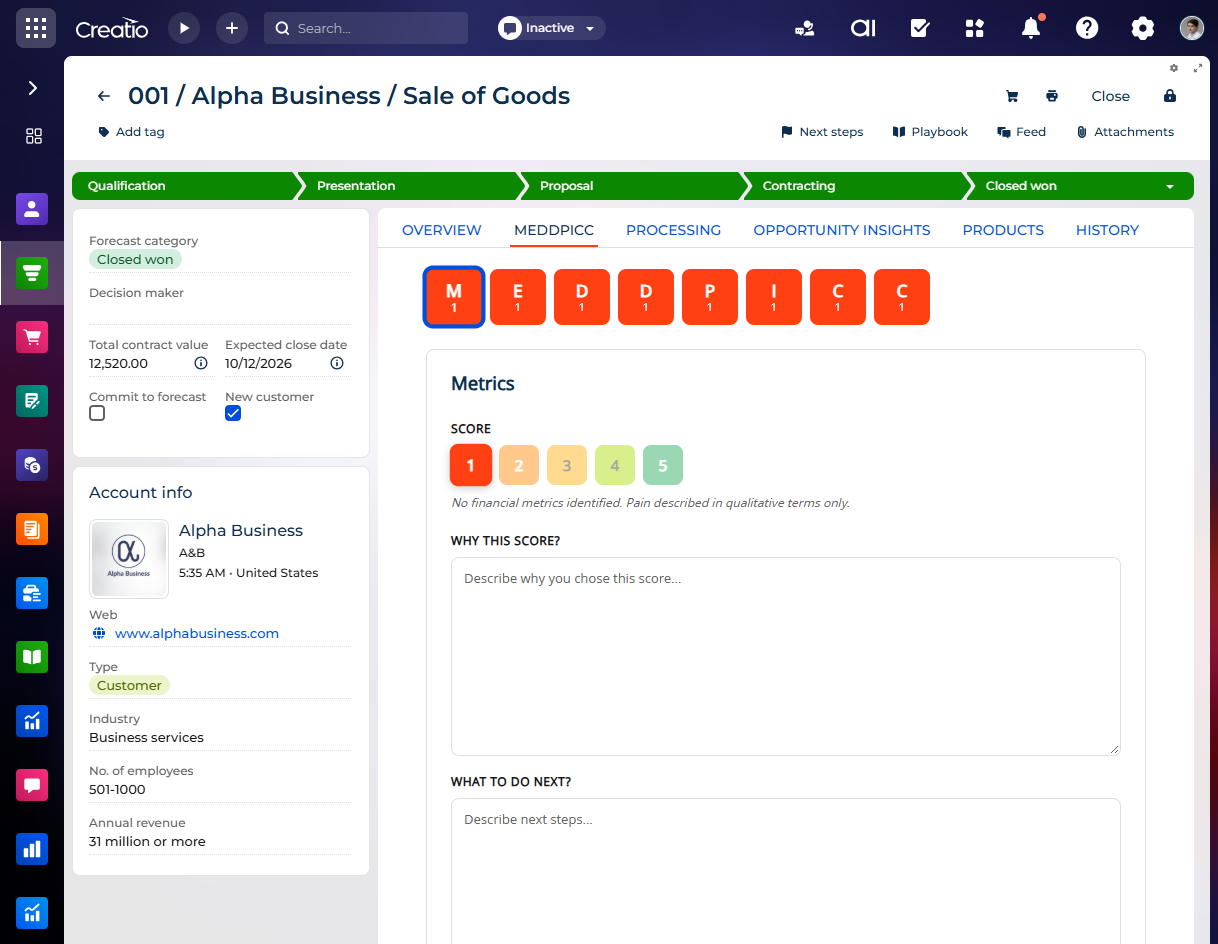
The top of the tab shows a tile for each criterion with its letter and score. Each tile is color-coded by its score.
-
Click the tile of the criterion to score, for example, "M" for "Metrics."
Creatio shows the criterion below the tiles. When you open the tab, Creatio shows the "Metrics" criterion.
-
Select the score from 1 to 5 in the Score block.
Point to a score to see what it means. Creatio shows the description of the selected score below the score buttons. For example, score 1 of the "Metrics" criterion means that no financial metrics are identified yet.
-
Explain the score in the Why this score? field.
-
Describe the next steps to improve the score in the What to do next? field.
-
Repeat steps 3–6 for other criteria if needed.
As a result, Creatio will save the score as soon as you select it and save the text fields when you leave them. The tiles at the top of the tab and the "MEDDPICC scores" column of the list show the new scores. If another user changes the assessment while you edit it, Creatio keeps your draft and refreshes the tab after you finish.
MEDDPICC criteria
The criteria follow the order of the letters in "MEDDPICC."
Letter | Criterion | What it assesses |
|---|---|---|
M | Metrics | Measurable economic impact of your solution for the customer, for example, cost savings or return on investment. |
E | Economic Buyer | The person who has the power to approve the opportunity and the budget. |
D | Decision Criteria | The formal criteria that the customer uses to evaluate and compare vendors. |
D | Decision Process | The steps, people, and timeline of the buying decision. |
P | Paper Process | The legal, procurement, and administrative steps to sign the contract. |
I | Implicate the Pain | The critical business problem of the customer and its measured impact. |
C | Champion | An internal advocate who has influence and promotes your solution inside the customer's company. |
C | Competitor | Other vendors or the status quo that compete for the same budget. |
View MEDDPICC scores in the list
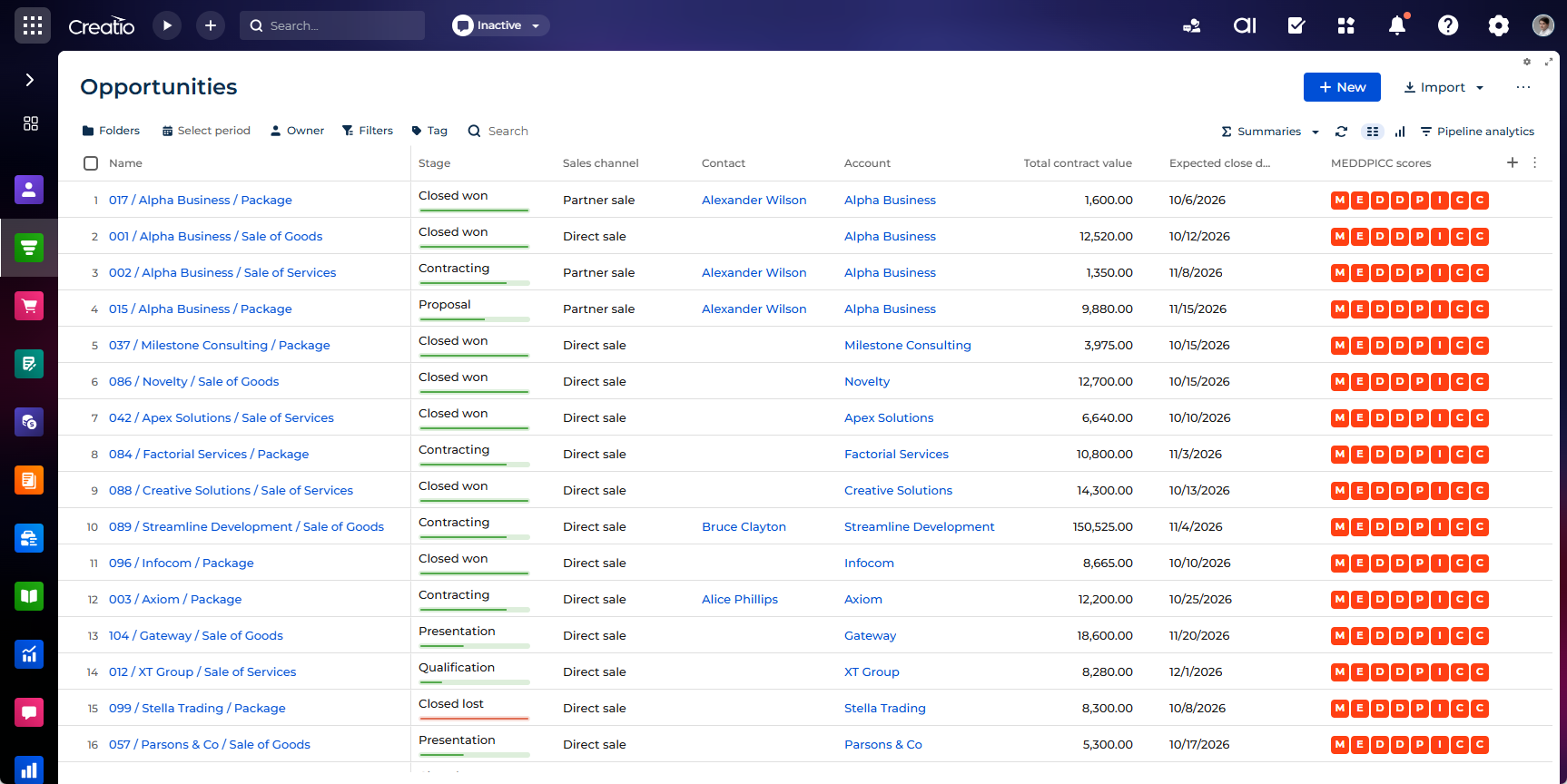
The "MEDDPICC scores" column of the Opportunities list page shows the letters of the eight criteria for each opportunity, in a fixed order. Each letter is color-coded by its score, so you can compare opportunities at a glance and find the criteria that need attention. Point to a letter to see the criterion name and its score.
Score | Color |
|---|---|
1 | Red |
2 | Orange |
3 | Yellow |
4 | Light green |
5 | Green |
The opportunity panel of the Sales forecasts section also shows the MEDDPICC scores on the Summary tab. Learn more: Work with sales forecasts.
Customize the MEDDPICC criteria
Creatio stores the criteria and the description of each score in lookups. You can change the descriptions to match your sales methodology, for example, add the questions that your team asks at each stage.
Out of the box, these lookups are not registered in the Lookups section. To edit their values, register a lookup based on the object, for example, "MEDDPICC criteria score." Learn more: Create new lookups.
After that, edit the "Description" column of the lookup values. Learn more: Manage lookup values.
Lookup | Object code | What it stores |
|---|---|---|
MEDDPICC criteria |
| The criteria and their descriptions. |
MEDDPICC criteria score |
| Five scores for each criterion and their descriptions. |
MEDDPICC score |
| The scores and notes that users enter for each opportunity. |