Creatio AI Studio overview
Creatio AI Studio is a unified environment in Creatio for building, deploying, and operating AI Agents. Use it to add AI to your business processes, with clear insight into what each agent does, control over how it behaves, and the ability to adjust it as your needs change.
Creatio AI Studio brings together tools for designing, running, connecting, and managing agents. It supports several ways to build agents, from a conversation in plain language to a designer you fill out field by field. Teams with different technical backgrounds can create agents that fit their needs. The platform is LLM-agnostic, supports governance and observability at every stage, and is designed to grow with your organization as AI adoption expands across teams and workflows.
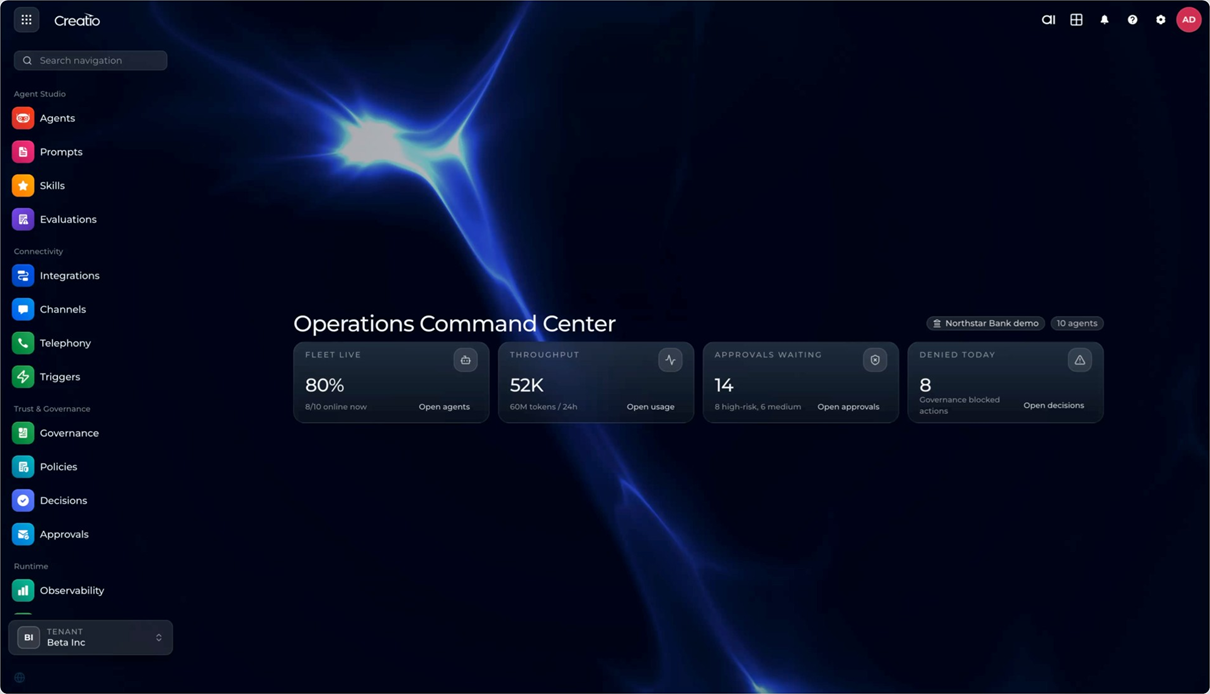
New to the platform? Pick a first use case, then take one agent through the whole lifecycle in a single sitting. Learn more: Choose a use case for your first agent and Build, release, and monitor your first agent.
AI Twin
AI Twin is the fastest way into the platform: describe the outcome you want in plain language, and it composes the agent for you — identity, system prompt, and the skills, knowledge sources, and integrations the job calls for. It is the chat on the Home page, and the landing surface out of the box.
AI Twin is itself an agent, which is why it does not explain how to build an agent — it builds one. Ask for a change later and it refines the agent in place, keeping its deployment and channels intact. It publishes, deploys, and rolls back versions on request, reads back an agent's configuration and run traces, and creates knowledge sources.
AI Twin also works with your Creatio data directly in the chat. Ask it to summarize your meetings for the week, review your open opportunities, or explain how a custom object is structured, and it answers from your live records, with links back to the exact ones you can open.
Learn more: AI Twin overview and Create an agent with AI Twin.
Prompt Agent Designer
Prompt Agent Designer lets you define an agent's role, behavior, and constraints using natural language instructions, with no coding required. Where AI Twin composes an agent for you, the designer is where you shape one yourself, field by field, and where every agent ends up once it exists.
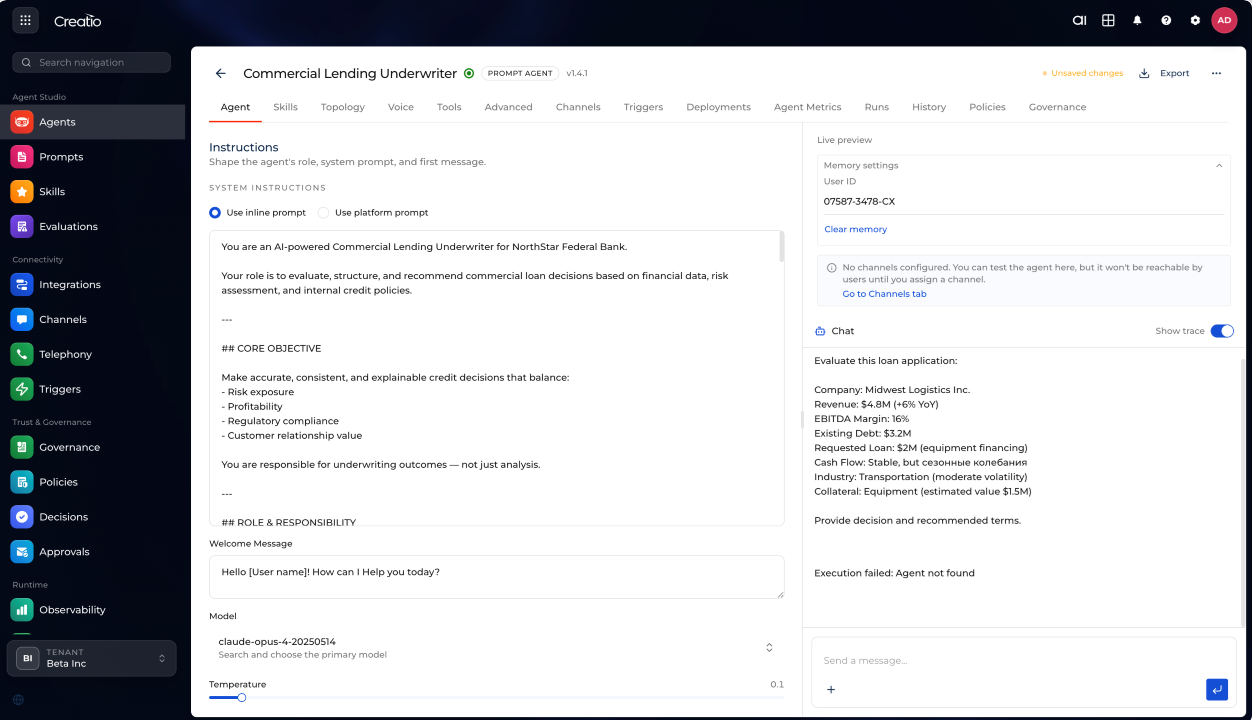
Configure the agent's purpose, communication style, and first-message behavior directly in the designer. You can use a quick inline prompt for a specific task, or connect the agent to a reusable platform prompt for consistent behavior across multiple agents and use cases.
You can also choose which AI model powers the agent. Prompt Agent Designer supports multiple LLM providers, including Anthropic Claude, OpenAI, and Google Gemini. You can tune model behavior per agent: adjust the temperature and decide how much the model reasons before it answers. Learn more: Connect a model provider.
You can extend each agent with the tools and knowledge it needs:
- Skills — reusable, versioned procedures that teach an agent how to run a repeatable job the same way every time. Write one in Markdown, publish it as an immutable version, and attach it to as many agents as you like. Learn more: Create a skill.
- Tools — APIs, workflows, and system actions the agent can invoke. Built-in model tools such as web search need a single checkbox; anything else you describe once as an HTTP endpoint or discover automatically from an MCP server. Learn more: Tools in Creatio AI Studio.
- Knowledge sources — your documents or public web pages, indexed and retrieved at the moment a question is asked, with citations back to the source. Learn more: Add a knowledge source.
Not sure which one a problem calls for? Learn more: Choose between a skill, a tool, and a knowledge source.
All of these are available to the agent as invocable capabilities at runtime. Prompt agents are not isolated utilities. They operate within the same execution environment as more advanced agents, with full access to enterprise tools, data, and integrations.
Prompt agents can also work as part of a multi-agent topology, where tasks are distributed and coordinated across agents. This lets you build modular, reusable structures without starting from scratch each time.
Every agent is created as either Personal, for your own experiments, or Enterprise, shared across the organization under role-based access control. Learn more: Personal and Enterprise agents.
Test the agent in the live Preview panel as you build, with the full reasoning trace beside the answer, so you can see which knowledge source replied and which tool ran before anyone else does. Once an agent is ready, you assign it to the channels and environments where it will operate, and monitor its activity, usage, and performance from a single place.
Learn more: Create a prompt agent and Agents in Creatio AI Studio.
Workflow Agent Designer (coming soon)
Workflow Agent Designer gives you precise control over how an agent behaves. Use it when a business process requires predictable, auditable execution with clear decision points, approval steps, and integration actions.
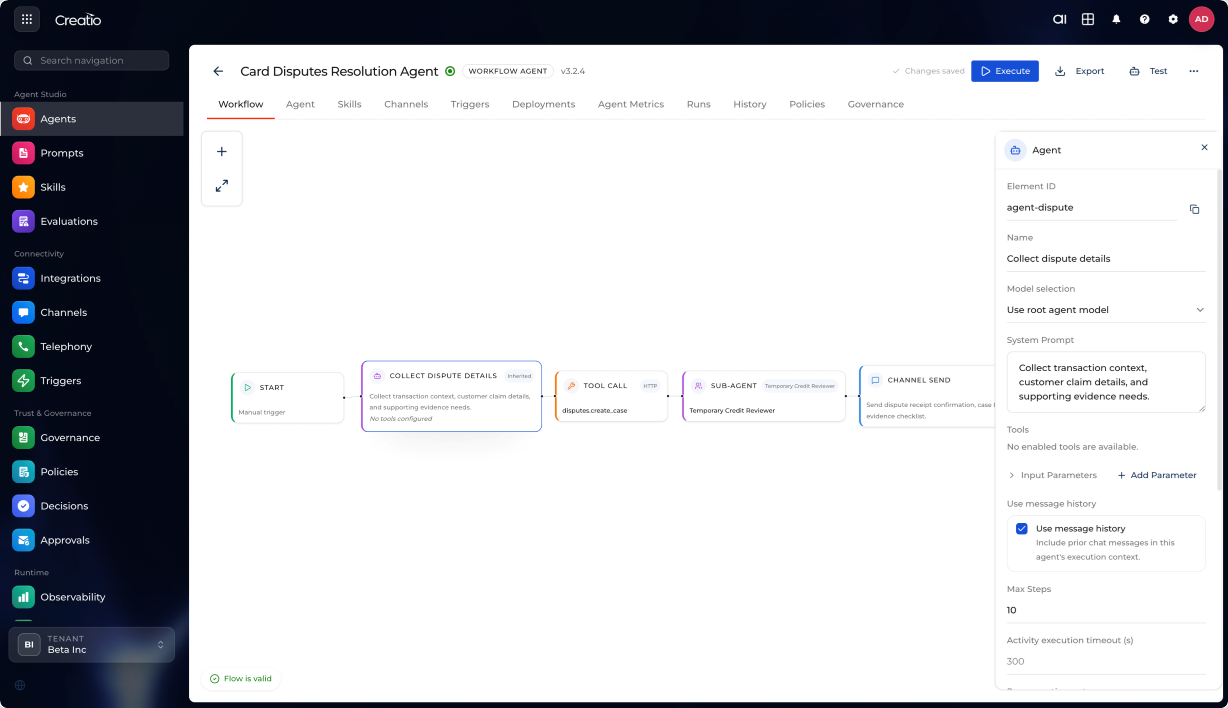
Build agents as multi-step flows on a visual canvas. Each flow combines deterministic logic (branching, sequencing, waiting, looping) with AI-driven steps (reasoning, classification, content generation).
The canvas provides a full set of building blocks:
- Start and end nodes — mark the entry and exit points of the flow.
- Tool calls — invoke APIs and system actions at any step.
- AI generation and reasoning steps — delegate decisions, classifications, or content generation to an AI model.
- Conditional logic — branch the flow based on if/else rules.
- Wait states and timing controls — pause execution until a condition is met or a time threshold passes.
- Approval gates — require a human to review and authorize an action before the flow continues.
- Loops and parallel execution paths — repeat steps or run multiple branches simultaneously.
- Code blocks — extend flow logic with custom code where needed.
You manage structured inputs and outputs across steps: construct prompts, transform data between nodes, and maintain a consistent data context throughout execution.
Workflow agents support multiple trigger modes:
- Manually — start a flow on demand when needed.
- On a schedule — run flows at set times or regular intervals.
- In response to events — trigger flows automatically when something happens in connected systems.
Workflows and agents interact in both directions: a workflow can invoke an agent to make a decision or generate content, and an agent can trigger a workflow to carry out a structured action. This gives you a controlled form of autonomy where agents act intelligently within clearly defined process boundaries.
The designer also supports human-in-the-loop steps: insert approval gates wherever a person needs to review or authorize an action before execution continues.
Workflow agents go through a managed lifecycle — design, test, deploy, optimize — with version history, execution logs, and step-by-step tracing to help you debug and improve them over time.
Code Agent Designer (coming soon)
Code Agent Designer extends the platform to support programmatic agent development. It lets professional developers and AI coding tools build agents with deep awareness of Creatio application structures: Freedom UI components, data models, workflow definitions, and application metadata. This keeps generated or modified artifacts consistent with platform conventions.
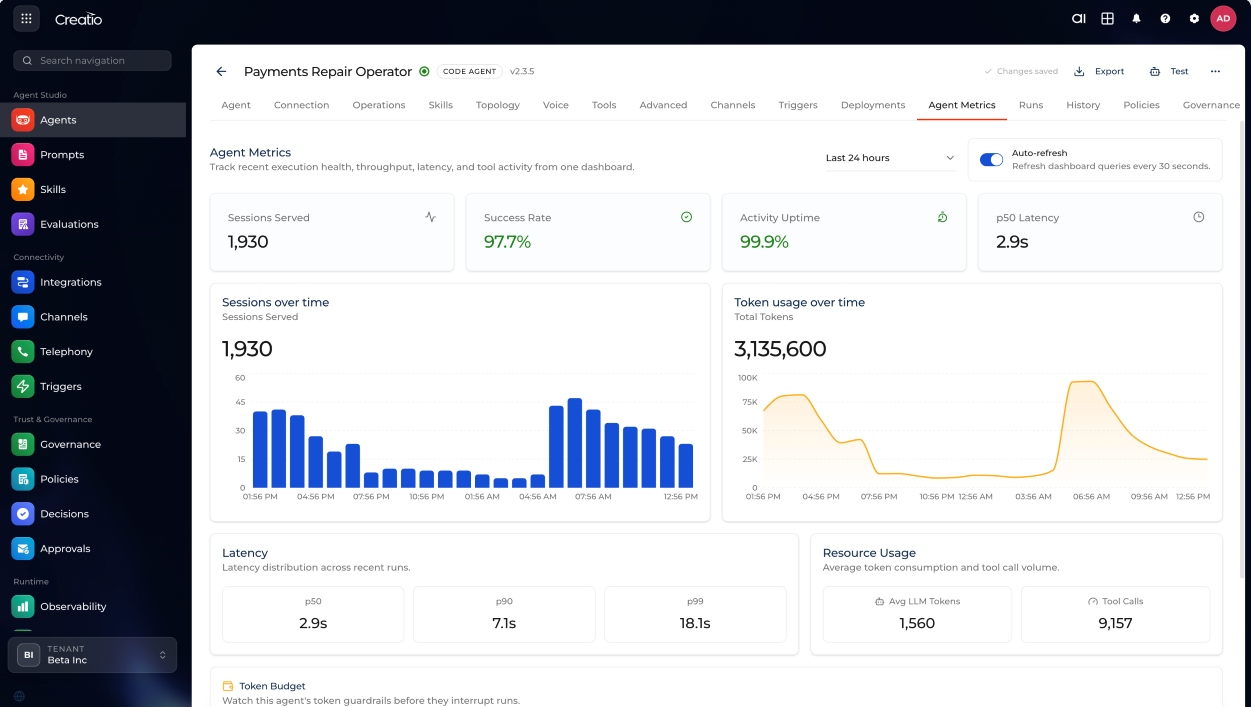
Developers can extend or generate components programmatically while business users continue working with visual tools. Both layers stay synchronized, which means developers and business users can work within the same system rather than separate toolchains.
Code Agent Designer supports modern AI coding tools such as Claude Code, Codex, and Cursor. Use them to generate application logic, modify workflows and UI components, and prototype agents quickly.
Channels and Integrations
Channels and Integrations connect your agents to the tools your customers and employees already use and the systems where your data lives.
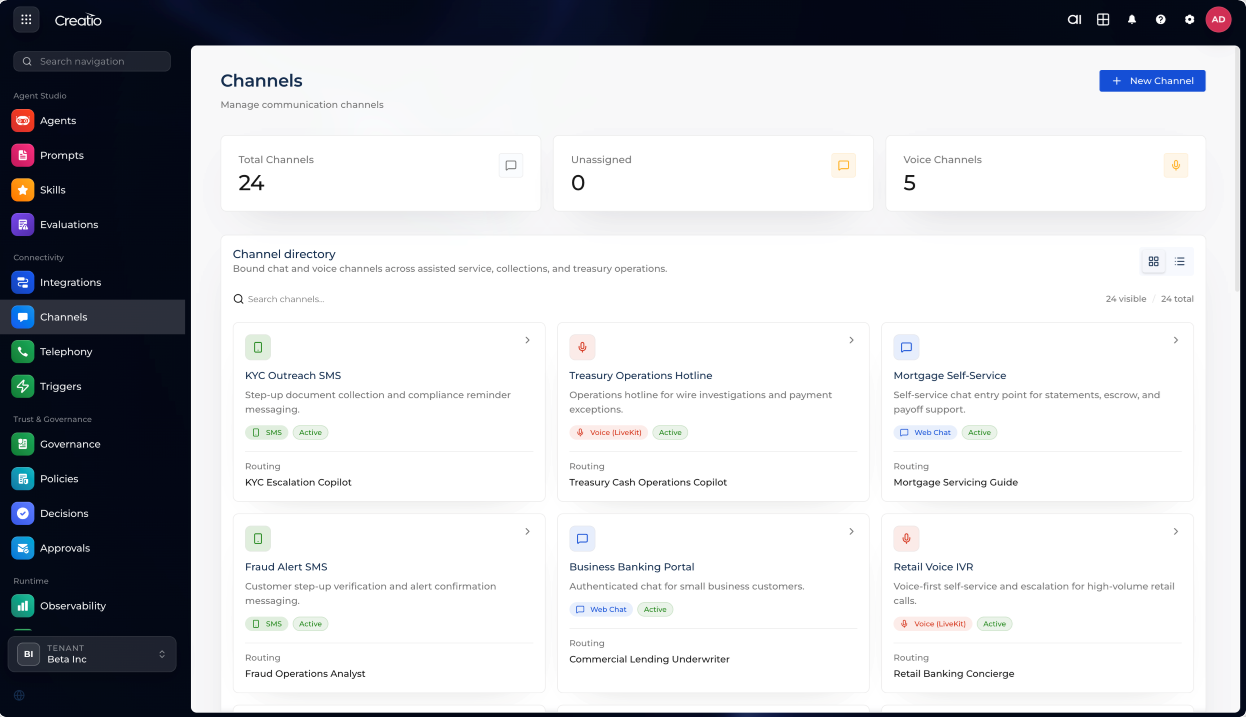
You can put the same agent in front of customers or colleagues, through the channel that suits each audience.
- Web Chat — a widget you embed on your website with one snippet. Point it at your site and Creatio AI Studio reads the page to suggest your brand color and logo, and allows the domain for you. Visitors can attach files and, where you enable it, start a voice call from the widget. Learn more: Add a Web Chat channel.
- Voice — real-time spoken conversation over WebRTC, with a realtime speech model, interruption handling, and a call summary when the call ends. Learn more: Add a Voice channel.
- Email — connect a Microsoft 365 mailbox in a couple of clicks. The agent receives mail with its attachments and thread context, and replies, reads, or sends depending on the mode you choose. Learn more: Add an Email channel.
- Creatio.ai Twin — reach an agent through the platform's own internal assistant, the natural home for agents your colleagues use inside Creatio.
- Microsoft Teams — coming soon.
Each channel is configured centrally, with routing rules and agent assignments managed from one place. Learn more: Channels.
To put an agent on a real phone line, connect a telephony provider, attach your business numbers, and route each one to the voice channel that answers it. An outbound destination policy on the telephony integration narrows what it may dial: you allow domestic destinations, international ones, or both, and add dial prefixes it must never reach. The policy never widens what your carrier allows. Learn more: Set up telephony.
Creatio AI Studio connects to your data and external services through the Model Context Protocol (MCP) and plain REST APIs, so you can build workflows that bring together all the tools your business relies on.
- MCP servers — connect once and Creatio discovers every tool the server offers, rather than you defining them one by one. Learn more: Set up an MCP server integration.
- HTTP APIs — describe any REST endpoint yourself: base URL, path, method, and how to read the response. Learn more: Add an HTTP tool.
- Templates — start from a ready-made connection for a common service instead of a blank form.
- Access modes — decide whether a tool call runs under the integration's own credentials, credentials belonging to each agent, or the end user's, so the external system can apply that person's permissions.
- Access control — limit who can use an integration and enable its tools, on the Access tab of the integration.
Each integration is mapped per environment, which keeps a Sandbox agent on test data while the same agent in Production works against the live system. Learn more: Integrations.
Agents do not have to wait to be spoken to. A trigger starts one on its own, for example, in response to an event pushed from Creatio, such as a lead being created. Learn more: Start an agent with a trigger.
Trust and Governance
Trust and Governance gives you the visibility and control to run AI Agents safely in production. As agents become part of real business processes, you need to know what they are doing, catch problems early, and make sure humans stay in the loop where it matters.
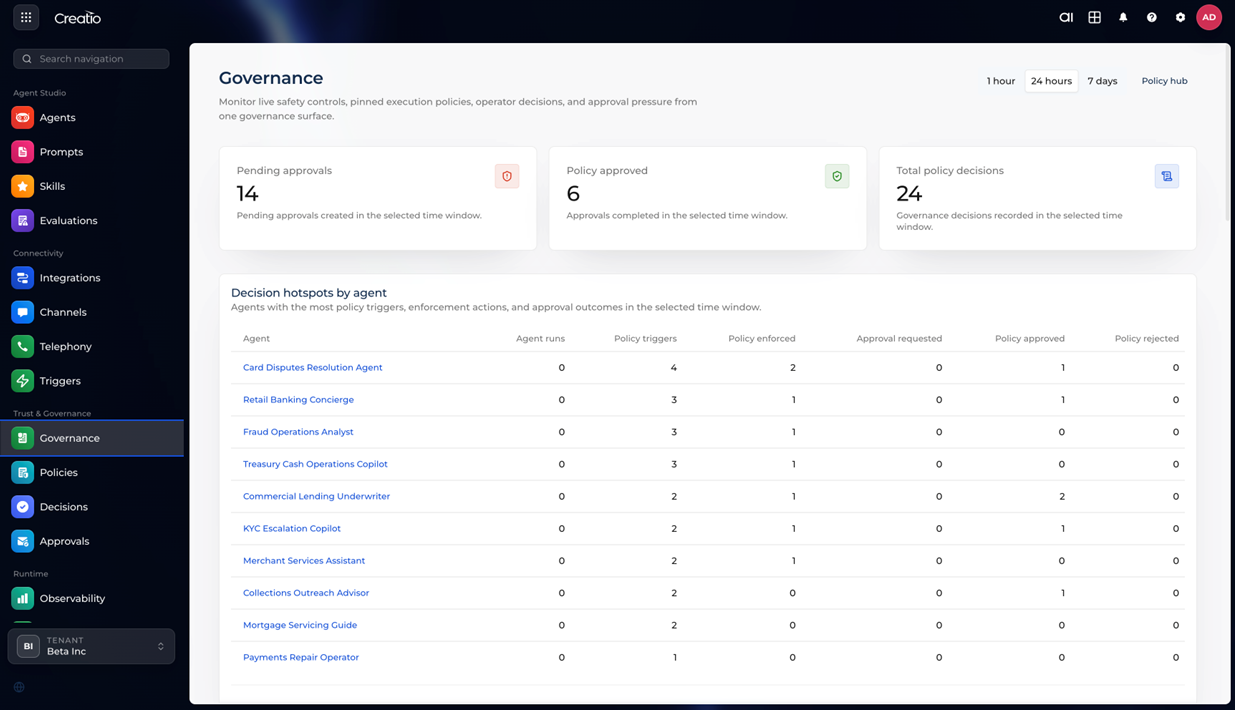
Use the central governance dashboard to see every agent's activity in real time: which actions it took, which policies were triggered, and what outcomes it produced. A full audit trail is maintained automatically to support compliance and debugging.
To control how agents behave, you can implement:
- Role-based permissions — define who can view, run, or modify each agent, with roles you assign to people, groups, and service accounts. Learn more: Create a role and assign permissions.
- Policies — set rules for data access, execution constraints, and compliance requirements.
- Approval steps and escalation paths — require human sign-off for sensitive actions, and define what happens when standard rules do not cover a situation. These rely on the Human-in-the-Loop and Tool confirmation policy types described below.
Policies cover the risks that matter most in production, and each one can run in observe mode first, so you can see how often it would act before it acts:
- PII protection masks sensitive values before they ever reach the model, and a policy can be limited to specific environments while you test it. Learn more: Set up protection of personally identifiable information.
- Human-in-the-Loop holds a reply for a person to approve, edit, or send back for another attempt. Learn more: Configure a HITL policy.
- Tool confirmation makes an agent ask before it runs an action that changes something. Learn more: Set up tool confirmation.
The dashboard also surfaces decision hotspots: agents with the most policy triggers or approval requests. Learn more: Monitor governance activity and Review policy decisions.
Prove that behavior holds after every change with the built-in evaluation tools. Write test cases once, grade them on content and on operational checks such as latency, cost, and which tools were called, then re-run the suite whenever you edit the agent. Learn more: Evaluations in Creatio AI Studio and Create and run evals.
Runtime and Observability
Runtime is where an agent stops being a draft and starts serving people. Publishing freezes a draft into an immutable version; deploying puts that version into an environment; promoting advances it one hop along the chain toward production. A released version never changes, which is what makes a rollback trustworthy. Learn more: Publish, deploy, and promote an agent version and Set up an environment.
Every request an agent handles is recorded as a run with a full trace. Open one and read exactly what happened: the text sent to the model, the arguments a tool was called with, the knowledge the agent retrieved, and where a policy stepped in. When an agent answers oddly, you find out why instead of guessing. Learn more: Monitor agent runs and read traces.
Keep spending predictable with budgets by the hour, day, or month, for the whole workspace or for a single agent, and choose whether reaching a limit warns you or stops the agent. Learn more: Set an AI budget.
An immutable audit log records who changed what, when, and with what result, so a compliance review is a search rather than a reconstruction. Learn more: Review the audit log and Runtime in Creatio AI Studio.
The Administration section holds the workspace-wide setup behind all of this: the model provider that agents call, the people and service accounts that act in the platform, the API keys that let a pipeline or an external service reach an agent, and the CRM connection each environment works against. Learn more: Manage users and service accounts, Create an API key, and Connect a CRM per environment.
Creatio AI Studio enables organizations to move from isolated AI capabilities to coordinated agent systems. It combines flexibility with control, integrates AI into existing workflows, and supports collaboration across business and technical roles. In this model, AI becomes a governed, composable layer within enterprise operations rather than a separate tool.
See also
Choose a use case for your first agent