8.3.3 Twin release notes
At Creatio, we are committed to empowering our customers with industry-leading product innovations for workflow automation, no-code development, and modern CRM. Today we are advancing new forms of innovation with Creatio version 8.3.3 "Twin," featuring the following new capabilities and enhancements.
A comprehensive overview of technical changes and enhancements can be found in the 8.3.3 Twin changelog.
The update guide for the on-site applications is available in a separate article.
Creatio.ai
AI-assisted landing page generation. You can now accelerate campaign execution and improve brand consistency by generating responsive landing pages with the Landing Page Generation Agent in the Lead Generation app. Simply describe your goal and target audience as well as provide the details of the landing page if any, for example, language or color preferences, to Creatio.ai, and the agent will automatically select the most suitable template, create persuasive copy, apply brand styling, and deliver a ready-to-use landing page. The agent supports common marketing scenarios such as lead capture, product promotion, webinars, events, pricing, and comparisons, with a generic option available as a fallback. Administrators can also define the color palette used during generation to ensure visual consistency across campaigns. Learn more: Create a landing page using Creatio.ai.
Template-based email generation. You can now generate bulk marketing emails with greater stability and brand consistency using the upgraded Email Generation Agent in the Email Marketing app. The agent leverages a template-based approach to improve predictability of email generation, applies configurable color palettes to ensure consistent branding, and enables users to create high-quality, responsive emails faster with fewer manual adjustments. Learn more: Create an email using Creatio.ai.
RAG-enabled Knowledge Library governance. You can now securely configure and manage retrieval-augmented generation (RAG) knowledge sources in the Creatio.ai Knowledge Library app as part of the Creatio.ai knowledge management service. Administrators can configure integration with the external RAG microservice through a system setting, define knowledge sources based on Creatio sections or uploaded text-based files and PDF files with configurable size limits, and control transfer-layer chunking of large knowledge items to ensure stable payload size and improved retrieval quality. The system applies server-side RBAC validation to filter RAG results according to the current user’s read access rights, preventing unauthorized data exposure and dynamically reflecting permission updates in subsequent queries. Citation metadata is retrieved in bulk and attached to each response, enabling end users to see clear source attribution, including source links and display names, for both file-based and section-based knowledge. This enhancement improves data security, transparency, governance, and performance while expanding RAG usage scenarios by allowing both structured CRM data and unstructured textual documents to serve as governed and traceable knowledge sources.
Usage guidance update. You can now understand more clearly where each skill can be used thanks to updated field names and help text in the skills setup area.
- Usage mode field was renamed to Where to use.
- Chat usage mode was renamed to Prompt agents.
- API usage mode was renamed to Workflows and the tooltip text for the field was updated accordingly.
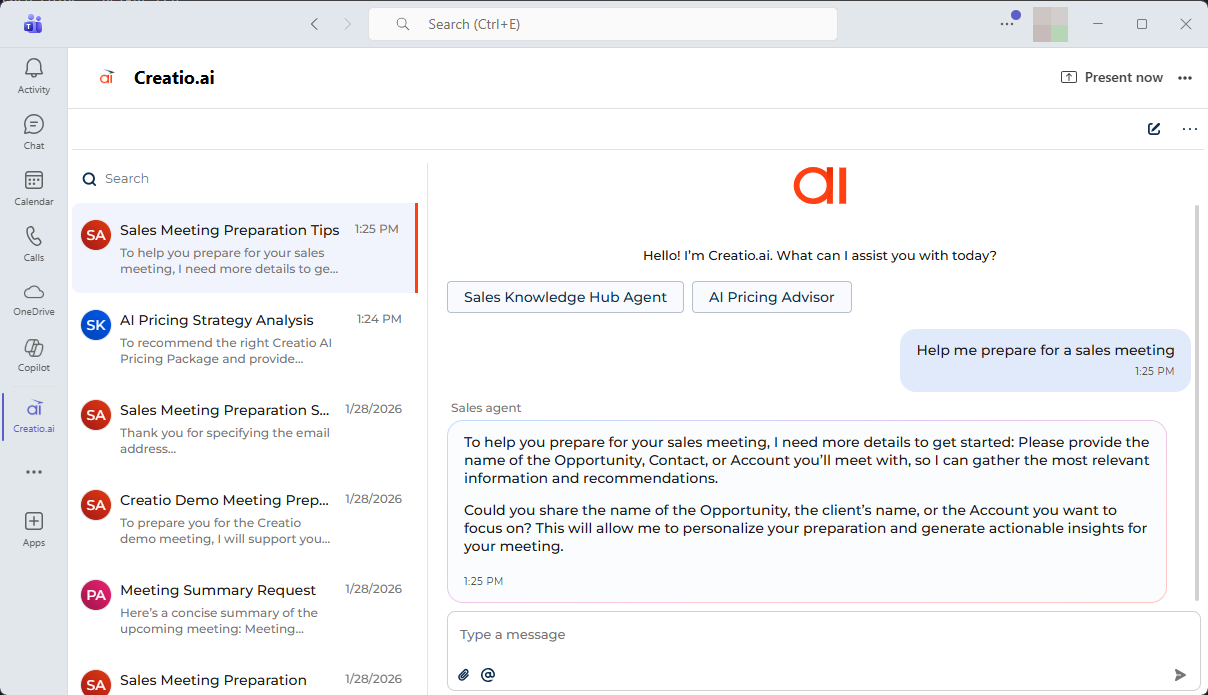
Creatio.ai personal tab in Microsoft Teams. You can now access Creatio.ai anytime directly from Microsoft Teams by using it as a personal tab outside of meetings. After installing Creatio.ai from the Microsoft Marketplace, it appears as a personal app in the Teams app bar, opening the full Creatio.ai chat interface with its own quick skill selection actions, so users can interact with AI directly within their daily Teams workspace without starting or joining a meeting. The personal tab is supported for Creatio websites starting from version 8.3.1, and administrators can configure dedicated quick agent selection buttons for it separately from meeting chat actions using the "teams_outlook_personal" page name.
AI-generated meeting summaries. You can now save time reviewing meetings and ensure consistent follow-ups with automatically generated AI meeting summaries based on Microsoft Teams transcripts if you have Productivity app installed. When a Teams meeting is recorded, its transcript is imported into Creatio and used to generate a summary that is displayed in the Meeting summary tab of the activity page alongside the transcript. Only meeting participants can view the transcript and the AI-generated summary. After the summary is generated, Creatio automatically sends an email with the meeting summary on your behalf to all internal attendees who have active user accounts, while external participants without active accounts do not receive the email. Emails that contain AI-generated meeting summaries are sent automatically only for meetings that occurred on the current day. Learn more: View AI meeting summaries.
Creatio products and apps
Creatio Sales
Opportunity change tracking. You can now analyze pipeline evolution and forecast changes with greater transparency by tracking the full history of key opportunity updates. Creatio automatically records changes to critical fields such as "Amount," "Stage," "Owner," preserving both previous and new values for every update. All changes are stored chronologically and remain available for analytics and reporting, allowing teams to see exactly when and how opportunities changed, even if fields were updated multiple times. The set of tracked fields can be configured to match your data model, enabling the inclusion of custom fields such as "Custom amount" or "Close date." This provides sales associates with clearer visibility into deal progression during pipeline reviews, helps revenue leaders understand forecast shifts with greater confidence, and gives sales operations and analysts a reliable data source for dashboards, reports, and advanced pipeline analysis. The functionality is enabled out of the box for all users. If needed, you can disable it by disabling the EnableChangeTracking additional feature. Learn more: Manage an existing additional feature.
Opportunity stage forecast mapping. You can now improve forecast consistency by mapping each opportunity stage to a forecast category such as "Pipeline," "Best Case," "Commit," or "Closed." This ensures that every stage movement automatically carries a clear forecasting intent, reducing the need for manual interpretation during pipeline reviews. By aligning stages with forecast categories, teams can maintain consistent rollups across territories and segments while keeping their existing sales process. This helps sales representatives understand when deals should move between forecast categories, enables sales leaders to conduct faster and more reliable forecast reviews, and provides revenue leaders with clearer visibility into pipeline coverage and forecast risk.
Sales dashboard. You can now monitor sales performance, lead management, and team productivity from a unified Sales home dashboard that consolidates analytics into structured views for improved operational control. The updated Sales home page in the Sales workplace includes the following functional tabs that group analytics by key sales activities:
- Sales performance
- Lead management
- Team Productivity
A global period filter enables switching between yearly, quarterly, monthly, and weekly views to align with common sales planning cycles. The selected timeframe applies to all dashboards on the page, enabling consistent analysis across metrics.
Fiscal period filtering. You can now filter data using fiscal period macros in the "Date/Time" filter, enabling analytics and reporting to align with your organization’s fiscal calendar instead of only calendar boundaries. The filter supports fiscal macros such as "Q1–Q4," "Half year," "Current year," "Previous year," and "Next year." Fiscal-based logic is derived from the "Start date of the fiscal year" (FiscalYearStartDate code) system setting. When enabled, fiscal boundaries are automatically applied across lists, dashboards, widgets, and details, ensuring consistent filtering across analytics components. If the fiscal year start date is not configured, Creatio automatically falls back to calendar-based calculations. This improves reporting accuracy for organizations that operate on fiscal calendars while preserving calendar-based filtering as the default behavior. Learn more: Set up Quick filter components.
Creatio Marketing
Reusable campaign templates. You can now reduce campaign setup time and ensure consistent marketing automation by saving existing workflows as reusable templates in Campaign Designer. When creating new campaigns in "Planned" status, users can apply predefined campaign structures and configurations across Email Marketing, Lead Generation, Event Management, and Digital Ads apps, simplifying reuse and improving consistency of marketing workflows.
Modernized campaign element panel. You can now design marketing campaigns in a cleaner and more streamlined interface as legacy Add from landing and Landing page elements are hidden by default in Campaign Designer. This update aligns campaign creation with the current webhook-based integration approach, recommending the use of Add from web page and Web page elements for Creatio and external landing pages in campaign workflows. Existing campaigns that use the legacy elements continue to run and report without changes. If required for specific scenarios, system administrators can re-enable the hidden elements through dedicated additional features, ensuring a smooth transition to modern landing page integrations while reducing design complexity and improving usability across marketing automation workflows. Learn more: Customize marketing campaigns.
Grouped campaign elements in Campaign Designer. You can now design marketing automation workflows more efficiently by using grouped campaign elements in Campaign Designer across Email Marketing, Digital Ads, Lead Generation, and Event Management apps. Campaign elements in the Elements area are organized into logical sections based on their intent—such as triggered entry, data management, flow logic, and outcomes—replacing the previous flat list. This enhancement simplifies navigation, helps marketers locate and add required elements faster, and improves overall campaign design efficiency. Learn more: Campaign element groups, Implement a custom group of campaign elements.
Digital Ads
Ad audience synchronization. You can now streamline digital advertising campaigns by sending contacts directly from Creatio to Meta and Google Ads audiences via a new Ad audiences section in the Digital Ads app. The integration enables synchronization with Meta audiences and Google Ads segments, allowing you to push selected contacts either manually on demand or automatically in recurring mode. In recurring mode, a business process checks for updated contacts once per hour and synchronizes them automatically. Email is used as the required identifier for contact synchronization with advertising platforms. Learn more: Send contacts to Meta and Google Ads audiences.
Email Marketing
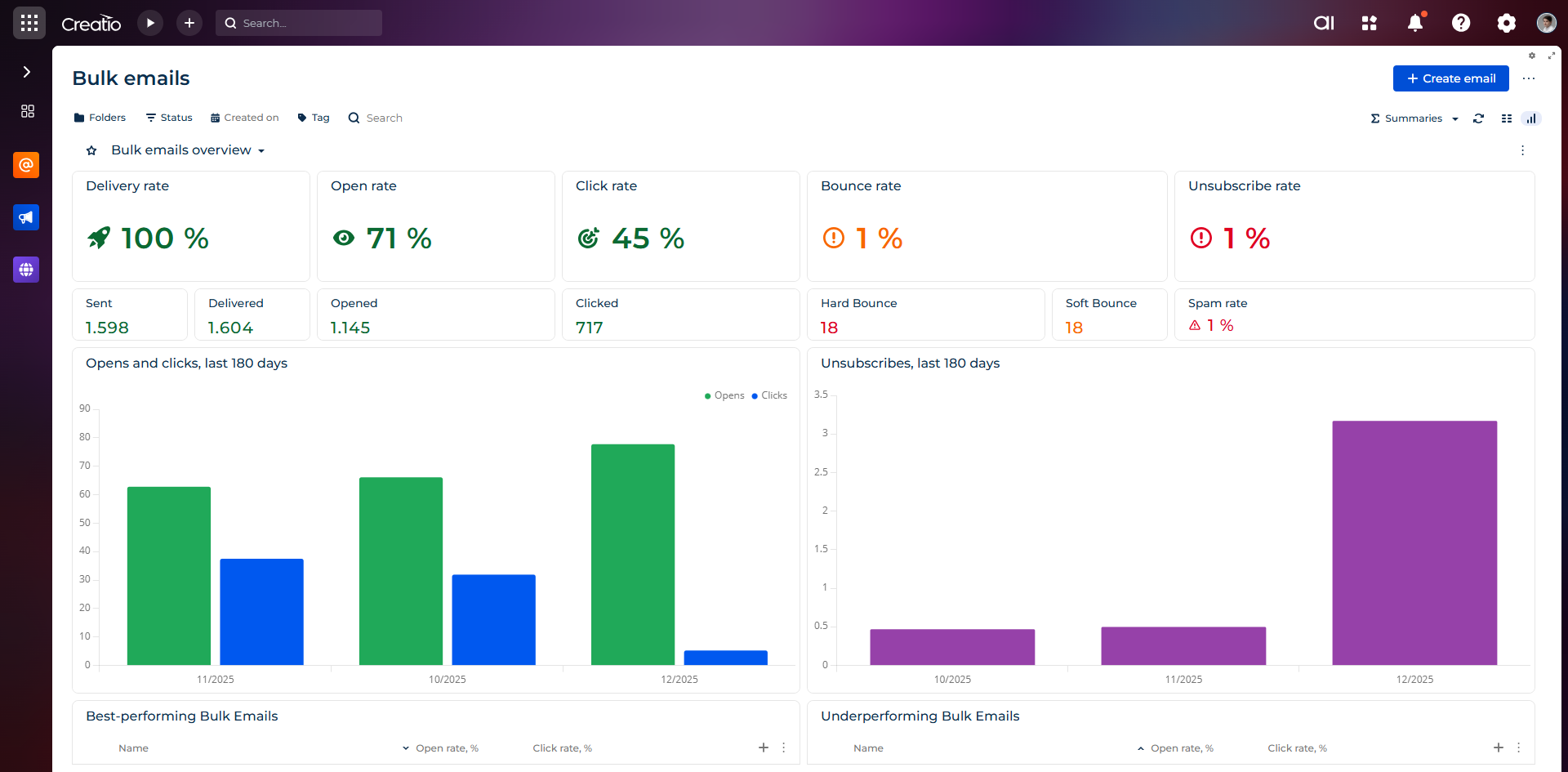
Enhanced bulk email analytics. You can now better evaluate email marketing performance with an updated Bulk emails dashboard that includes key metrics such as delivery, open, click, bounce, unsubscribe, and spam rates. The dashboard also features widgets that display the top 10 best-performing and underperforming bulk emails to help you quickly identify successful campaigns and areas for improvement. Learn more: Bulk email analytics.
Email rate limit. You can now improve email delivery stability and reduce the risk of messages being flagged as spam or rejected by email clients by splitting large email batches and sending them sequentially within a defined time frame. The throttling mechanism is available in manual mode only.
Advanced merge tag personalization. You can now create more flexible and reliable email personalization by configuring merge tags that retrieve data from directly and indirectly related objects and by defining fallback values for missing data. You can also configure fallback text when creating or editing merge tags to ensure consistent communication content when the selected field returns empty or null values.
Previously, merge tags could reference only columns of the "Contact" (Contact code) object. With this enhancement, merge tags can dynamically retrieve values from a broader data model and insert related object data into email content. If no data is available for the referenced field, Creatio automatically inserts the configured default value, helping maintain complete and meaningful email messages.
UTM management in Freedom UI. You can now manage campaign tracking more efficiently by viewing and editing UTM parameters for each bulk email directly in Freedom UI. Previously available only in Classic UI, UTM parameters can now be reviewed and modified at any stage before sending. UTM values are stored individually for each bulk email and can be adjusted during setup and preparation without additional configuration changes.
Lead Generation
Custom script management for landing pages. You can now configure and manage custom scripts for landing pages directly from the landing page in the Lead Generation app without editing page HTML. A built-in visual editor enables adding, editing, previewing, and removing scripts, as well as placing them at the top or bottom of the <head> or <body> HTML element, with changes applied after publishing or downloading the page. This enhancement supports scenarios such as integrating analytics and tracking tools like Google Tag Manager, enabling cookie consent solutions such as Cookiebot, integrating Google reCAPTCHA v2 and v3, extending form submission logic with custom parameters, validations, redirects, and tracking, customizing success and error messages, and overriding post-submit behavior. A dedicated SDK with supported patterns and ready-to-use examples is provided to streamline script implementation. Learn more: Customize landing page behavior with scripts.
Dropdown placeholder handling in landing page forms. You can now improve form accuracy and clarity by using a localized "Select a value" placeholder option in "Dropdown" type fields created with Creatio landing pages. The system treats the placeholder as not filled out, while any other selected value is considered valid input, ensuring correct validation behavior. Default field values and required object-side fields continue to function consistently at runtime, enabling more precise form logic and clearer form submissions. The placeholder text can be localized and is hidden when a default value is configured or when the field is required.
Dynamic conditional logic for landing page forms. You can now create more personalized, responsive, and precise landing page experiences by configuring runtime conditional logic for landing page forms in the Creatio Landing Page Designer. Conditional rules enable you to build "IF" conditions and "THEN" actions using "AND" or "OR" operators, validate whether fields are completed or match specific values, and automatically show or hide fields or set field values based on user input. Rules are applied dynamically at runtime and automatically updated when form settings change, ensuring flexible form behavior without additional manual configuration. This enhancement enables shorter and more relevant forms, improves completion rates, and helps teams collect cleaner and more accurate data while delivering a simpler and more intuitive experience for visitors.
Creatio Service
New omnichannel Contact Center app. You can now improve support agent productivity, streamline workload distribution, and deliver consistent omnichannel customer service with the enhanced Contact Center composable app and expanded Agent Inbox capabilities. The solution provides a unified support agent workspace that centralizes real-time and offline interactions, automates routing and prioritization, and enhances chat-based communication with advanced productivity tools. The app is available on Creatio Marketplace. Key enhancements include:
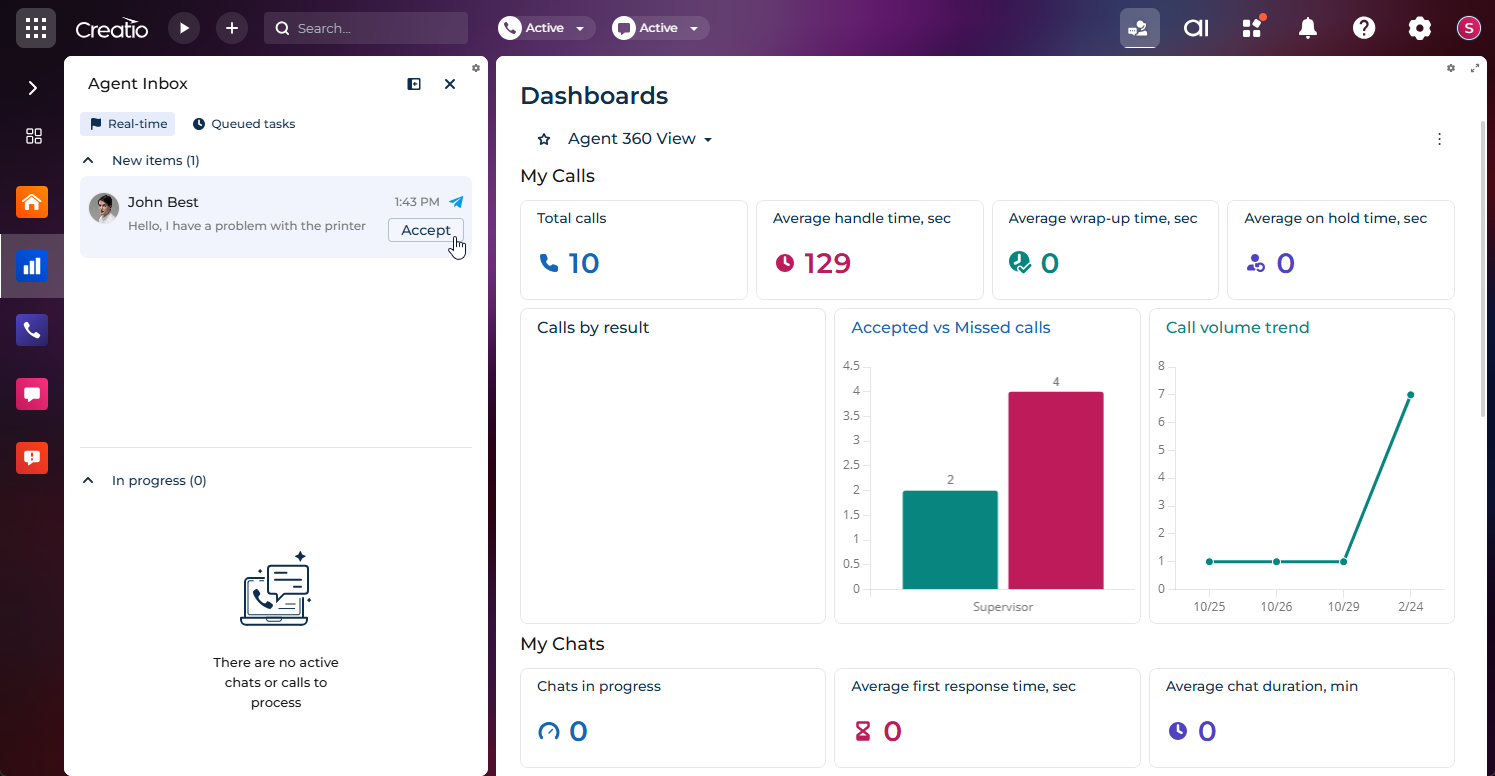
- A unified Agent Inbox panel that consolidates live chats and offline tasks into a single prioritized workspace, with intelligent work queues supporting blind and open routing models.
- Real-time chat management, organizing conversations into New items and In progress lists, with queue visibility, routing context, and support for the "Simultaneous Chats" (
SimultaneousChatscode) system setting to control workload capacity. - Real-time overdue monitoring, highlighting chats that exceed configured first response or ongoing response thresholds to help agents meet service level targets. Available for chat processing in the inbox.
- Direct messaging from the Agent Inbox, allowing agents to communicate with customers without switching views.
- Predefined message templates, including usage-based grouping with a Recently used section for frequently selected responses and Others section for alphabetical organization of remaining templates.
- Emoji support, enabling more natural and expressive communication while maintaining professionalism.
- Real-time chat translation, allowing agents to translate incoming and outgoing messages, switch between original and translated versions, and configure translation preferences per chat.
- Customizable contact profiles accessible from the chat header, displaying essential customer information and configurable with low-code tools.
- Quick actions and business process execution directly from the chat header using the
 button, such as creating a case without leaving the conversation.
 - Chat relinking via the
 button, enabling correction of contact assignment errors by merging conversations under the correct contact and removing outdated records.
 - Chat completion management via the Complete button, allowing agents to close conversations in a structured manner while preserving full message history and attachments in read-only mode.
- Chat transfer between agents and queues, maintaining complete conversation history and system messages for continuity.
- File and image sharing, including upload via button, drag-and-drop, or clipboard paste, with enforcement of system settings ("File extensions DenyList" (
FileExtensionsDenyListcode), "Attachment max size" (MaxFileSizecode)) and messenger-specific restrictions. - WhatsApp-specific file and image sharing, applying channel-level limitations automatically and displaying clear error messages when delivery is not possible. Chats in the communication panel also support this now.
- Role-based agent and supervisor workspaces, combining personalized homepages, dashboards, and real-time performance insights to support proactive management and continuous improvement.
Together, these enhancements provide a scalable, modern foundation for efficient, transparent, and high-quality omnichannel customer service operations. Learn more: Contact Center app overview.
End user experience
UX enhancements
Date/time filtering in quick filters. You can now filter records by exact date and time values using the "Date picker" quick filter, improving filtering precision and enabling more accurate data retrieval. When enabled, the filter displays additional controls for time input at runtime and lets you enter date/time values directly in the input field or select time using a built-in time picker. Creatio generates filter conditions that include both date and time values and correctly processes date/time filtering across the application. For date ranges, Creatio automatically applies default values of "12:00 AM" for the start time and "11:59 PM" for the end time when time is not specified, ensuring consistent filtering behavior.
Metric updates. Creatio now shows calculation error message in metric tooltips if a metric encounters issues such as division by zero or system errors.
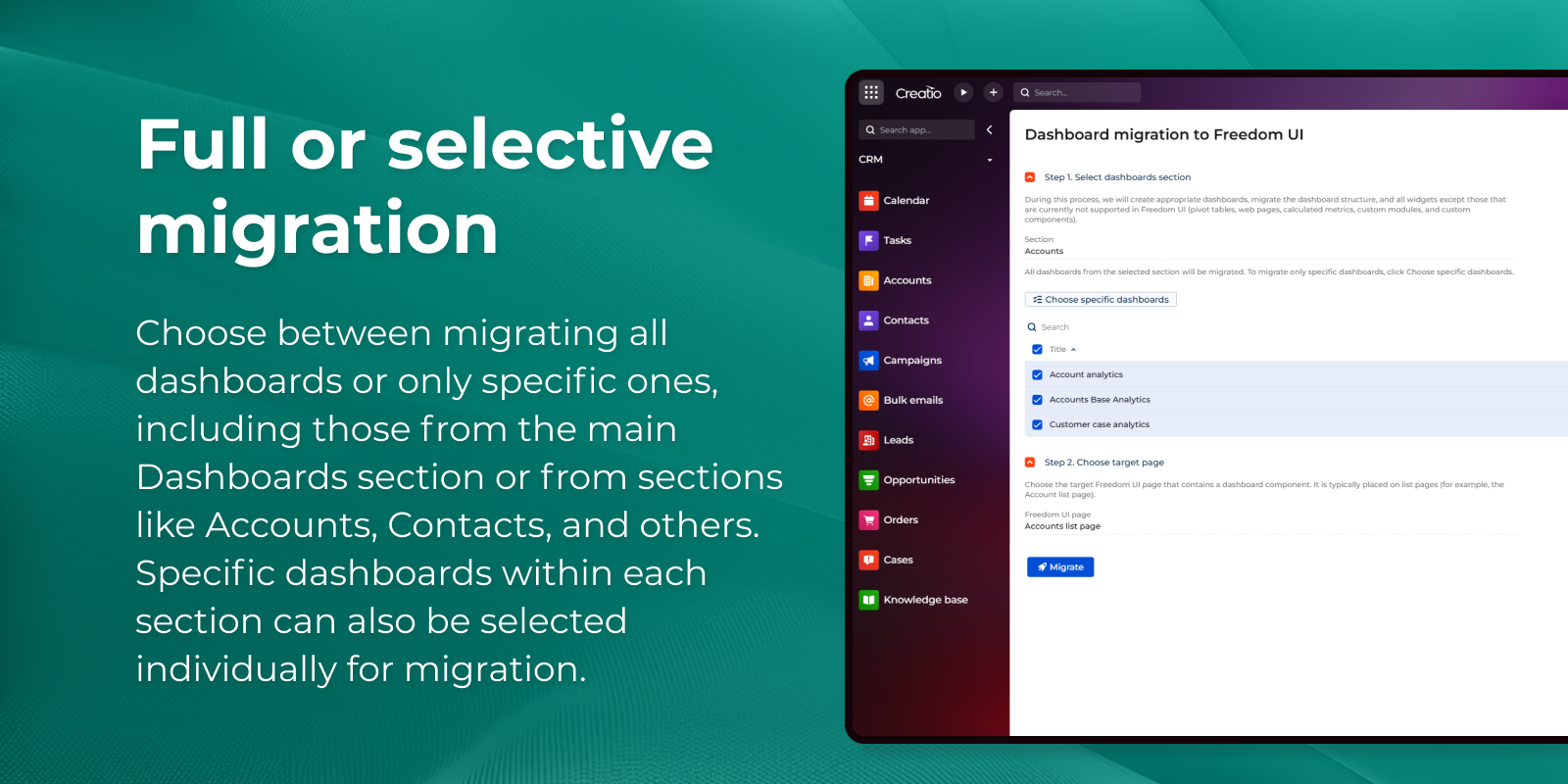
Dashboard migration to Freedom UI. You can now simplify the transition from Classic UI to Freedom UI by migrating dashboards using a dedicated Dashboards migrator Marketplace application. The app provides a manual migration mechanism via a Migrate button and supports dashboards from the Dashboards section as well as dashboards embedded in other sections, such as Accounts and Contacts. Learn more: Dashboards migrator (Creatio Marketplace).
Personalized dashboard favorites. You can now quickly access the most important dashboards by adding them to favorites directly from the dashboards list or the dashboard page. Favorite dashboards are displayed in a dedicated "Favorites" block at the top of the list, which appears only when at least one dashboard is marked as favorite. Favorites are stored individually for each user, ensuring a personalized dashboard view.
Sticky all-day meetings row. It is now possible to track all-day events in the calendar more easily because the "all-day" row remains fixed at the top of the page when scrolling. This ensures better visibility of full-day events while navigating through the calendar.
Tabbed task page layout. You can now improve task navigation and page structure with a redesigned task page that features a tabbed layout. Key task details are organized within a dedicated General info tab instead of a single continuous page, making information easier to access and enabling future expansion with additional tabs. If you previously customized the task page and added your own tabs, you can request a rollback of those changes to prevent nested or duplicate tabs.
Improved list readability. You can now improve data clarity and consistency in lists thanks to enhanced numeric value alignment and optimized column header layout in the List component. Numeric values are aligned to the right in column cells, and the updated header layout improves space usage and readability in line with common industry standards.
Configurable splash screen branding. You can now control the visibility of the logo on the splash screen to better manage application branding. A Hide splash screen logo image checkbox has been added to the Appearance setup page of the System Designer, allowing you to show or hide the splash screen logo as needed.
WCAG compliance
Accessible save state notifications. It is now possible to improve accessibility and user awareness by announcing loading states to screen readers when saving records using the default Save buttons. This enhancement helps visually impaired users better understand system activity during the save process.
No-code tools
Application Hub
AI elements in Application Designer. You can now incorporate AI capabilities into your applications by using the new Creatio.ai tab in the Application Designer within Application Hub. The tab enables no-code creators to manage AI Agents and Sub-agents as application elements and include them directly in application packages.
App metadata in gallery view. You can now review key app details more efficiently in Application Hub because the gallery view displays version and developer information directly on each application tile. Previously, no-code creators had to open the app page to see this metadata, which increased navigation effort and slowed down comparison. With this enhancement, essential application information is visible at a glance while all existing controls and behaviors remain unchanged, enabling faster review, updating, and management of apps.
Freedom UI Designer
Embedded third-party web content. You can now extend page functionality without custom development by embedding and interacting with third-party web content using the new no-code iFrame widget in Freedom UI. The widget lets you access external systems and information that is not stored in Creatio directly from application pages. Learn more: Set up an iFrame component, iFrame widget.
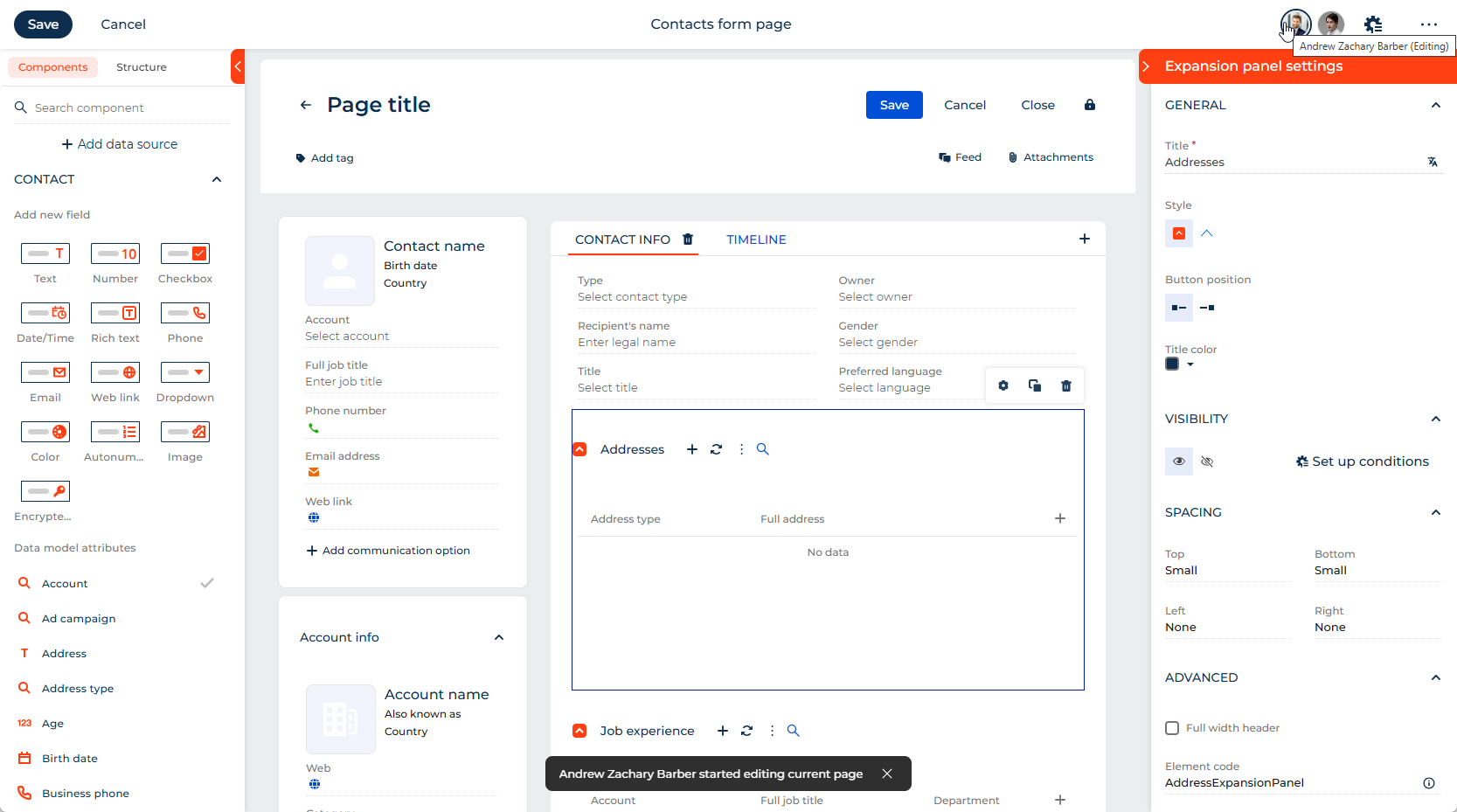
Enhanced user presence and editing awareness. You can now better coordinate collaborative work by seeing not only who has opened a page in Freedom UI Designer and Freedom UI Mobile Designer but also who is actively editing it. Creatio displays a notification when another user starts editing a page and uses animated avatars to visually indicate editing activity. The user presence element adapts to different screen sizes and automatically collapses when multiple users open the same page, with the option to view the full list of users in a mini page.
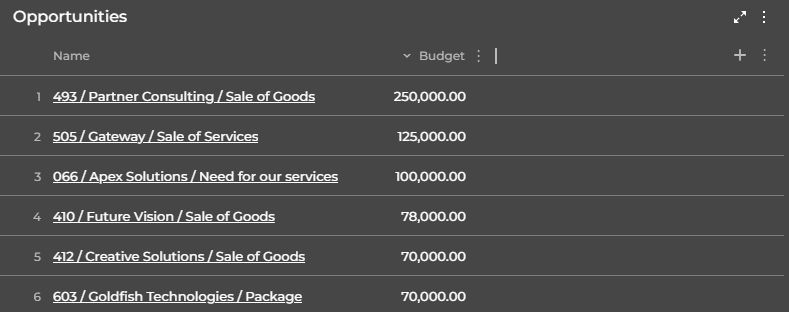
Glass effect for lists. You can now ensure visual consistency across dashboards by applying the "Glass effect" style to List component and list widget on desktop. Previously available only for charts and metrics, the glass effect can now be used for lists to align their appearance with other widgets.
Learn more: List component and list widget.
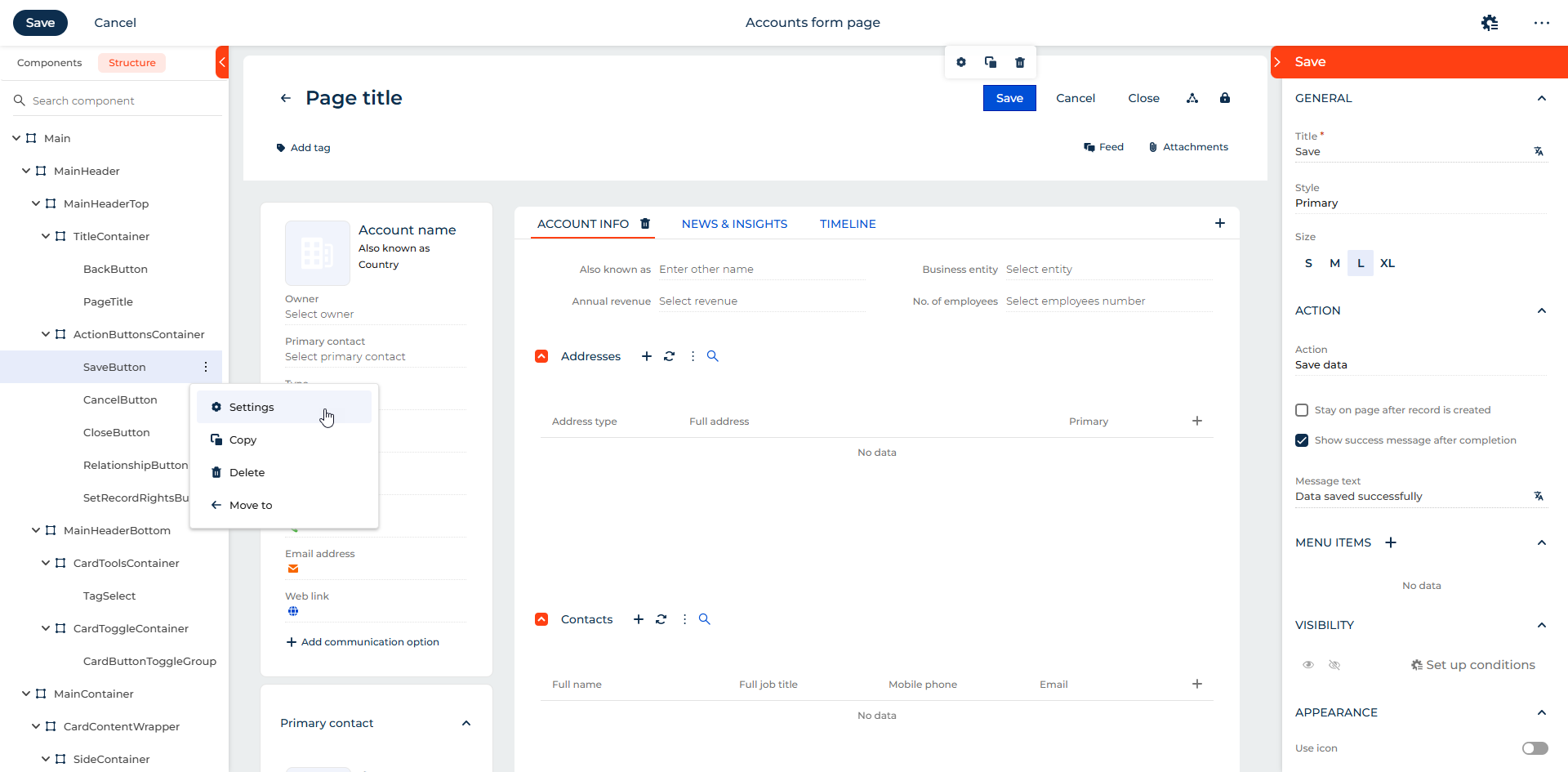
Hierarchical page structure view. You can now design and maintain complex page layouts more efficiently using a hierarchical structure view of page elements in the Freedom UI Designer and Freedom UI Mobile Designer. The new Structure tab provides clear visibility into parent-child relationships, enables search and navigation across elements, and simplifies layout management and validation of structure rules.
Configurable modal window size. You can now adjust mini page dimensions in the Freedom UI Designer to better fit your page scenarios. No-code creators can select predefined sizes ranging from S to XL directly in the page parameters, enabling more flexible and consistent page layout configuration.
New button styles. You can now create a more visually consistent desktop interface with the new "Plain white" and "Outline white" styles available for the Button component. The previous "Default" style has been renamed to "Plain." The new styles are recommended for use alongside glassmorphic widgets such as charts and metrics to ensure a balanced and cohesive design.
Business rules
Consistent behavior of business rules for summary items. You can now manage items of the Summaries component consistently on the single page by using visibility and activity business rules. Learn more: Set up business rules.
Integrations
Extended content-type support for integrations. You can now prevent integration failures caused by unsupported request headers because Creatio supports additional Content-Type values for integration endpoints, including application/json; charset=utf-8. Previously, endpoints accepted only a limited set of predefined content-type values, which led to rejected requests from third-party services and required custom workarounds when external systems could not be modified.
Secure webhook validation. You can now enhance webhook security by enabling configurable HMAC signature verification for incoming payloads. When HMAC verification is enabled, Creatio recalculates the hash of the received payload using a shared secret key and compares it with the signature provided in the request header. If the values do not match, the webhook request is rejected. When the option is disabled, webhook requests are processed without signature validation.
OAuth 2.0 client credentials. You can now configure secure integrations with external services that require application-level authentication by using the "Client credentials" grant type on the web service page in the Web services integration setup section of the System Designer. This enhancement enables no-code creators to set up OAuth 2.0 authentication without relying on end-user credentials.
Extended REST web service configuration. You can now support more complex integration scenarios by adding provider-specific parameters to token requests when configuring REST web services using the "Client credentials" grant type. This enhancement enables greater flexibility when integrating with external services that require additional token request parameters.
Omnichannel SMS and MMS communication in chats. You can now streamline customer communication and ensure compliant, seamless two-way messaging by sending and receiving SMS and MMS messages directly within omnichannel chats in Creatio. Incoming messages automatically create new chats, link to existing contacts by phone number when possible, and are routed to the appropriate chat queue. Agents can process SMS conversations in the Agent Inbox panel (together with the Contact Center app) or in the Chats sidebar of the communication panel, with full access to previous interaction history within the current channel. The system supports text messages and attachments, validates message length in the Agent Inbox, and ensures compliance with channel limitations through the familiar chat interface. Learn more: Set up SMS channel integration.
Administration
Centralized configuration activity tracking. You can now strengthen system governance and audit readiness by using a global Configuration activity log page of the System setup block in the System Designer that provides centralized tracking of configuration changes and operations across the entire platform. The log records actions performed on configuration elements and operations, offering detailed visibility into who performed each change, when it occurred, and the resulting outcome, ensuring transparent and controlled configuration management.
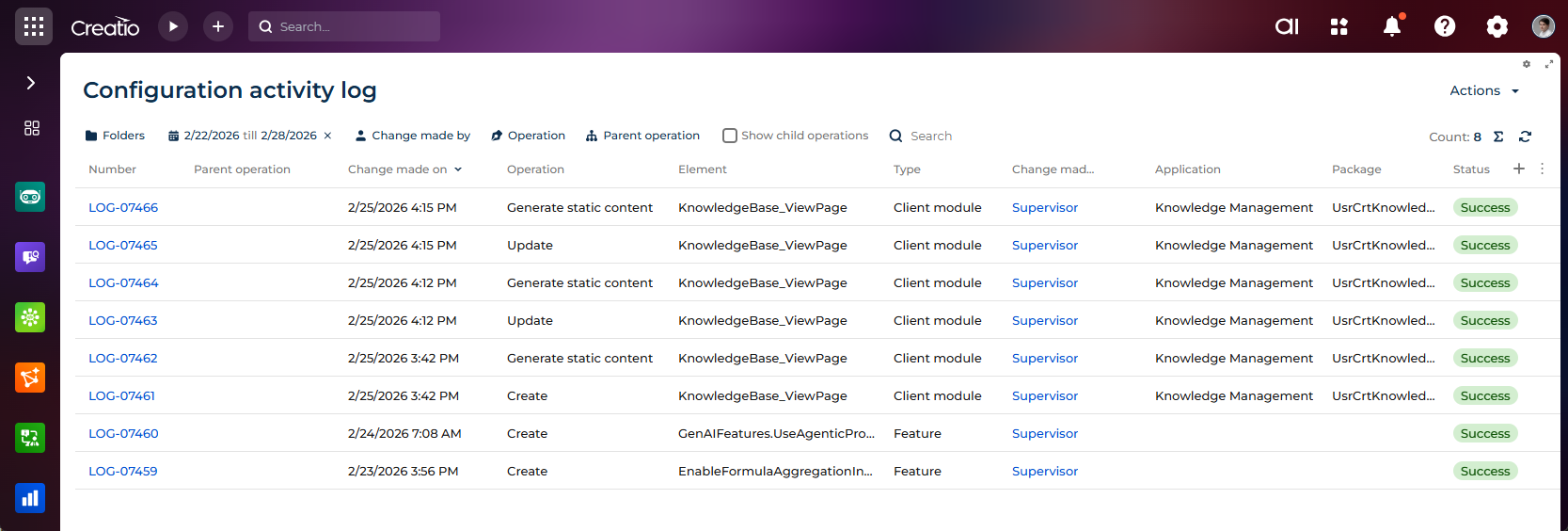
Configuration activity log cleanup. You can now control log storage and maintain up-to-date system records by using a cleaning mechanism for the configuration activity log. System administrators can perform manual cleanup or configure automatic cleanup based on a defined retention period. The process also removes all files attached to configuration activity log records and related compilation history records.
Duplicate detection during record creation. You can now automatically validate potential duplicates when saving a new contact record, helping maintain clean and consistent customer data. When you click Save, Creatio triggers the deduplication service and displays a "Potential duplicates found" window if matching records are detected. The window shows a list of potential duplicates and lets you merge records, open an existing record for editing, or save the new record anyway. If a merge is performed, the unsaved record participates in the merge process instead of being created separately. Administrators can configure the most important comparison columns using the Favorite columns for deduplication lookup that defines the columns and their display order. Creatio also handles temporary unavailability of the deduplication service gracefully, allowing the record to be saved without blocking the user. This enhancement improves duplicate detection transparency and reduces the risk of creating duplicate contact records.
Creatio Mobile
New mobile workplaces and updated Customer 360. You can now use a modernized mobile navigation model with the new workplace and an updated Customer 360 experience. The mobile application includes new contact and account pages that you can customize and extend directly in the Freedom UI Mobile Designer. Creatio automatically provides a dedicated "Customer 360" workplace with Contacts and Accounts sections when the instance has Customer 360 app installed. This enhancement delivers a more flexible mobile architecture and supports low-code customization of key mobile pages.
The functionality can be enabled and managed using additional features. Mobile.UseSysWorkplaceForModuleRegistration and UseMobileCustomer360_V2 are registered and enabled out of the box, while Mobile.DisableLegacyWorkplaces is unregistered and disabled out of the box. Learn more: Implement a custom additional feature. This lets you evaluate the new experience and transition from legacy workplaces when ready.
Configurable mobile workplaces. You can now align mobile and web workplace configuration by setting up workplaces for the mobile application using the standard Workplace setup section with the appropriate usage type. Administrators can define sections and assign access to user groups or individual users, while users can switch between workplaces using swipe gestures. Switching no longer triggers full data resynchronization, improving performance and user experience. This functionality is available out of the box for new customers and can be activated for existing customers using the Mobile.UseSysWorkplaceForModuleRegistration additional feature, ensuring a flexible transition from legacy workplaces. Learn more: Implement a custom additional feature.
Updated mobile design. You can now experience a more consistent and modern UI across all Freedom UI pages and core sections in the mobile application. The updated design includes a refreshed color palette, typography, icon set, spacing, and base UI elements such as components, fields and inputs, layout elements, improving readability and overall user experience while preserving existing functionality and interaction flows.
Mobile progress bar for dynamic case stages. You can now track, manage, and visualize dynamic case stages directly in mobile applications by adding the Progress bar component in the Freedom UI Mobile Designer. The component renders and binds data correctly in mobile runtime, displaying clearly labeled and color-coded stages (such as "Draft," "In Review," "Approved," and "Completed"), highlighting the current stage, and indicating active, completed, or pending statuses. It supports horizontal scrolling for multiple stages, grouped stages, offline scenarios, role-based restrictions, and both light and dark layouts. Users can change stages via tap interactions when permitted, while the system validates transitions, reacts to push notification updates, and displays informative messages if actions are restricted by rules or permissions. Built-in validation and fallback logic ensure stable rendering even when filtering columns are missing or unexpected stage values are received, delivering a consistent, accessible, and interactive mobile experience for dynamic case workflows.
Multi-device canvas presets and view switcher. You can now design and validate responsive page layouts more efficiently in the Freedom UI Mobile Designer by switching between predefined layouts for phone, tablet portrait, and tablet landscape views. A convenient view switch control near the page title lets you instantly toggle between device modes, automatically updating canvas proportions, styling, and configuration without reloading the page. This enhancement improves layout accuracy and consistency across devices, reduces validation time and rework, and makes multi-device no-code UI design more predictable and efficient.
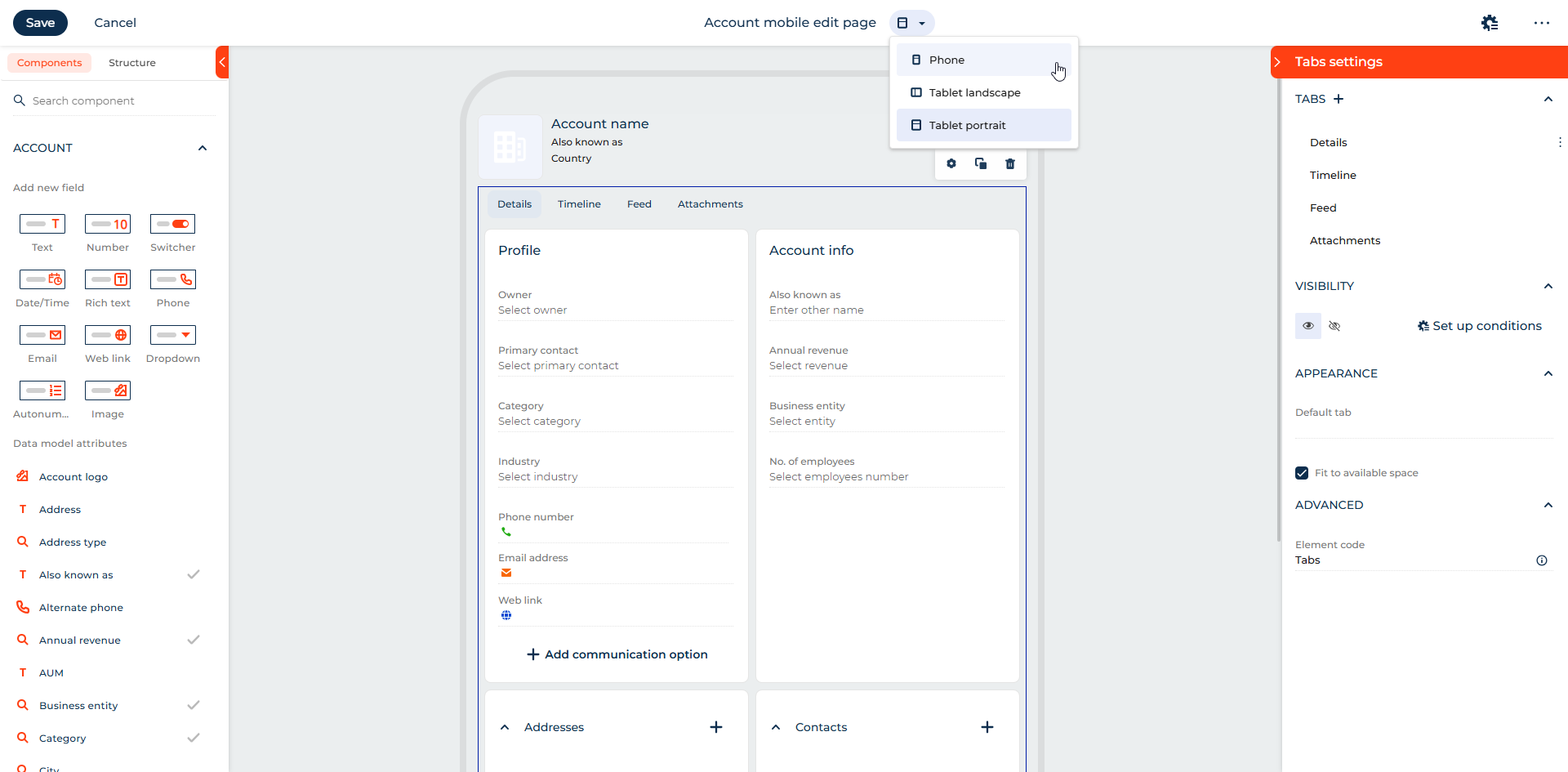
Responsive mobile grid layouts. You can now design structured and responsive mobile pages using the Grid container, an implementation of Area and Column layout element, in the Freedom UI Mobile Designer. The layout element enables configurable column layouts for phone and tablet, drag-and-drop placement of components into specific grid cells, and control over spacing, styling, and visibility. The layout renders correctly in the mobile app on supported devices, includes validation for incorrect configurations, and ensures stability with fallback handling for invalid schemas.
Mobile filter configuration. You can now enhance mobile page flexibility without custom development by adding and configuring the Filters component in the Freedom UI Mobile Designer. The component appears on the canvas as Filters and can be configured using the "Setup filters" action in the setup area, allowing you to group and manage quick filters directly in the Designer.
Mobile quick filter configuration. You can now simplify mobile list filtering by adding and configuring the Quick filter component in the Freedom UI Mobile Designer. The component lets you select the filter type ("Custom," "Date/Time," or "Lookup"), configure filtering logic, define a default value, and customize the filter title and icon. To take advantage of this component, add and turn on the UseMobileDesignerQuickFilterComponent additional feature. Learn more: Implement a custom additional feature.
Advanced customization
Pre-installation compilation validation for CLI deployments. You can now improve deployment reliability by validating compilation errors before installing applications via WorkspaceConsole or Clio. When the installation command is executed with the checkCompilationErrors parameter enabled, the system checks the target environment for existing compilation errors and displays detected issues in the console output before proceeding. This allows administrators and developers to identify and resolve environment-related problems in advance, reducing the risk of deploying applications into unstable environments and increasing transparency and control throughout the installation process.
Collection-based calculated attributes. You can now simplify client-side development by generating BaseViewModelCollection instances directly from calculated attributes. Developers can define calculated attributes that return collections without requiring manual initialization in the view model. This enhancement reduces custom code, ensures consistent collection initialization, and improves maintainability of client-side logic.
Package-level localization management. You can now simplify multilingual development by using the new "Localization" type of configuration schemas to centrally observe localizable resources within a package. Packages that contain localizable resources automatically include a "Localization" type schema, which consolidates all localizable values for a specific language and provides a centralized, read-only view in the Localization Designer. "Localization" type schemas are generated automatically when localizable resources are added to a package and are also displayed for all existing packages after upgrading to version 8.3.3. Each element represents a single language and enables developers to review translations in one place, increasing transparency of localization content, simplifying translation tracking and maintenance, and improving support for multilingual development and delivery workflows.
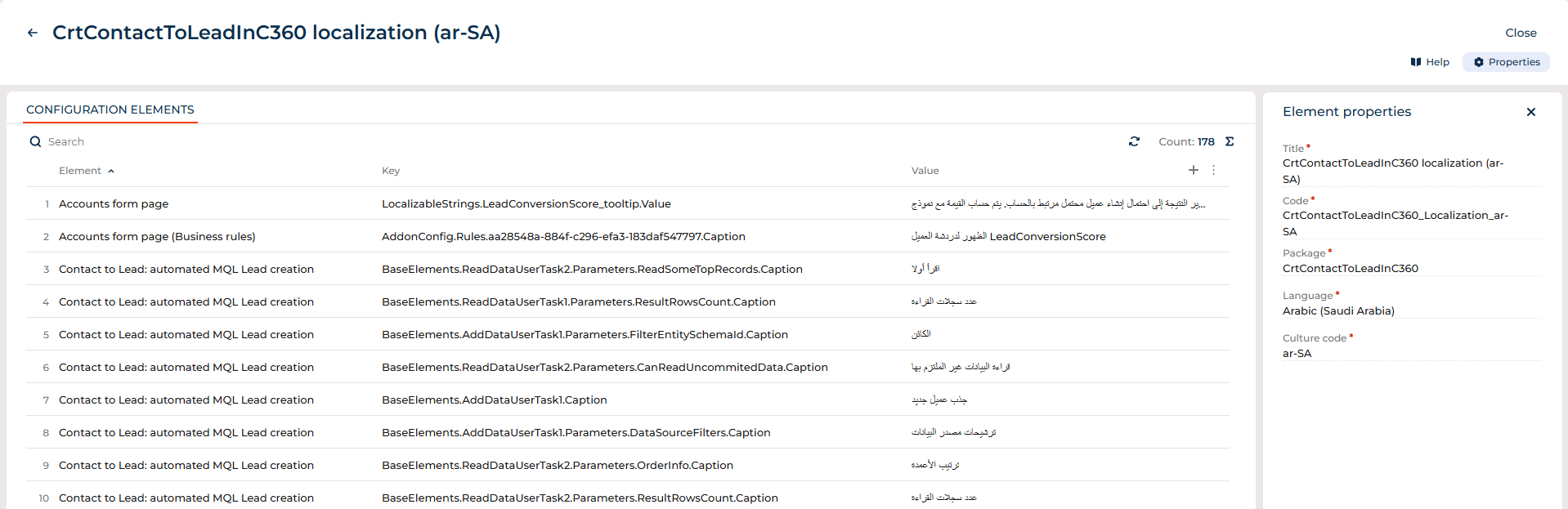
Learn more: "Localization" type schema.
Beta testing of new features
The features below are available for beta testing in Creatio version 8.3.3 Twin. If you have any feedback, contact us at: beta@creatio.com. All feedback is appreciated.
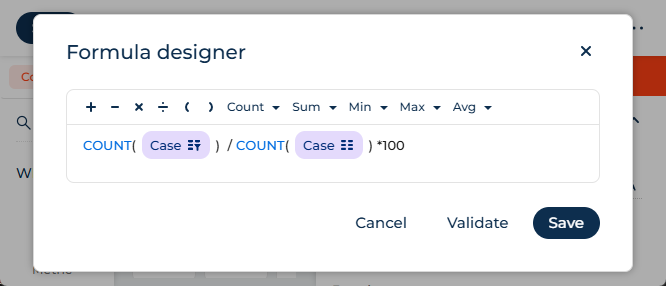
Custom metric formulas. You can now improve analytical flexibility by configuring custom formulas for metrics using the Formula designer. You can define calculated metrics by selecting the "Formula" option from the Function parameter and applying aggregation functions (COUNT, SUM, AVG, MIN, MAX), arithmetic operations, static filters, and page-level filters. The system validates the formula and calculates and displays the configured results at runtime.
To take advantage of this functionality, add and enable the EnableFormulaAggregationInDesigner additional feature, unregistered and disabled out of the box. Learn more: Implement a custom additional feature.
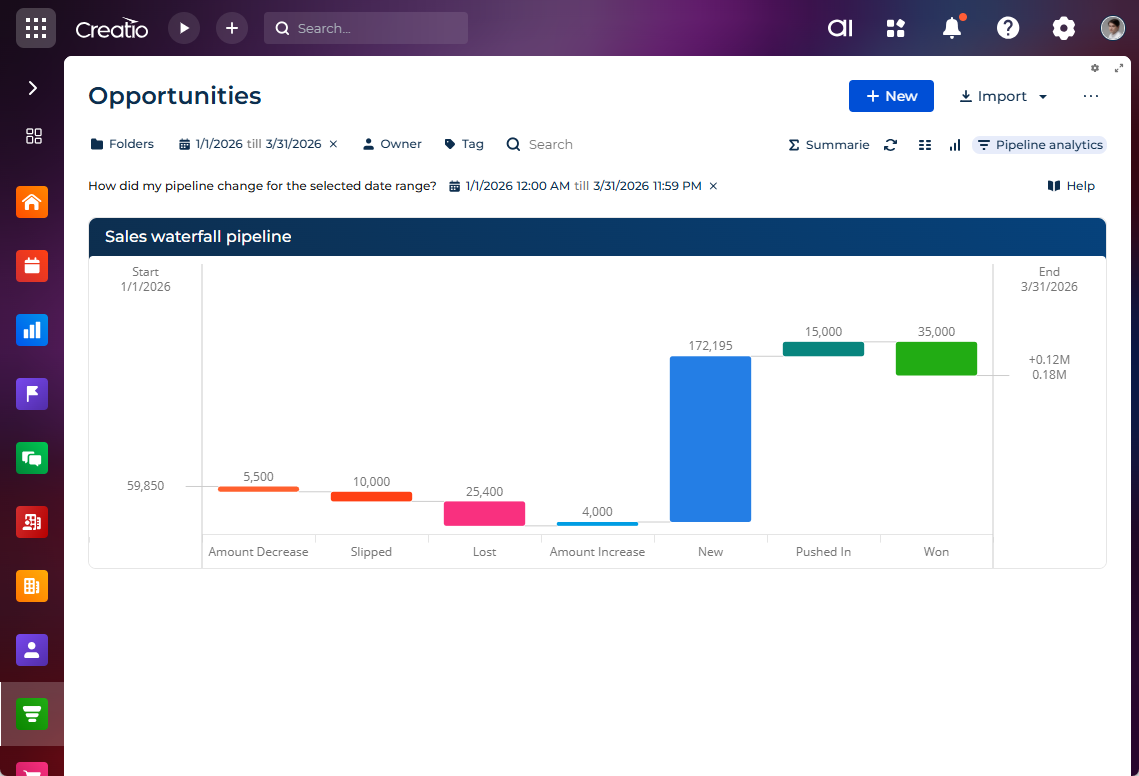
Waterfall pipeline analytics. You can now analyze and visualize pipeline changes in the Opportunities section of the Lead and opportunity management app using the new Sales waterfall pipeline widget that clearly breaks down how deals impact pipeline movement over time. The widget shows contributions from new opportunities, amount updates, close date shifts, and closed outcomes, helping teams understand and explain forecast changes without manual reconciliation or spreadsheets. You can specify the widget data sources and define key column mappings during setup. Based on the page context, Creatio dynamically generates filter collections and automatically persists them in the filters array of the widget view configuration within the page schema. To take advantage of this functionality, add and turn on the EnablePipelineAnalytics feature. Learn more: Implement a custom additional feature.