View AI meeting summaries
This functionality is available for Creatio 8.3.3 and later and supported only for Office 365 cloud accounts.
When a Microsoft Teams meeting is recorded, Creatio automatically imports the transcript and generates an AI meeting summary. This lets you quickly review key outcomes, action items, and risks without watching the full recording.
The AI meeting summary is displayed in the Meeting summary tab of the activity record alongside the transcript. Only meeting participants can view the transcript and the AI-generated summary.
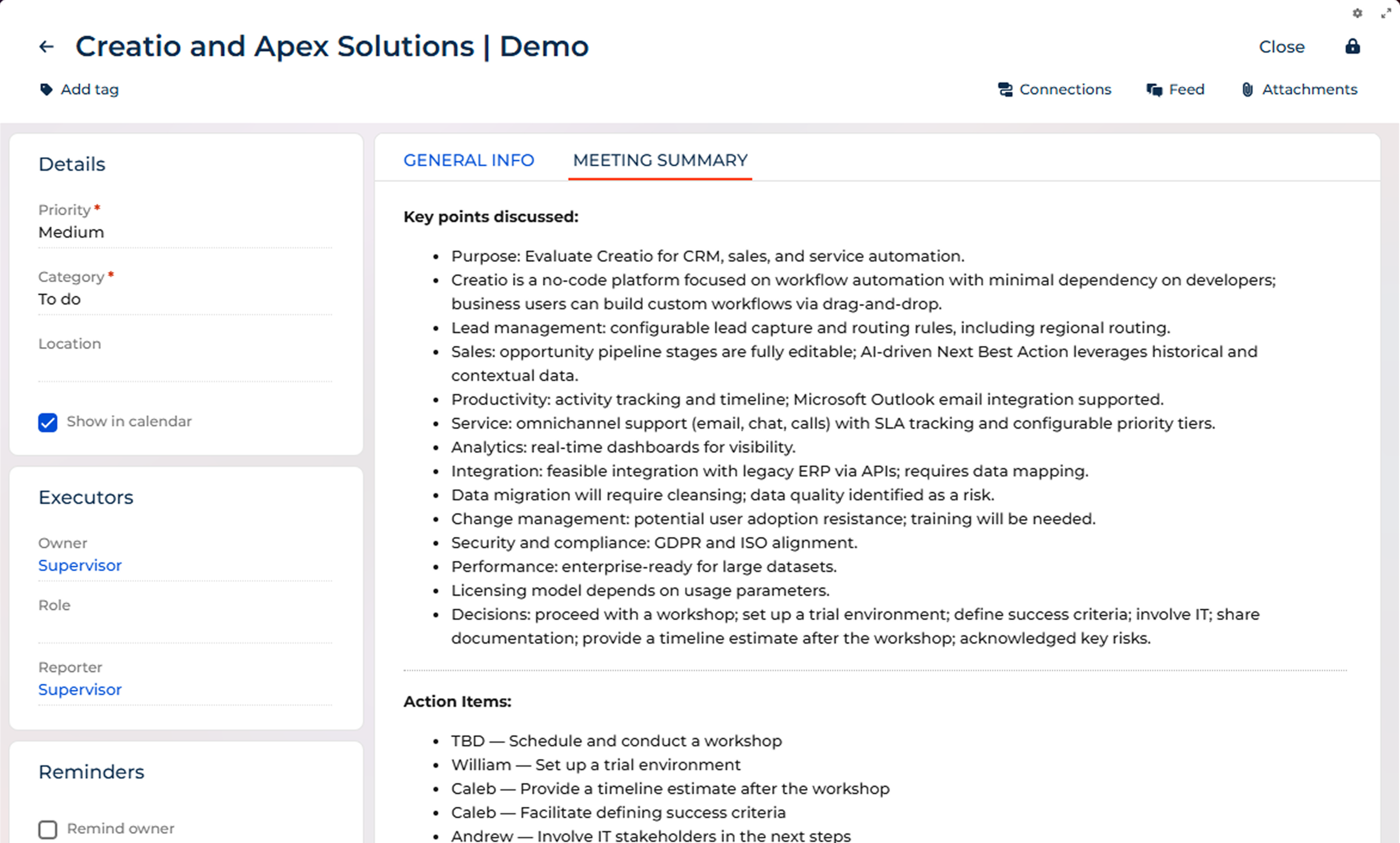
The AI meeting summary includes the following sections:
- Key points discussed — the main topics covered during the meeting.
- Action items — tasks and follow-ups assigned during the meeting.
- Risks — potential issues or blockers identified during the meeting.
After the summary is generated, Creatio automatically sends an email with the summary on your behalf to all internal attendees who have active Creatio user accounts. External participants do not receive this email. Email notifications are sent only for meetings that occurred on the current day.
To stop receiving email notifications with AI meeting summaries or to prevent Creatio from sending them on your behalf, contact your system administrator.
See also
Synchronize calendar with Microsoft Exchange and Microsoft 365
Customize AI meeting summaries
Resources
One Checkbox, Every Meeting Summarized: AI Summary from MS Teams | Creatio