System requirements for 500 users
Main application infrastructure
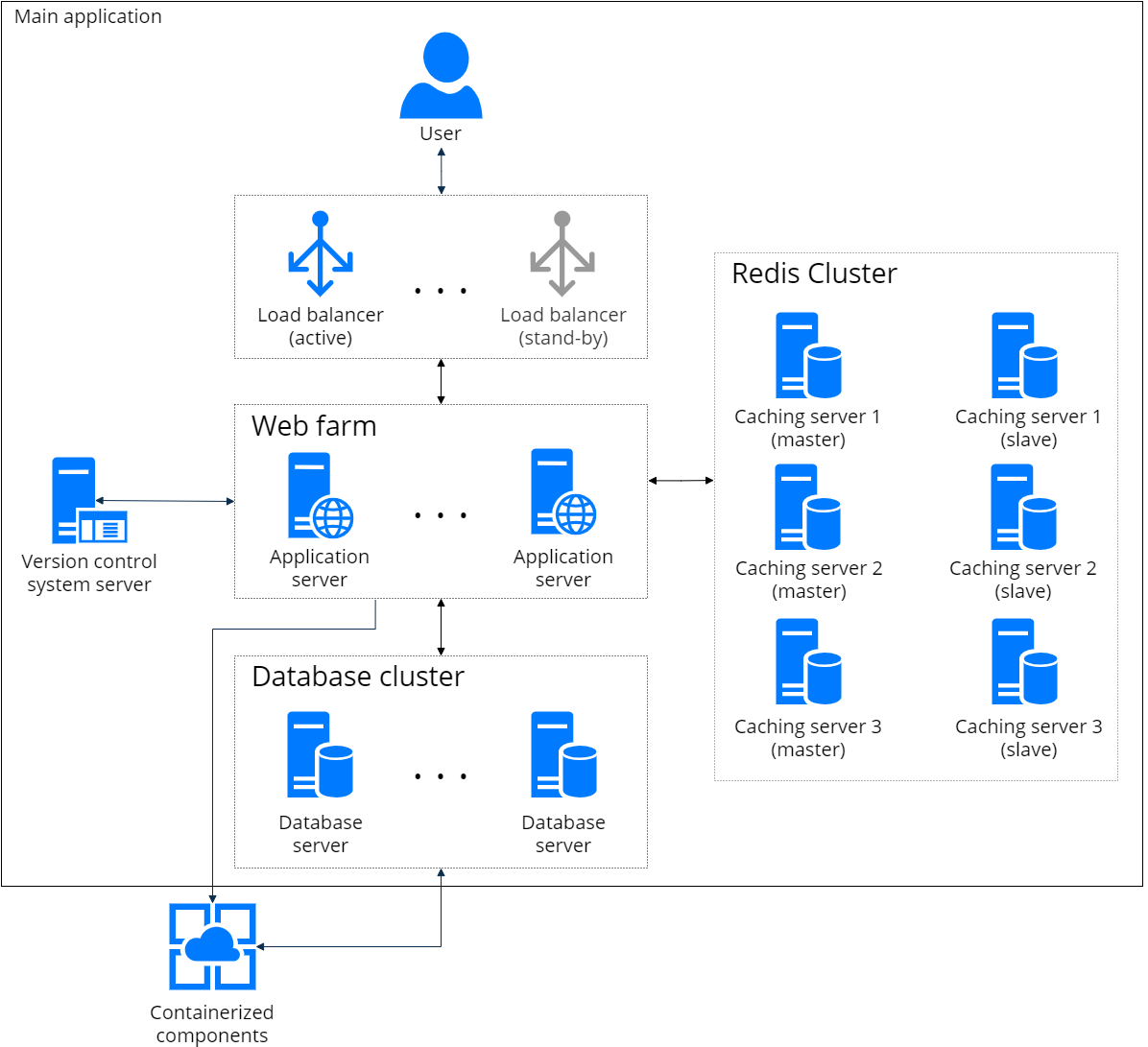
MS Exchange integration service infrastructure
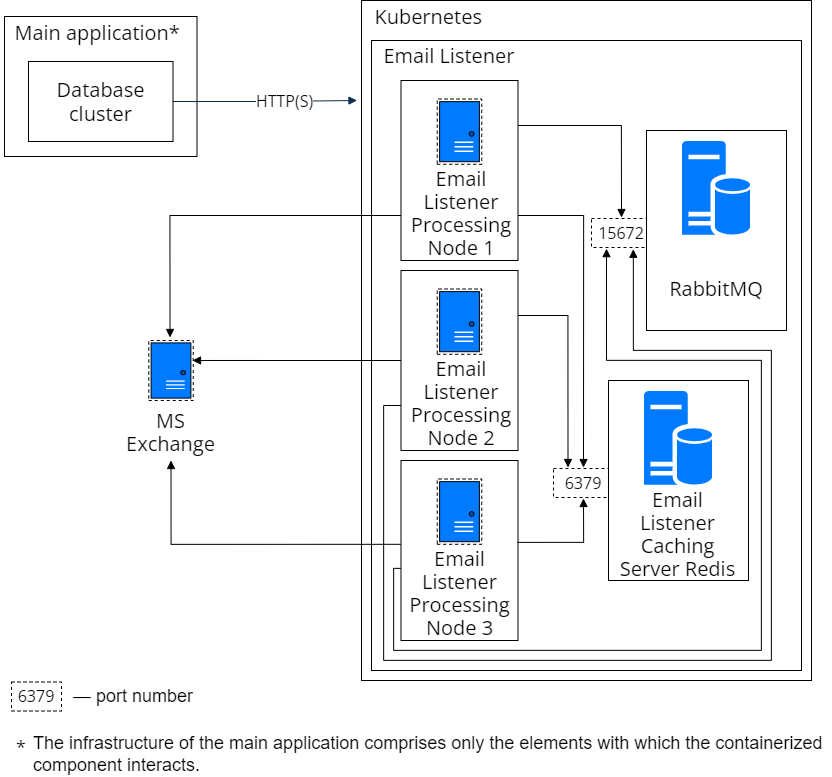
Learn more about how to deploy the component: Exchange Listener synchronization service.
Connection channels
| Web server – DBMS server | 50 Mb/sec |
| Web server – user | Minimum: 128 Mbps Recommended: 256 Mbps |
| Input/output | 100 IOPS |
| Input/output (DBMS server) | 1000 IOPS |
Application server
| Number of servers with fail safety | 2 |
| OS | Windows Server 2022 and up |
| Software requirements | IIS 10 and up 64-bit .Net framework 4.7.2 .NET 8 |
| Environment | Virtual infrastructure |
| vCPU | Number of cores — 4 and more. Maximum number of cores — 16. Frequency 2,6 GHz and more (Haswell gen. or newer) per server |
| vRAM | 17 GB per server |
| HDD (OS) | 60 GB, 100 IOPS, latency less than 10 ms per server
|
| HDD (application) | 20 GB, 100 IOPS, latency less than 10 ms per server |
| Network interface | Number — 1, speed 1 GbE and more |
| Ratio of virtual and physical cores | No more than 2 virtual cores per 1 physical core |
Database server
| Number of servers with fail safety | 2 |
| OS | Windows Server 2022 and up Linux Debian 12 |
| Software requirements (Oracle) | Oracle Database 19c or higher. To deploy the Creatio database on Oracle, set up Oracle Data Access Components (ODAC) of version 11. |
| Environment | Virtual infrastructure (physical servers preferable) |
| vCPU | Number of cores — 4 and more, frequency 3 GHz and more (Haswell gen. or newer) per server |
| vRAM | 34 GB per server |
| HDD (OS) | 80 GB, 100 IOPS, latency less than 7 ms per server |
| HDD (Database) | Data — 150 GB, 500 IOPS, latency less than 7 ms per server The specified drive capacity, IOPS, and latency values are general recommendations. Actual requirements can vary based on the user dataset size, workload, and system usage patterns. We recommend assessing storage needs based on real-world data growth and performance demands. |
| Network interface | Number — 1, speed 0.1 GbE and more |
| Ratio of virtual and physical cores | No more than 1 virtual core per 1 physical core |
Caching server (user sessions)
| Number of servers with fail safety | 6 |
| OS | Linux Debian 12 |
| Software requirements | Redis Server 7.4 and up Creatio supports Redis Open Source and other Redis editions. Creatio is fully compatible with all supported Redis versions. Redis Open Source provides all the required functionality for performance, reliability, and scalability in standard Creatio environments. The choice of Redis edition (Open Source or commercial) is determined by the customer's infrastructure requirements and licensing preferences. |
| Environment | Virtual infrastructure |
| vCPU | Number of cores — 1 and more, frequency 2,4 GHz and more per server |
| vRAM | 4 GB (on Linux) per server |
| HDD | 20 GB, 20 IOPS, latency less than ms (on Linux) per server |
| Network interface | Number — 1, speed 0.1 GbE and more |
| Ratio of virtual and physical cores | No more than 2 virtual cores per 1 physical core |
| Fault tolerance scheme |
Load balancer server (web servers)
| Number of servers with fail safety | 2 |
| OS | Linux Debian 12 |
| Environment | Virtual infrastructure |
| vCPU | Number of cores — 2 and more, frequency 2,6 GHz and more per server |
| vRAM | 8 GB per server |
| HDD | 20 GB, 20 IOPS, latency less than 10 ms per server |
| Network interface | Number — 2, speed 10 GbE and more |
| Ratio of virtual and physical cores | No more than 2 virtual cores per 1 physical core |
Version control server (SVN)
| Software requirements | Subversion (SVN) 1.14 or newer |
| OS | Windows, Linux |
| Environment | Virtual infrastructure |
| vCPU | Number of cores — 2 and more, frequency 2,6 GHz and more per server |
| vRAM | 8 GB per server |
| HDD | 100 GB, 20 IOPS, latency less than 20 ms per server |
| Network interface | Number — 1, speed 0.1 GbE and more |
| Ratio of virtual and physical cores | No more than 2 virtual cores per 1 physical core |
| Fault tolerance scheme | Not needed |
Kubernetes master server
| Number of servers with fail safety | 3 |
| OS | Linux Debian 12 |
| Environment | Virtual infrastructure |
| vCPU | Number of cores — 2 and more, frequency 2,60 GHz and more per server |
| vRAM | 4 GB per server |
| HDD | 30 GB, 100 IOPS, latency less then 10 ms per server |
| Network interface | Number — 1, speed 1 Gbit/s and more |
| Ratio of virtual and physical cores | No more than 2 virtual cores per 1 physical core |
Kubernetes node server
| Number of servers with fail safety | 3 |
| OS | Linux Debian 12 |
| Environment | Virtual infrastructure |
| vCPU | Number of cores — 4 and more, frequency 2,60 GHz and more per server |
| vRAM | 16 GB per server |
| HDD | 120 GB, 500 IOPS, latency less then 10 ms per server |
| Network interface | Number — 1, speed 1 Gbit/s and more |
| Ratio of virtual and physical cores | No more than 2 virtual cores per 1 physical core |
Kubernetes balancer server
| Number of servers with fail safety | 2 |
| OS | Linux Debian 12 |
| Environment | Virtual infrastructure |
| vCPU | Number of cores — 1 and more, frequency 2,60 GHz and more per server |
| vRAM | 1 GB per server |
| HDD | 30 GB, 100 IOPS, latency less then 10 ms per server |
| Network interface | Number — 1, speed 1 Gbit/s and more |
| Ratio of virtual and physical cores | No more than 2 virtual cores per 1 physical core |
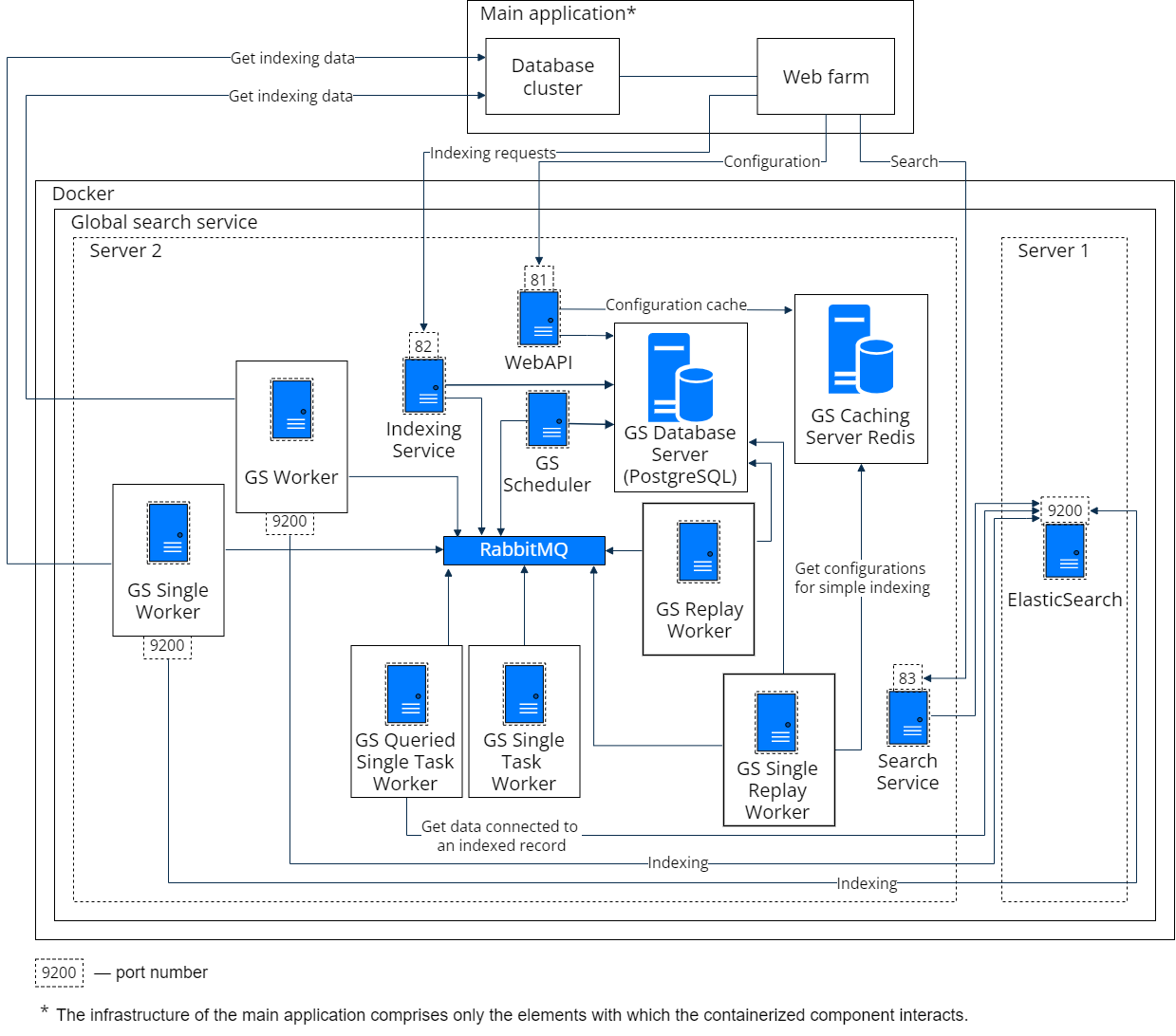
Global search server requirements
Global search service using Kubernetes
| vCPU | Number of cores — 4 and more, frequency 2.4 GHz and more |
| vRAM | 12 GB and more |
| SSD | 50 % of free disk space available from the Creatio database, with 30 GB minimum. For example, if the database takes 60 GB, the disk should have 30+ GB of free space to install ElasticSearch. If the database takes 75 GB, the disk must have 38+ GB for this purpose. |
Global search service in Docker
ElasticSearch server (server 1)
| vCPU | Number of cores — 1 and more, frequency 2.4 GHz and more |
| vRAM | 4 GB and more |
| HDD | 50 % of free disk space available from the Creatio database, with 15 GB minimum. For example, if the database takes 40 GB, the disk should have 20+ GB of free space to install ElasticSearch. If the database takes 25 GB, the disk must have 15+ GB for this purpose. |
| vCPU | Number of cores — 2 and more, frequency 2.4 GHz and more |
| vRAM | 8 GB and more |
| SSD | 50 % of free disk space available from the Creatio database, with 15 GB minimum. For example, if the database takes 40 GB, the disk should have 20+ GB of free space to install ElasticSearch. If the database takes 25 GB, the disk must have 15+ GB for this purpose. |
Server with the global search components (server 2)
| vCPU | Number of cores — 1 and more, frequency 2.4 GHz and more |
| vRAM | 2 GB and more |
| HDD | 30 GB and more |
| vCPU | Number of cores — 2 and more, frequency 2.4 GHz and more |
| vRAM | 4 GB and more |
| SSD | 30 GB and more |
Email Listener synchronization service server requirements
By default, separate nodes of the StatefulSet type process the requests based on 1 processor replica per 40 active mailboxes. The number of replicas depends on the replicaCount parameter. If the number of mailboxes increases, you need to increase the number of processors by specifying the needed value.
One processor requires 30% of the 2Hz processor time and 850 Mb of RAM (disk storage is not used).
You can configure automatic scaling depending on the number of active subscriptions. To learn more, contact support@creatio.com.
Marketplace solution requirements
Using of additional Marketplace solutions may affect system requirements. For more information, contact the vendor of the solution.
Implementation recommendations
The main parameter for calculating hardware requirements is the predicted number of users. At the same time, other indicators can affect the performance of the system:
- number of integrations;
- number of sections and pages;
- average number of requests;
- minimum and maximum response time;
- file storage mode;
- average file size, etc.
It is recommended during the implementation of the application to form practical cases with a high load and count performance measurements in conditions close to the real load on the application.
If the load increases, it may be necessary to revise the system requirements.