Creatio.ai add-in overview
You can use Creatio.ai directly in Microsoft Outlook or Teams using a dedicated add-in. This lets you automate repetitive tasks, retrieve CRM insights, and interact with AI-powered virtual agent assistants to streamline sales operations. Sales and customer-facing professionals can prepare for meetings, access opportunities, and review contact data directly in their collaboration environment. Once installed from the Microsoft Teams Marketplace, the add-in also appears as a personal app in the Teams app bar, so you can open the full Creatio.ai chat interface at any time without starting or joining a meeting.
The personal app in Microsoft Teams is available for Creatio 8.3.1 and later.
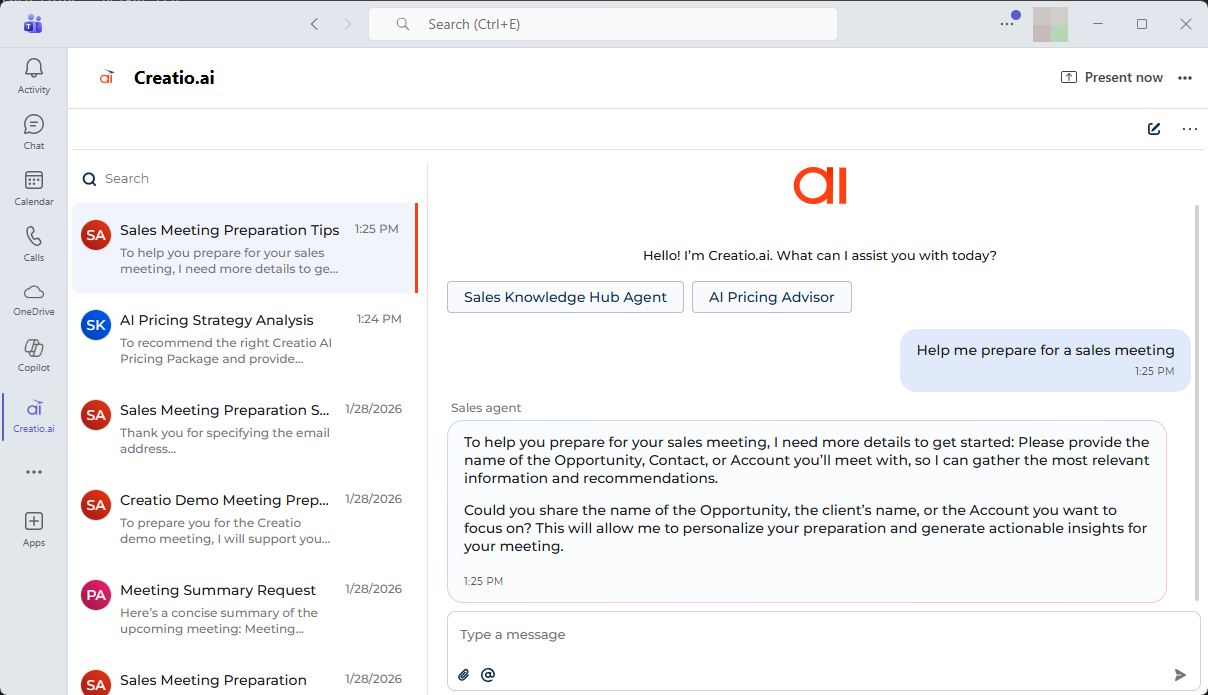
Out of the box, the add-in is targeted at sales representatives and customer service agents. They can prepare and summarize meetings, review contact and account data as well as access opportunities.
Creatio.ai add-in supports common communication and collaboration scenarios, including the following:
-
Working with emails in Microsoft Outlook.
- Analyze email threads.
- Review related contacts, accounts, and opportunities.
- Generate AI-assisted draft replies.
-
Preparing for meetings in Microsoft Outlook and Teams
- Review meeting participants and related CRM data.
- Get insights into current deals, cases, and activities.
- Receive AI-generated recommendations before the meeting.
-
Working during and after meetings in Microsoft Teams.
- Access CRM context during live meetings in Microsoft Teams.
- Capture notes and key points.
- Review AI-generated summaries after the meeting.
Set up Creatio.ai add-in
In general, the setup of Creatio.ai add-in consists of the following steps:
- Set up Microsoft 365 integration in Creatio. Learn more: Set up Creatio.ai add-in for Microsoft Outlook and Microsoft Teams. This step is performed once by the system administrator.
- Grant consent for users to access the add-in in your organization. Learn more: Set up Creatio.ai add-in for Microsoft Outlook and Microsoft Teams. This step is performed once by the system administrator.
- Install Creatio.ai add-in on the user's end. Learn more: Set up Creatio.ai add-in for Microsoft Outlook, Set up Creatio.ai add-in for Microsoft Teams.
- Grant Microsoft Outlook and Microsoft Teams access to Creatio. Learn more: Set up Creatio.ai add-in for Microsoft Outlook, Set up Creatio.ai add-in for Microsoft Teams. This step is performed by each Creatio user individually.
Learn more about using the add-in: Use Creatio.ai for emails and meetings. After the installation, you can start working with Creatio.ai in Outlook and Teams immediately.
Use AI Skills in Creatio.ai add-in
AI Skills are ready-to-use AI-powered capabilities that help users automate routine tasks and work with CRM data more efficiently. AI Skills are available directly in the Creatio.ai chat panel and adapt to the current context, such as an email thread or a meeting.
All existing and custom AI Skills are available in the add-in. It also comes with a set of pre-configured AI Skills optimized specifically for that add-in. These skills let you get started with intelligent automation right away. You can develop more AI Skills for the add-in if needed. Learn more: Development specifics for AI Skills in the Creatio.ai Outlook add-in.
View the comprehensive list of pre-configured AI Skills available in Creatio.ai chat panel in the task pane and explanations on how you can benefit from them in the table below.
Name | Description | Benefits and use cases | Emails in Outlook | Meetings in Outlook and Teams |
|---|---|---|---|---|
Identify contacts | Detects existing contacts based on email participants and shows recent history. Suggests creating new contacts if none are found. | Streamlines contact acquisition and profile enrichment. Reduces manual input and improves CRM data quality. | + | + |
Summarize email | Generates a summary of the full email thread. | Saves time and accelerates decision-making by providing quick insight into long email threads. | + | - |
Reply to email | Drafts a context-aware email response using the thread and Creatio data. | Improves response time and consistency. Boosts customer loyalty and agent performance. | + | - |
Check open cases | Searches for open cases related to the current email and highlights if any are overdue. | Helps reduce missed follow-ups and improve resolution time and CSAT. | + | + |
New meeting | Finds a slot for the meeting with the needed people. | Automates meeting scheduling, improves coordination, and saves time. | + | + |
Prepare for the sales meeting | Generates personalized recommendations to prepare for a client meeting at the Opportunity stage. | Enables sales executives to prepare quickly and efficiently. | - | + |
Creatio.ai add-in capabilities go beyond the pre-configured AI Skills shown in the chat panel:
- Run any active AI Skill. Users can invoke any AI Skill they have access to, not just the ones available via chat panel buttons.
- Customize AI Skills. No-code developers who have access to the "Can manage configuration elements" (
CanManageSolutioncode) system operation can modify existing AI Skills to fit business needs. Learn more: Develop Creatio.ai Skill, AI Skill development recommendations. - Build add-in-specific AI Skills. New AI Skills can be developed specifically for the Outlook add-in context. Learn more: Development specifics for AI Skills in the Creatio.ai Outlook add-in.
AI-generated meeting summaries
This functionality is available for Creatio 8.3.3 and later.
After a recorded Microsoft Teams meeting ends, Creatio automatically generates a meeting summary based on the transcript — so you spend less time reviewing recordings and more time acting on outcomes. The summary is displayed in the Meeting summary tab of the activity record alongside the transcript.
The AI meeting summary includes key points discussed, action items, and risks identified during the meeting. Only meeting participants can view the transcript and the generated summary.
After the summary is generated, Creatio automatically sends an email with the summary on your behalf to all internal attendees who have active Creatio user accounts. External participants without active accounts do not receive this email.
This feature requires the Productivity app to be installed and is supported only for Office 365 cloud accounts with calendar synchronization enabled. Learn more: View an AI-generated meeting summary.
See also
Use Creatio.ai add-in for emails and meetings
Set up Creatio.ai add-in for Microsoft Outlook
Set up Creatio.ai add-in for Microsoft Teams
Development specifics for AI Skills in the Creatio.ai Outlook add-in
Creatio.ai (developer documentation)