Cyclic connection chains in package hierarchy
Creatio adds the required dependencies automatically for elements created or modified using Freedom UI Designer. I.e., you can use the functionality of all app packages when working with Freedom UI pages, sections, objects, business processes, and web services. This makes no-code development easy and comfortable for users.
A cyclic dependency occurs when a package depends on another package that already depends on it, either directly or indirectly through other dependencies. Cyclic dependency chains lead to app runtime errors.
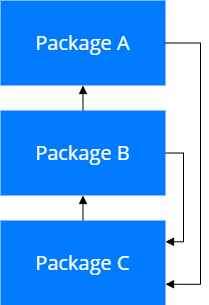
Consider an app with A, B, and C packages where the B package depends on the A package, and the C package depends on the B package. If you use an element from the C package in the A or B package, the A or B package must depend on the C package. Creatio will not execute an operation with such a requirement since it will cause a cyclic chain (Fig. 1).
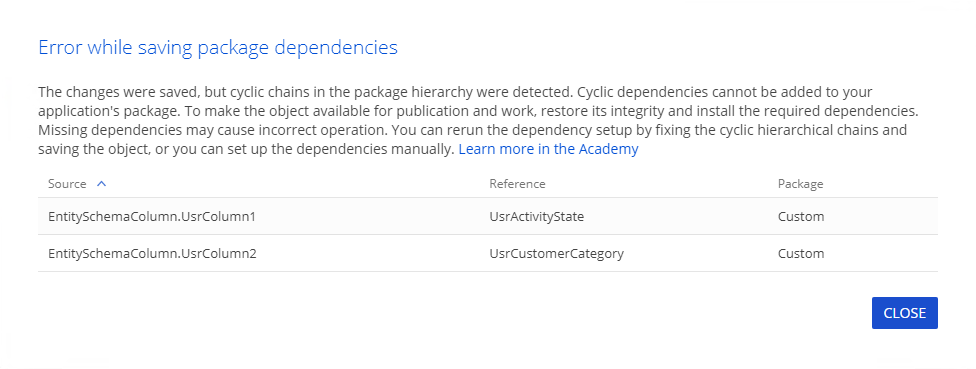
Using apps that have cyclic dependencies can cause Creatio runtime issues. To avoid this, Creatio checks the app elements used and dependencies configured while saving the app changes. If Creatio detects a cyclic dependency chain, it saves the changes but does not add new package dependencies. You will receive a recommendation to check and fix the dependencies configured. The notification will contain more information about the error as well (Fig. 2):
- "Source" is a part of the schema that refers to the error-causing element.
- "Reference" is a name of the element that causes the error.
- "Package" is a name of the package that contains the element.
We recommend fixing cyclic dependencies before you configure the app further to ensure its operability.
Cyclic chain examples
This section covers several examples that cause cyclic chain errors.
For Creatio 8.3.1 and earlier, if you use an existing schema from the Custom package (Fig. 3) in the UserApplication custom app, this will cause a cyclic chain error. Cause: out of the box, the Custom package depends on every package, including the UserApplication package. However, the UserApplication package must depend on the Custom package to access its elements.
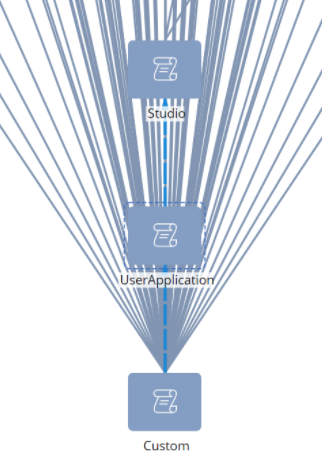
For Creatio 8.3.2 and later, this scenario does not cause a cyclic dependency chain because the Custom package no longer depends on newly created packages automatically.
You have created Application1 and Application2 apps. If you use Application1 app elements in Application2, Creatio adds Application1 package to Application2 package as a dependency automatically. If you use the functionality of the *Application2 package in the Application1 package to improve the latter, this will cause a cyclic chain error.
Prevent cyclic chains
To avoid cyclic chains, we recommend the following:
- If you configure an app using elements from another app, mind the app's resulting dependencies. If you configure an app using elements from another app, make sure the dependency chain is correct and does not introduce cyclic dependencies.
- Only save the improvements that the app uses to the app package. Make all possible changes in the Application Designer of the app. Keep an eye on packages where your changes are saved. If changes are saved to an unintended package, ensure they are moved to the appropriate package in the Configuration section.
Resolve the cyclic chain issue
View examples that resolve the cyclic chain issue in the table below.
Examples that resolve the cyclic chain issue
Way to eliminate cyclic chains | Example |
|---|---|
If you use the wrong elements by mistake, which caused a cyclic chain, you can delete them or replace them with new elements that do not cause a cyclic chain. After that, save the changes to re-add the dependencies. Objects or business processes that use methods and Script task element cannot be published before you eliminate the cyclic chain issue. | The Read data process element reads a redundant column or uses it in filtering conditions. To eliminate the cyclic chain, simply delete the column and save the business process. |
If the elements that cause a cyclic chain are not critical to the app operation or you made the changes by mistake, simply revert the changes to eliminate all newly introduced cyclic chains. | You replaced the same object schema in two different packages that depend on each other. As a result, the object column has different Name property values across the packages, which causes a cyclic dependency. To eliminate it, restore the original Name property value and save the updated object. |
If you cannot edit or delete the elements that caused a cyclic chain, move them:
Learn more: Move the functionality between packages. | You have the |
Do not replace a single object in a single package more than once. If the cyclic chain is caused by two replacements of a single object in two different packages, move the schema that causes the cyclic chain to a third package. The package where you configure the app must inherit from the package to which you moved the schema.
See also
Packages overview (developer documentation)