Manage loans
The Loans section stores detailed information about loan products issued to customers. Loan records are created automatically at the final stage of an application flow, once the related application is approved, and are populated using the parameters defined in that application.
Creatio can be integrated with Core Banking Systems (CBS) and third-party platforms to automate data exchange across financial products. These integrations are not provided out of the box but can be implemented using the no-code tools of the Creatio platform. Typical integration scenarios include real-time balance updates, transaction synchronization, card issuance tracking, loan servicing updates, and insurance record maintenance.
Loans records are created automatically during the final stage of an application flow. Once the application for the corresponding product is approved, Creatio generates a new loan record and populates its fields using the parameters defined in the application
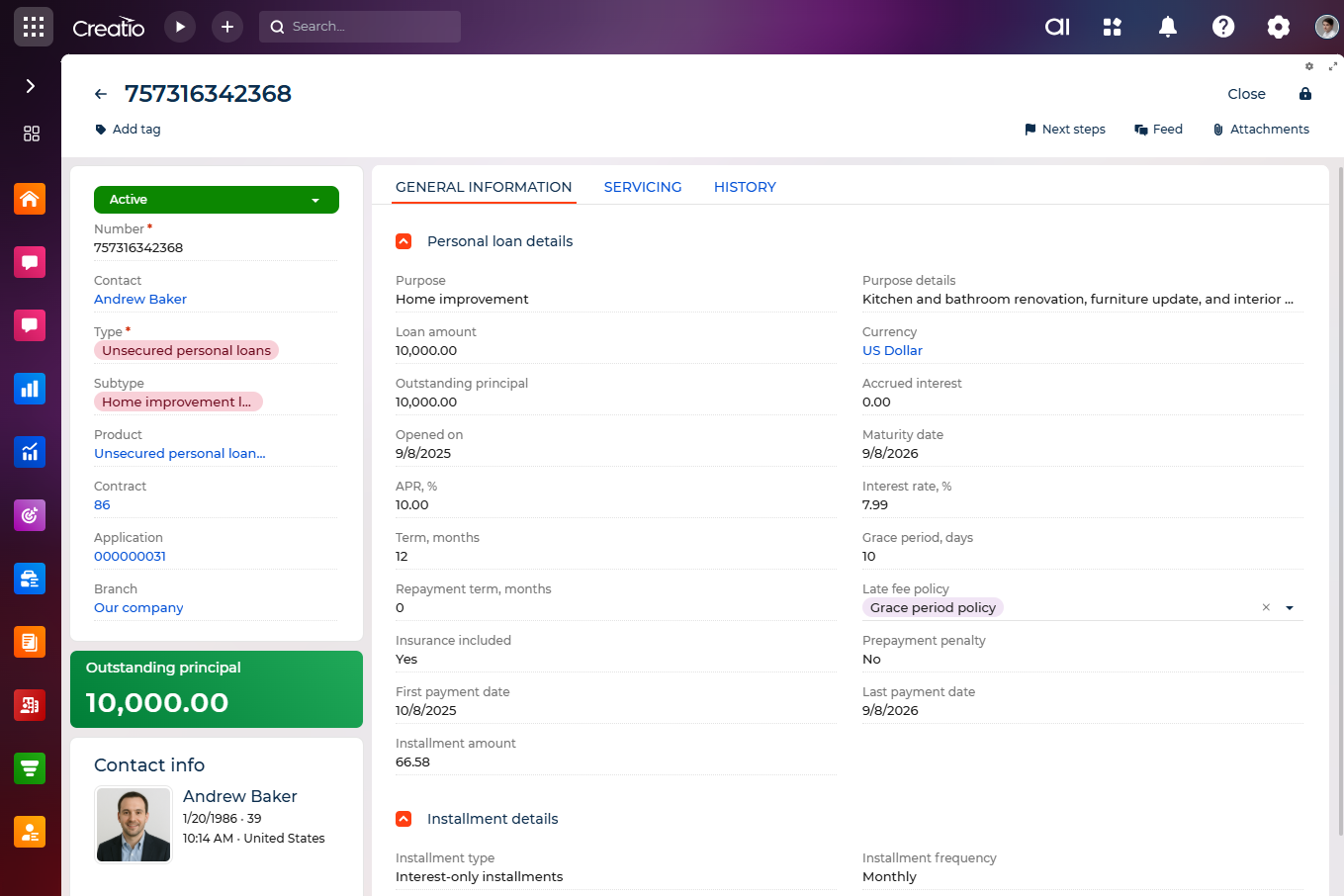
The layout of the loan page changes dynamically based on the selected loan type, displaying type-specific blocks, fields, and related data while keeping common loan information available for all loan types.
Loan profile
Field | Description |
|---|---|
Status | The current status of the loan (e.g., "Active," "Closed," "Delinquent"). Required. |
Number | Unique loan number. Required. |
Contact | Individual customer affiliated with this loan. If populated, a separate block displays the customer's profile details (name, age, location, email, and primary phone numbers). |
Type | Type of loan (e.g., "Unsecured personal loans"). Determines the layout and fields shown on the page. |
Subtype | Subtype of loan, filtered by type (e.g., "Debt consolidation loan"). |
Product | The product activated using the loan. |
Contract | Contract associated with the loan. Required. |
Application | Application used to create the loan. |
Branch | Branch or division responsible for the loan. |
General loan information
Field | Description |
|---|---|
Purpose | Purpose of the loan. |
Purpose details | Detailed explanation of the loan purpose. Field is visible when loan type is not "Credit cards," "Auto loans," "Lines of credit." |
Loan amount | Total loan amount issued to the customer. |
Currency | Currency in which the loan is issued. |
APR, % | Annual percentage rate for the loan. |
Interest rate, % | Interest rate defined for the loan. |
Opened on | Date when the loan was opened. |
Maturity date | Loan maturity date. |
Term, months | Loan term specified in months. |
Linked and related data
The Applications expanded list displays all application records associated with the loan.
The Installment details block summarizes upcoming and outstanding repayments, providing insight into current obligations without requiring access to the full payment schedule.
The Payment schedule block displays all planned and actual payments, helping users monitor repayment progress and identify delays.
The Credit limit change log block maintains a full history of credit limit changes, including their source — case, application, or pre-approved credit limit offer.
Pre-approved credit limit offers
Creatio supports pre-approved credit limit increase (CLI) offers. These allow financial institutions to propose higher credit limits to eligible customers proactively based on internal evaluations or marketing campaigns.
The most recent offer with:
- type: "Requires confirmation"
- status: "Pending"
- a valid expiration date
is stored directly in the loan record for quick access and further processing.
Transactions
The Transactions expanded list displays all transaction records associated with the loan, including transaction number, status, amount, currency, balance, transaction date, write-off date, and comments.
Cards
The Cards expanded list displays all cards details associated with the loan. This can include supplementary cards or cards tied to the same loan.
Lines of credit (LOC)
For loans that have "Line of credit (LOC)" type, loan page contains the following expanded lists:
- Line of credit details on the General information tab
- Cards on the General information tab
- Transactions on the Servicing tab
For these loans, the system enables tracking of revolving balances, available credit, draw schedules, and repayment phases. The UI supports multiple linked cards, allowing users to view usage history and manage account-level rules.
Credit card loans
For loans that have "Credit cards" type, Creatio displays the following expanded lists:
- Credit card loan details on the General information tab
- Pre-approved credit limit offer on the General information tab
- Credit limit change log on the Servicing tab
- Transactions on the Servicing tab
This type enables detailed monitoring of card-linked credit facilities. Fields related to statement cycles, minimum payments, grace periods, and APRs are displayed. A direct reference to the associated credit card ensures alignment between transactional data and loan-level reporting.
Unsecured personal loans
For loans that have "Unsecured personal loans" type, Creatio displays following data:
- Personal loan details field group on the General information tab
- Installment details field group on the General information tab
- Payment schedule expanded list on the Servicing tab
It provides a comprehensive view of the loan structure and repayment progress, helping users effectively manage unsecured personal lending.
Auto loans
For loans that have "Auto loans" type, Creatio displays the following blocks:
- Auto loan details field group on the General information tab
- Collateral details field on the General information tab
- Installment details field group on the General information tab
- Payment schedule expanded list on the Servicing tab
For this loan type, the loan record contains general parameters such as purpose, loan amount, interest rate, currency, opening date, maturity date, and repayment terms, along with installment details. These fields ensure that both the asset securing the loan and the core loan terms are available in a single, unified view.
All vehicle-related information, including but not limited to model, year, VIN, mileage, lienholder, and assessed value, is stored in the Collateral details field. This centralizes all collateral data for consistent tracking and easier access.
As a result, users can manage all loan types while monitoring repayment schedules, limits, collateral, and linked applications.