Manage insurances
The Insurances section provides a unified workspace for maintaining policy data, tracking premiums, commissions, and carrier details.
Insurance policy records are created manually in the Insurances section. Their details are populated by users or via custom integrations.
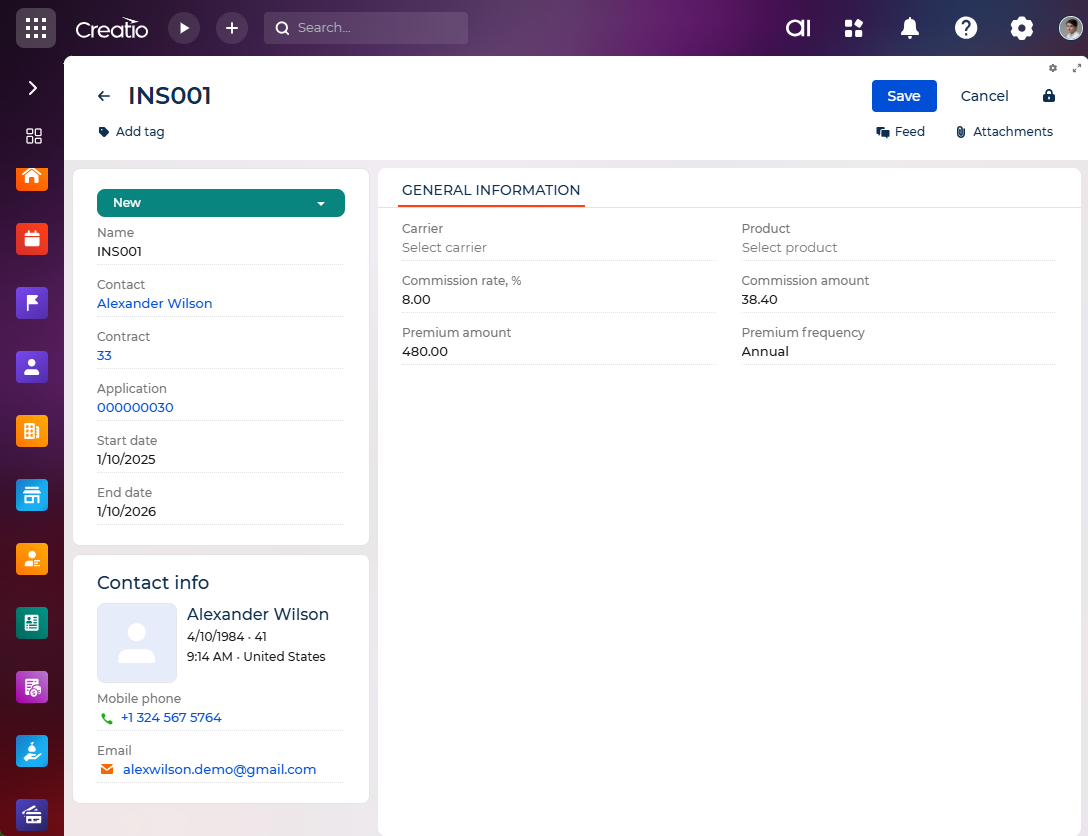
The insurance page contains the following fields:
Field | Description |
|---|---|
Name | Specifies the name of the insurance policy. |
Status | Indicates the current status of the policy. Required. |
Contact | Individual customer affiliated with the insurance policy. When populated, a contact profile appears displaying name, age, location, email, and primary phone number. The profile displays only the fields that have values in the corresponding contact record. If some fields of the contact are not populated, the related data will not appear in the profile. |
Contract | Contract under which the insurance policy was issued. Required. |
Application | Application used to create the insurance record. |
Start date | Insurance policy start date. Required. |
End date | Insurance policy end date. Required. |
Carrier | Insurance carrier responsible for the policy. When populated, a carrier profile appears displaying name, location, primary contact, web address, and primary phone number. |
Product | Insurance product tied to the policy. |
Commission rate, % | Percentage rate of the commission assigned to the policy. |
Commission amount | Total commission amount for the policy. |
Premium amount | Amount of the premium charged for the policy. |
Premium frequency | Defines how frequently the premium is billed (e.g., monthly, quarterly). |
As a result, users can manage customer insurance policies, track premiums and commissions, and maintain accurate policy data integrated with customer profiles and contracts.