Manage bank accounts
The Bank accounts section provides a centralized workspace to manage all deposit and settlement products associated with a customer, track balances, link cards, and monitor financial activity in real time.
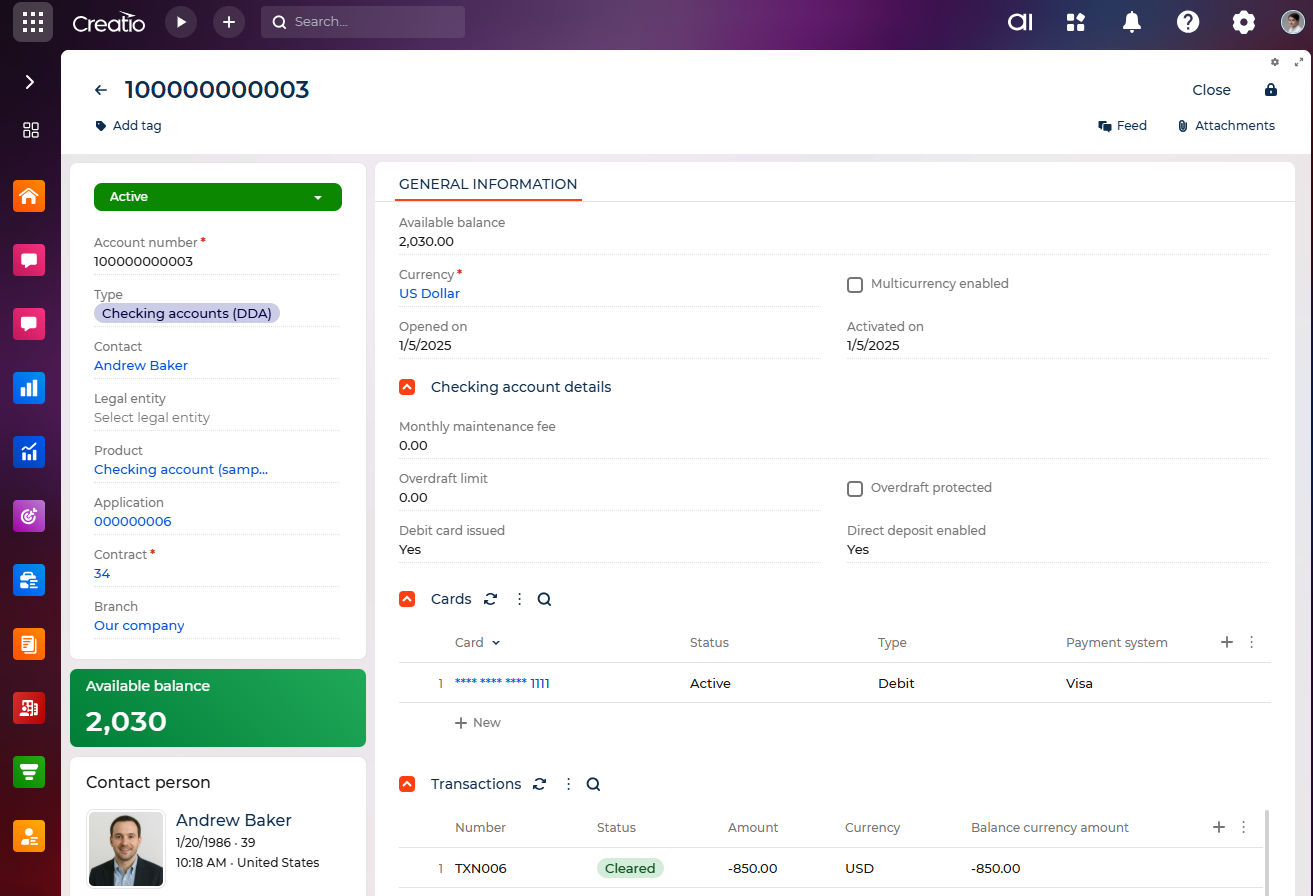
Creatio can be integrated with Core Banking Systems (CBS) and third-party platforms to automate data exchange across financial products. These integrations are not provided out of the box but can be implemented using the no-code tools of the Creatio platform. Typical integration scenarios include real-time balance updates, transaction synchronization, card issuance tracking, loan servicing updates, and insurance record maintenance.
Bank account records are created automatically during the final stage of an application flow. Once the application for the corresponding product is approved, Creatio generates a new bank account record and populates its fields using the parameters defined in the application.
Bank account profile
Field | Description |
|---|---|
Status | The current status of the bank account (e.g., "Active," "Closed," "Locked"). Required. |
Account number | Unique bank account number. Required. |
Type | Type of bank account (e.g., "Checking account (DDA)"). Determines the layout and fields shown on the page. |
Contact | Individual customer assigned to this bank account. If populated, a separate block displays the customer's profile details (name, age, location, email, and primary phone numbers). |
Legal entity | The company associated with the Contact. If populated, a separate block displays the organization's profile details (name, location, web address, and primary phone). |
Product | The product activated using the bank account. |
Application | Application used to create the bank account. |
Contract | Contract associated with the bank account. Required. |
Branch | Branch or division responsible for the bank account. |
Contact profile
The contact profile displays only the fields that have values in the corresponding contact record. If some fields of the contact are not populated, the related data will not appear in the profile.
Field | Description |
|---|---|
Full name | The full name of the customer associated with the bank account. |
Date of birth / Age | The customer's date of birth and the automatically calculated age. |
Location | The customer's current time zone and country. |
Primary email | Primary email address of the customer. |
Primary mobile phone | Primary mobile phone number of the customer. |
Primary business phone | Primary business phone number of the customer. |
Bank account general information
Field | Description |
|---|---|
Available balance | Real-time balance value of the bank account. |
Currency | Currency of the bank account. Required. |
Multicurrency enabled | Whether the bank account supports multicurrency operations. |
Opened on | Date when the bank account was opened. |
Activated on | Date when the bank account was activated. |
Closed on | Date when the bank account was locked or closed. Visible only for "Locked" or "Closed" statuses. |
Reason for lock/closure | Required reason if the bank account is locked or closed. Visible only for "Locked" or "Closed" statuses. |
Cards
The Cards expanded list displays all Card records associated with the bank account. This can include supplementary cards or cards tied to the same bank account.
Transactions
The Transactions expanded list displays all transaction records associated that contains the bank account. The list includes transaction number, status, amount, currency, balance, transaction date, write-off date, and comments.
Certificates of deposit
For accounts with "Certificate of Deposit" type, Creatio displays the Certificate of deposit details group with the following fields:
Field | Description |
|---|---|
Term length | Duration of the certificate. |
Maturity date | Date when the certificate matures. |
Interest rate, % | Annual interest rate applied to the certificate. |
APY, % | Annual Percentage Yield. |
Early withdrawal penalty | Penalty applied for withdrawals before the maturity date. |
Auto-renewal | Whether the certificate is automatically renewed at maturity. |
Checking accounts (DDA)
For accounts with "Checking accounts (DDA)" type, Creatio displays the Checking account details group that contains the following fields:
Field | Description |
|---|---|
Monthly maintenance fee | Fee charged for account maintenance. |
Overdraft limit | Maximum overdraft amount allowed on the account. |
Overdraft protected | Whether overdraft protection is enabled. |
Debit card issued | Whether a debit card has been issued for the account. |
Direct deposit enabled | Whether direct deposit functionality is active for the account. |
For all other bank account types, Creatio uses a default layout without product-specific fields.
Savings accounts & money market accounts
For accounts that have "Savings accounts & money market" type, Creatio displays the Saving account details group that contains the following fields:
Field | Description |
|---|---|
Minimum required balance | The minimum amount that must be maintained in the account. |
Withdrawal limits | The number or amount of withdrawals allowed within a specified period. |
Interest rate, % | Annual interest rate applied to the account balance. |
APY, % | Annual Percentage Yield for the account. |
Interest payout frequency | How often interest is paid out, for example, monthly, quarterly. |
Primary checking account | The main checking account associated with the savings or money market account. |
As a result, you can manage different types of bank accounts — including certificates of deposit, checking, and savings accounts — while maintaining linked relationships with cards and transactions. Account records are created automatically during the final stage of application processing and populated with all necessary parameters.