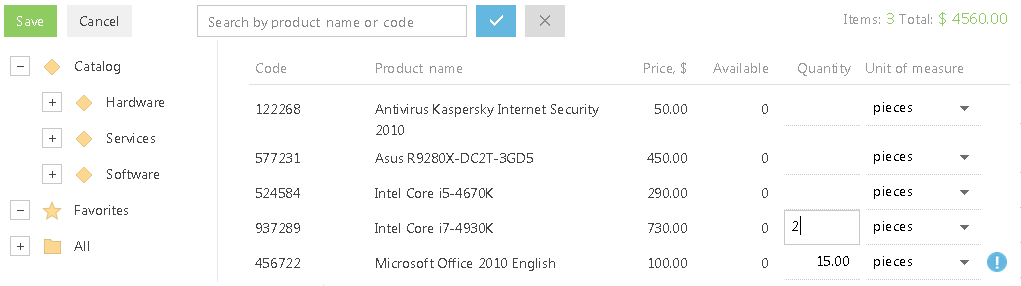
The product selection page (Рис. 135) is used to quickly add products to an order or invoice. This is especially useful when working with the extensive product catalogs.
Рис. 135Product selection page
The product selection page is available on the [Products] detail in the [Invoices] and [Orders] sections. It can be opened by clicking the [Select products] button.
The search string at the top of the page helps find a product by name or code. It also displays summary information about the quantity of the selected items and their total cost.
Page views
The product selection page is available in two views:
• – products list. Contains full list of offered products. Products catalog contains products grouped by categories, types and other parameters.
• – cart. The cart displays the list of products selected for the order.
Note
Product selection page does not display products, for which the [Inactive] checkbox is selected.
Products list
The Products list view displays information contained in the [Products] section. It also contains product catalog and other folders.
|
Code |
Product code. It displays the [Code] field value of a product page. This is a non-editable field. |
|
Product |
The product name. It displays the [Code] field value of a product page. This is a non-editable field. |
|
Price |
Product base price recalculated in the order currency. It displays the [Price] field value of the [Base price] detail of a product page. The correct currency symbol is shown to the right of the column title. This is a non-editable field. |
|
Available |
Number of products available in stock. Shows total amount calculated by the [On hand] column on the [Stock in warehouse] detail on the [Prices and availability] tab of the product page. This is a non-editable field. |
|
Quantity |
Quantity of the product added in the order. You can select a product by specifying required quantity value in this field and pressing [Enter]. Delete the entered value to cancel your selection. If a product is already selected for the order, the |
|
Unit of measure |
Product measuring unit. By default, it shows the base unit specified on the [Base price] detail of the product page. You can select another unit for this field, if it was added on the [Units] detail of the product page earlier. In this case, total amount of the selected products will be recalculated. |
Cart
The Cart displays the list of products selected for the order. Use the cart to check the list of products you have selected, and change it as necessary.
Columns in the Cart view correspond to the columns in the product list. You can also search products by name or code. The search result will show you the total quantity of products and the amount of the selected items.
Changing the quantity of a product in the list automatically adds the product to the cart. Also, you can change the quantity and unit of measure for each product in the cart. To remove a product from the cart, specify zero quantity or clear the field.
If you click the [Save] button, the product selection page will be closed and the selected product items will be added on the Products detail of the order.
Click the [Cancel] button to close the page without saving your changes.
See also
 icon will be displayed to the right of the field. Clicking this icon returns information on the product quantity for your order. You can change the selected amount for the previously selected products.