 button and select [Settings].
There are two modes available for the mobile application in bpm’online: “online” and “offline”. You can select the mode in the [Mobile application operation mode] system setting.
Note
Regardless of the working mode, mobile devices only display data for which the users have access permissions.
If you select the online working mode, there is no need to manually synchronize the application. Synchronization with the bpm'online server is performed automatically, in real time, i.e., if you add a task using the mobile application, the task will be immediately displayed in the main application and vice versa.
Note
You can specify parameters of automatic synchronization on the mobile application settings page.
Note
To work properly in the “online” mode, you need a stable Internet connection to the bpm’online server.
In offline mode, the mobile application user should synchronize periodically with the main bpm’online application. Changes made to the mobile application are saved on the bpm'online server only after synchronizing with the main application.
To synchronize manually while in “offline” mode:
1.Tap the button and select [Settings].
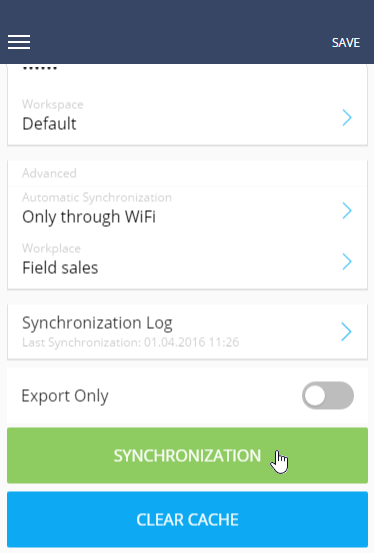
2.On the opened page, tap the [Synchronization] button (Fig. 243).
Fig. 243 Running synchronization in the mobile application
As a result, the data from the main application will be displayed in the mobile application and the main application will display the records that were created using the mobile application.
Attention
If the same system record was modified both in the main application and in the mobile app, then upon synchronization the changes that were saved last will be preserved. The synchronization itself is an operation of writing data to the database of the primary application. This means that the latest changes will always be saved. If the same record was modified in the primary application first and then in the mobile application, then the changes made in the mobile application will override changes in the primary application (changes made in the mobile application will be saved). If changes in the primary application are made during the synchronization or after the synchronization, then the changes made in the primary application will be saved.
Synchronization with the main application is performed by the OData protocol.
For example, there is a business process setup in the main application according to which if the opportunity moves to the next stage, an activity is generated in the system. When the opportunity moves to such stage, the synchronization with the main application will be performed. The business logic of creating an activity will be handled on the main application, then the created activity will be displayed in the mobile application.
A user working in the “online“ mode will not notice this because the application will be working directly with the server. The new activity will appear in the mobile application immediately after the corresponding business process completes and without the need for manual synchronization. Users who work in the “offline” mode will need to run synchronization for the activity to be displayed.
See also