Implement a custom validator using remote module
To implement the example:
- Create an Angular project. Read more >>>
- Install
npmpackages. Read more >>> - Create a custom validator. Read more >>>
- Add the custom validator to the Freedom UI page. Read more >>>
1. Create an Angular project
To create an Angular project, follow the instructions: Create an Angular project.
For this example:
<%projectName%>macro is set to "sdk_custom_validator."<%vendorPrefix%>macro is set to "usr."
As a result, an Angular project to develop a custom validator using a remote module will be added.
2. Install npm packages
To install npm packages, follow the instructions: Install npm packages.
As a result, required npm packages are installed.
3. Create a custom validator
-
Ensure the project includes the "AGENTS.md" file. Instructions: Create a custom Freedom UI component (step 1).
-
Run the
ng g class features/runtime/validators/verify-request-name.validatorcommand in the Visual Studio Code terminal to create an Angular class in the project. This adds theVerifyRequestNameValidatorclass files to the "src/app/features/runtime/validators" project directory. -
Implement the validator.
- Open the "verify-request-name.validator.ts" file.
- Flag the
VerifyRequestNameValidatorclass using the@CrtValidatordecorator. - Extend the
BaseValidatorclass from the@creatio-devkit/commonlibrary. - Override the
asyncfield. - Override the
validate()method that validates data in the field. - Import the required functionality from the libraries into the class.
- Save the file.
"verify-request-name.validator.ts" file/* Import the required functionality from the libraries. */import {BaseValidator,CrtControlState,CrtValidationErrors,CrtValidator,ValidatorParametersValues} from '@creatio-devkit/common';export const REQUEST_NAME_PREFIX = new InjectionToken<string>('REQUEST_NAME_PREFIX');/* Add the CrtValidator decorator to the VerifyRequestNameValidator class. */@CrtValidator({type: 'usr.VerifyRequestNameValidator',})export class VerifyRequestNameValidator extends BaseValidator {/* Inject the dependency using the @CrtInject decorator. */constructor(@CrtInject(REQUEST_NAME_PREFIX) private _prefix: string) {super();}protected override async = false;public validate(control: CrtControlState,params?: ValidatorParametersValues): CrtValidationErrors | null {const value = control.value as string;const maxLength = (params as { maxLength?: number } | undefined)?.maxLength;if (value &&(!value.startsWith(this._prefix) ||(typeof maxLength === 'number' && value.length > maxLength))) {return {error: {message: 'Add "REQ-" prefix',},};}return null;}} -
Inject dependencies.
- Open the "verify-request-name.validator.ts" file.
- Create the
REQUEST_NAME_PREFIXinjection token using theInjectionTokenclass. Use the token to work with Angular DI (dependency injection). - Inject the dependency into the constructor of the
VerifyRequestNameValidatorclass using the@CrtInjectdecorator. - Import the required functionality from the libraries into the class.
- Save the file.
"verify-request-name.validator.ts" file/* Import the required functionality from the libraries. */import { InjectionToken } from "@angular/core";import { CrtInject } from "@creatio-devkit/common";/* The REQUEST_NAME_PREFIX token that works with Angular DI (dependency injection). */export const REQUEST_NAME_PREFIX =new InjectionToken<string>('REQUEST_NAME_PREFIX');export class VerifyRequestNameValidator extends BaseValidator {/* Inject the dependency using the @CrtInject decorator. */constructor(@CrtInject(REQUEST_NAME_PREFIX) private _prefix: string) {super();}} -
Register the
VerifyRequestNameValidatorvalidator and theREQUEST_NAME_PREFIXtoken. The template already contains the runtime feature activation andbootstrapCrtModule()call. Extend the existing runtime feature files to register the validator.-
Open the "runtime-feature.module.ts" file.
-
Add the
VerifyRequestNameValidatorvalidator to thevalidatorssection in the@CrtModuledecorator. -
Add the configuration object to the
providerssection in the@NgModuledecorator.- Set the
provideproperty to "REQUEST_NAME_PREFIX." - Set the
useValueproperty to "REQ-."
"runtime-feature.module.ts" file/* Import the required functionality from the libraries. */import { ApplicationRef, DoBootstrap, NgModule } from '@angular/core';import { BrowserModule } from '@angular/platform-browser';import { CrtModule } from '@creatio-devkit/common';import {REQUEST_NAME_PREFIX,VerifyRequestNameValidator} from './validators/verify-request-name.validator';@CrtModule({/* Specify that VerifyRequestNameValidator is a validator. */validators: [VerifyRequestNameValidator],})@NgModule({imports: [BrowserModule],providers: [{provide: REQUEST_NAME_PREFIX,useValue: 'REQ-',},],})export class RuntimeFeatureModule implements DoBootstrap {ngDoBootstrap(_appRef: ApplicationRef): void {}} - Set the
-
Open the "runtime.feature-definition.ts" file.
-
Add the public
typeproperty of the validator to thediscovery.validatorssection."runtime.feature-definition.ts" file/* Import the required functionality from the libraries. */import type {RemoteDesignerDefinitionsLoadContext,RemoteFeatureDefinition} from '@creatio-devkit/common';/*** Root definition for the runtime feature.** Describes the view elements this remote package contributes at runtime* and provides the entry points used to load designer metadata and activate* the feature.*/export const runtimeFeatureDefinition = {id: 'sdk_custom_validator-runtime',discovery: {viewElements: [],validators: [{type: 'usr.VerifyRequestNameValidator',},],},loadDesignerDefinitions: (context: RemoteDesignerDefinitionsLoadContext) =>import('./runtime.designer-definitions').then((m) => m.loadRuntimeDesignerDefinitions(context)),activate: () =>import('./runtime.feature-activation').then((m) => m.activateRuntimeFeature()),} satisfies RemoteFeatureDefinition; -
Import the required functionality from the libraries into the files.
-
Save the files.
-
-
Run the
npm run buildcommand in the Visual Studio Code terminal to build the project.
As a result, the build will be added to the "dist" directory of the Angular project. The build will have the "sdk_custom_validator" name.
4. Add the validator to the Freedom UI page
-
Repeat steps 1-5 of the instructions: Add the custom Freedom UI component to the Freedom UI page. For this example, create a Requests app.
-
Click
 → Source code to open the source code of the Freedom UI page.
 -
Bind the
usr.VerifyRequestNameValidatorvalidator to theUsrNamemodel attribute in theviewModelConfigDiffschema section.viewModelConfigDiff schema sectionviewModelConfigDiff: /**SCHEMA_VIEW_MODEL_CONFIG_DIFF*/[{"operation": "merge","path": ["attributes"],"values": {"UsrName": {"modelConfigDiff": {"path": "PDS.UsrName"},"validators": {"usr.VerifyRequestNameValidator": {"type": "usr.VerifyRequestNameValidator","params": {"maxLength": 10}}}},}}]/**SCHEMA_VIEW_MODEL_CONFIG_DIFF*/, -
Click Save.
As a result, the custom validator will be added to the request page.
View the result
- Open the Requests section.
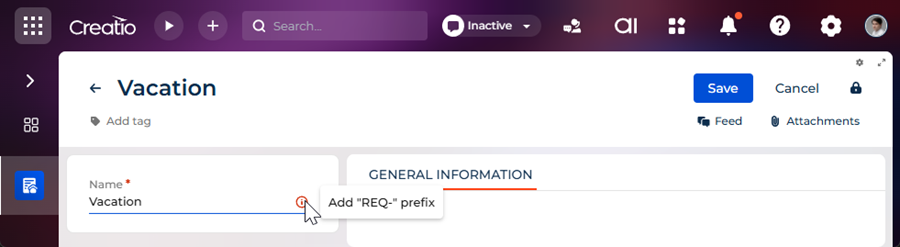
- Create a request that has an arbitrary name. For example, "Vacation."
As a result, Creatio will display an error message because the prefix in the Name field is omitted. The validator is implemented using a remote module created in the Angular framework. View the result >>>