Freedom UI page schema
The "Client module" type schema is required to implement the front-end part of Creatio and save and deploy the properties of Creatio parts (application, section, modal windows, etc.). Learn more: Module types.
The "Freedom UI page" schema of the "Client module" type represents the client schema for Creatio. Learn more about creating a Freedom UI page: Freedom UI page schema. The client schema belongs to the Schema layer (the metadata layer) of the DesignTime mode in the Creatio Business Studio and contains the settings of the RunTime mode layers.
The figure below shows the structural items of the Schema layer and how they interact with other structural items in Creatio.
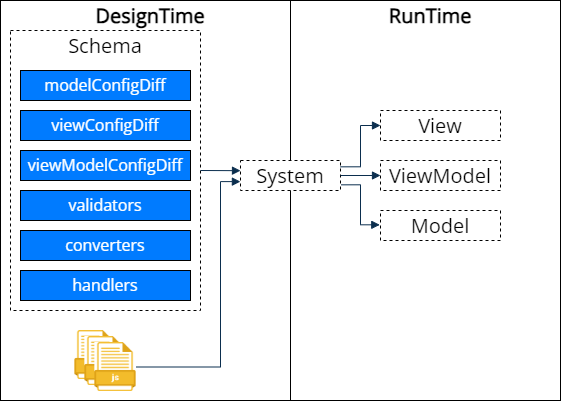
Learn more about DesignTime and RunTime modes: Creatio front-end architecture.
The code below shows the generic structure of the client schema source code.
define("SomeClientSchema", [], function() {
    return {
        modelConfigDiff: /**SCHEMA_MODEL_CONFIG_DIFF*/[]/**SCHEMA_MODEL_CONFIG_DIFF*/,
        viewConfigDiff: /**SCHEMA_VIEW_CONFIG_DIFF*/[]/**SCHEMA_VIEW_CONFIG_DIFF*/,
        viewModelConfigDiff: /**SCHEMA_VIEW_MODEL_CONFIG*/{}/**SCHEMA_VIEW_MODEL_CONFIG*/,
        validators: /**SCHEMA_VALIDATORS*/ {} /**SCHEMA_VALIDATORS*/,
        converters: /**SCHEMA_CONVERTERS*/ {} /**SCHEMA_CONVERTERS*/,
        handlers: /**SCHEMA_HANDLERS*/[] /**SCHEMA_HANDLERS*/
    };
});
Token comments of client schema sections are required.
The table below includes the client schema sections.
Section | Description |
|---|---|
modelConfigDiff | Handles the description of the |
viewConfigDiff | Handles the generation of the |
viewModelConfigDiff | Handles the generation of the |
validators | Functions that check whether the |
converters | Functions that modify the value of the |
handlers | Items of the |
Learn more about layers: Creatio front-end architecture.
Describe the client schema sections in JSON. Implement the behavior of the validators, converters, and handlers schema sections in JavaScript.
Since version 10.1, when you save a Freedom UI page in the Freedom UI Designer, Creatio saves only changed element properties to the viewConfigDiff schema section. Creatio skips the properties that have default values. This keeps the page schema limited to the actual customizations, makes diffs in version control systems cleaner, and simplifies merging and troubleshooting of page customizations.
For elements inherited from a parent schema, Creatio compares property values with the parent values. If you reset an inherited property to its default value, Creatio saves this change. Creatio does not change default values saved in parent schemas, for example, in the schema of another package. However, Creatio removes default values saved earlier in the current schema, including those of elements you did not change. To save the full set of element property values, disable the UseViewConfigDefaultsFilter additional feature. Learn more: Manage an existing additional feature.
When you delete the Inputs type elements from the Freedom UI page and save the changes in the Freedom UI Designer, Creatio executes the following actions:
- Validate usage of corresponding
ViewModelandDataModelattributes in thehandlersschema section and business rules of the current Freedom UI page. - Delete unused attributes from the current Freedom UI page schema automatically. Otherwise, the attributes are left as is.
See also
Creatio front-end architecture
Best practices for optimizing data fetching in Freedom UI page logic