Localizable resources basics
Users of the same Creatio instance often work in different languages, and each user needs to see the UI in their own language. To do this, Creatio uses localizable resources, i.e., strings and images that Creatio displays in the language selected in the user profile. Each localizable resource can have values in several languages, and Creatio selects the value that matches the language of the current user. Localizable resources are part of Creatio configuration resources. Packages contain localizable resources, and each resource is bound to a base schema. When you request resources of a specific schema, Creatio collects them based on package hierarchy, levels, and positions.
Primary and additional languages
Creatio selects the localizable resource value to display based on the primary and additional languages. The primary language (primary language culture) is the default Creatio UI language. The additional language (additional language culture) is the Creatio UI language that the user selected in the user profile and that differs from the primary language. We do not recommend changing the primary language. This may lead to incorrect display of localizable resources. To let users work in another language, activate the language. Instructions: Enable UI language (user documentation).
The Process and Case Designers, and the Translation section use every language installed in Creatio. In other cases, only activated languages (i.e., languages for which the Active checkbox is selected) are available. This separation decreases the task execution time, for example, logging in, opening the record page, etc. Learn more: Manage UI languages, Localize UI via the Translation section (user documentation).
The language defines which value of a localizable resource Creatio displays. How Creatio displays and stores the resource also depends on the localization type. Creatio provides the following localization types that differ in what they localize and where Creatio stores the values:
- Schema localization. Localizable strings and images of configuration schemas. Creatio stores them in the
SysLocalizableValuedatabase table. - Data localization. Localizable values of data that a package binds to a schema. Creatio stores them in the
SysPackageDataLczdatabase table.
Display of localizable resources
Creatio displays localizable resources based on the display mode and display method. The display mode defines which packages Creatio includes when it collects the resources of a schema. The display method defines which language Creatio uses to display the resource value.
Display modes
Creatio implements runtime and design-time display modes of localizable resources. Both modes collect resources based on the package hierarchy but include different packages.
Runtime mode
Runtime mode defines the localizable resource values that users see in the Creatio UI, for example, in sections and on pages. In this mode, Creatio collects resources from all packages in the hierarchy. For each resource, Creatio uses the value from the lowest package in the hierarchy that sets this value. If a package does not set the value, Creatio keeps the value from the package above.
If several packages on the same level of the package hierarchy replace the resource, Creatio uses the value from the package that has a higher position value. If the packages have the same position value, Creatio uses the value from the package whose name comes first in alphabetical order.
Design-time mode
Design-time mode defines the localizable resource values that developers see and edit in designers when they open a schema in a specific package. In this mode, Creatio collects resources only from packages that contain the schema or its parent schemas, and from the package in which you open the schema. Packages that contain only localizable resources do not contain schemas, so the designer can display values that differ from the values users see in runtime mode.
Display methods
Creatio implements the following display methods of localizable resources:
- If a primary language is active in the user profile, Creatio displays the localizable resource value in the primary language.
- If an additional language is activated in the user profile and the localizable resource value in this language exists, Creatio displays the localizable resource value in the additional language.
- If an additional language is activated in the user profile and the localizable resource value in this language does not exist, Creatio displays the localizable resource value in the primary language.
The classes listed in the table below implement the mechanism that displays localizable resources.
Class | Description |
|---|---|
Terrasoft.Common.LocalizableString | Manages localizable strings. |
Terrasoft.Common.LocalizableImage | Manages localizable images. |
To retrieve the localizable resource values, use the properties and methods listed in the table below.
Property or method | Description |
|---|---|
| Returns the localizable object value for the current language. If the value for the current language does not exist, returns the value for the primary language. If the value for the primary language does not exist either, returns the value for any other language. |
| Returns a flag that specifies whether the localizable object has a value. Considers the same languages as the |
| Returns the localizable object value for the language passed as a parameter. Does not return the value for the primary language if the value for the requested language does not exist. |
| Returns a flag that specifies whether the localizable object has a value for the requested language regardless of the primary language. |
Learn more: LocalizableString class, LocalizableImage class (.NET classes reference).
Storage of localizable resources
When you transfer localizable resources among environments or analyze why Creatio displays a particular value, you need to know where Creatio stores the resources. Where and how Creatio stores localizable resources depends on the localization type.
Schema localization
Creatio can store localizable schema resources in the following repositories:
- Database. Stores resources required for Creatio operation. The main repository for localizable resources.
- SVN repository. Stores resources that must be installed into Creatio or transferred among development environments. Pre-export the localizable resources to the SVN repository.
The SysLocalizableValue database table stores localizable resources in text format as "key-value" pairs. Each record is bound to a package and base schema ID. The table below lists the primary columns of the SysLocalizableValue database table.
Column | Description |
|---|---|
Id | Record ID. |
SysPackageId | Package ID. |
SysSchemaId | Base schema ID. Populated only for configuration resources. |
ResourceManager | Resource manager name. Populated only for core resources. |
SysCultureId | Language culture ID. |
ResourceType | Resource type. |
IsChanged | Flag that specifies whether the user changed the localizable resource. |
Key | Localizable resource key. |
Value | String resource value. |
ImageData | Graphic resource value. |
If an additional language culture is activated in the user profile, Creatio adds a corresponding record to the SysLocalizableValue database table when you add a localizable resource. If the resource has no value for the primary language culture, Creatio uses the mechanism that duplicates the resource to the primary language culture. The mechanism copies the value of the current language culture to the primary language culture, i.e., creates a similar localizable resource record that has a link to the primary language culture. Creatio does not overwrite an existing value of the primary language culture. As a result, if the resource has no value for the language culture of a user, Creatio displays the value of the primary language culture.
Since version 10.1, when you save a configuration schema, Creatio can delete localizable values that the schema no longer declares. Creatio compares the localizable keys stored for the schema in the SysLocalizableValue database table with the keys the schema declares, and deletes the values of the keys that are no longer declared. For example, if you delete or rename a Freedom UI component on a page, Creatio deletes the localizable values of that component. This keeps localizable resources aligned with the current schema content, so translators do not translate text that Creatio never displays. Out of the box, the CleanUpObsoleteSchemaLocalizableValues additional feature that enables this functionality is registered and enabled. To stop using the functionality, disable the additional feature. Instructions: Manage the status of an additional feature. The clean-up has the following specifics:
- Creatio runs the clean-up only when you save an existing schema. Creating a schema or installing a package from files does not run the clean-up. Creatio does not clean up all schemas at once.
- Creatio compares the declared keys with all stored keys, so the clean-up also deletes obsolete values that accumulated before you enabled the additional feature.
- Creatio deletes only values of the language cultures that the save carries. A save performed in one language culture does not delete values of other language cultures.
- Creatio deletes only values changed in the current environment and keeps values that belong to an installed package.
- The clean-up works only if the
UseConfActivityLog,SkipLocalizableValuesInitializationOnSchemaLoadFromMetadata, andFeatureUseLoadedCultureValuesForResourcesDiffadditional features are enabled. Out of the box, these additional features are registered and enabled. - Creatio records deleted keys in the localization change log.
- If Creatio deletes at least one value, it adds an "Info" level entry to the log. The entry includes the schema ID, package ID, culture ID, number of deleted records, and up to 20 deleted keys.
In the SVN repository, the "Resources" directory stores localizable package resources. A package can contain localizable resources for a schema in a different package. This is possible because Creatio separates schemas from resources using checksums. The SysPackageResourceChecksum database table stores a checksum for each set of schema resources in the package – schema – culture chain. The checksum lets you identify resource changes when the package is updated.
To store localizable schema resources that have the same name but different managers, for example, Entity and ClientUnit, Creatio adds the schema manager name without the "SchemaManager" suffix to the names of the package localizable resources. Creatio stores the localizable resources in exported schemas as "*.xml" files.
Data localization
The repositories for data localization and schema localization are similar.
The SysPackageDataLcz database table stores localized data. The table below lists the primary columns of the SysPackageDataLcz database table.
Column | Description |
|---|---|
Id | Record ID. |
SysPackageSchemaDataId | Binding ID from the |
SysCultureId | Language culture ID. |
Data | Localized data. |
The storage of localized data has the following specifics:
- If the object is not localizable, Creatio saves all data to the
SysPackageSchemaDatadatabase table. - If the object is localizable, Creatio saves the values of non-localizable columns for the primary language culture to the
SysPackageSchemaDatadatabase table, and the values of localizable columns to theSysPackageDataLczdatabase table. Creatio adds a separateSysPackageDataLczrecord for each language culture, including the primary language.
A record of the SysPackageDataLcz database table contains the following data:
- Link to the corresponding record ID from the
SysPackageSchemaDatadatabase table. - Link to the corresponding language culture ID from the
SysCulturedatabase table.
For example, if the Creatio instance uses English and Ukrainian language cultures, each record of the SysPackageSchemaData database table corresponds to two records of the SysPackageDataLcz database table.
In the SVN repository, the "Data" directory stores localized data. The "Data" directory has the following structure:
- The "data.json" file. Non-localizable resources.
- The "Localization" directory. Localized data. The directory contains the corresponding files for the language cultures. The file names follow this pattern: "data.LanguageCultureCode.json," for example, "data.en-US.json".
The figure below shows the structure of the stored localized data for the Periodicity object in the TryItPackage package.

Installation of localized data
How Creatio installs localized data depends on whether the object is localizable. An object is localizable if at least one of its text columns is localizable. The installation of localized data has the following specifics:
- If the object is not localizable, Creatio installs the data into the primary database table of the object.
- If the object is localizable, Creatio installs the values of the primary language culture into the primary database table of the object, and the values of other language cultures into the localization table. Creatio installs values only for the language cultures that have localized data and does not add records of the primary language culture to the localization table.
For example, Creatio installs localized data of the ContactType object as follows:
- Non-localizable data and values of the primary language culture go to the
ContactTypedatabase table. - Values of other language cultures go to the
SysContactTypeLczdatabase table.
The figure below shows which value a user sees in the Contact type and Description fields on a page. Both fields take their values from the Contact types lookup created based on the "Contact type" (ContactType code) object. In the CrtBase package, the lookup value has the "Customer" title and no description. Other packages replace the title and description of the lookup value.
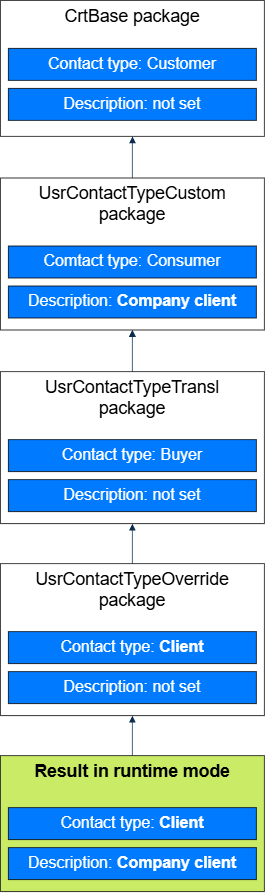
Creatio installs the packages according to the package hierarchy, so the data of a lower package overwrites the data of the packages above. If a package does not set a value, Creatio does not overwrite the existing value in the database. As a result, users see "Client" in the Contact type field and "Company client" in the Description field. To overwrite existing values with empty values, enable the FeatureOverwriteNullLocalizationForSchemaData additional feature.
Creatio creates the localization table automatically when you save a localizable object or install a package that contains it. Creatio does not create localization tables for objects based on database views and for virtual objects. The localization table name follows the SysObjectCodeLcz template, where ObjectCode is the code of the object. To find the actual localization table name of an object, use the LocalizationSchemaName property of the EntitySchema class, for example, UserConnection.EntitySchemaManager.GetInstanceByName("ContactType").LocalizationSchemaName. The property also considers a localization table name that is set explicitly in the object properties.
Creatio does not add another "Sys" prefix if the object code already starts with the "Sys" prefix. For example, the localization table for the SysTestSchema object is named SysTestSchemaLcz, not SysSysTestSchemaLcz.
See also
Manage UI languages (user documentation)
Localize UI via the Translation section (user documentation)
Resources
LocalizableString class (.NET classes reference)
LocalizableImage class (.NET classes reference)