Implement a custom validator using remote module
To implement the example:
- Create an Angular project. Read more >>>
- Install
npmpackages. Read more >>> - Create a custom validator. Read more >>>
- Add the custom validator to the Freedom UI page. Read more >>>
Example implementation in Creatio 8.3.4 and later
1. Create an Angular project
To create an Angular project, follow the instructions: Create an Angular project.
For this example:
<%projectName%>macro is set to "sdk_custom_validator."<%vendorPrefix%>macro is set to "usr."
As a result, an Angular project to develop a custom validator using a remote module will be added.
2. Install npm packages
To install npm packages, follow the instructions: Install npm packages.
As a result, required npm packages are installed.
3. Create a custom validator
-
Ensure the project includes the "AGENTS.md" file. Instructions: Create a custom Freedom UI component (step 1).
-
Run the
ng g class features/runtime/validators/verify-request-name.validatorcommand in the Visual Studio Code terminal to create an Angular class in the project. This adds theVerifyRequestNameValidatorclass files to the "src/app/features/runtime/validators" project directory. -
Implement the validator.
- Open the "verify-request-name.validator.ts" file.
- Flag the
VerifyRequestNameValidatorclass using the@CrtValidatordecorator. - Extend the
BaseValidatorclass from the@creatio-devkit/commonlibrary. - Override the
asyncfield. - Override the
validate()method that validates data in the field. - Import the required functionality from the libraries into the class.
- Save the file.
"verify-request-name.validator.ts" file/* Import the required functionality from the libraries. */import {BaseValidator,CrtControlState,CrtValidationErrors,CrtValidator,ValidatorParametersValues} from '@creatio-devkit/common';export const REQUEST_NAME_PREFIX = new InjectionToken<string>('REQUEST_NAME_PREFIX');/* Add the CrtValidator decorator to the VerifyRequestNameValidator class. */@CrtValidator({type: 'usr.VerifyRequestNameValidator',})export class VerifyRequestNameValidator extends BaseValidator {/* Inject the dependency using the @CrtInject decorator. */constructor(@CrtInject(REQUEST_NAME_PREFIX) private _prefix: string) {super();}protected override async = false;public validate(control: CrtControlState,params?: ValidatorParametersValues): CrtValidationErrors | null {const value = control.value as string;const maxLength = (params as { maxLength?: number } | undefined)?.maxLength;if (value &&(!value.startsWith(this._prefix) ||(typeof maxLength === 'number' && value.length > maxLength))) {return {error: {message: 'Add "REQ-" prefix',},};}return null;}} -
Inject dependencies.
- Open the "verify-request-name.validator.ts" file.
- Create the
REQUEST_NAME_PREFIXinjection token using theInjectionTokenclass. Use the token to work with Angular DI (dependency injection). - Inject the dependency into the constructor of the
VerifyRequestNameValidatorclass using the@CrtInjectdecorator. - Import the required functionality from the libraries into the class.
- Save the file.
"verify-request-name.validator.ts" file/* Import the required functionality from the libraries. */import { InjectionToken } from "@angular/core";import { CrtInject } from "@creatio-devkit/common";/* The REQUEST_NAME_PREFIX token that works with Angular DI (dependency injection). */export const REQUEST_NAME_PREFIX =new InjectionToken<string>('REQUEST_NAME_PREFIX');export class VerifyRequestNameValidator extends BaseValidator {/* Inject the dependency using the @CrtInject decorator. */constructor(@CrtInject(REQUEST_NAME_PREFIX) private _prefix: string) {super();}} -
Register the
VerifyRequestNameValidatorvalidator and theREQUEST_NAME_PREFIXtoken. The template already contains the runtime feature activation andbootstrapCrtModule()call. Extend the existing runtime feature files to register the validator.-
Open the "runtime-feature.module.ts" file.
-
Add the
VerifyRequestNameValidatorvalidator to thevalidatorssection in the@CrtModuledecorator. -
Add the configuration object to the
providerssection in the@NgModuledecorator.- Set the
provideproperty to "REQUEST_NAME_PREFIX." - Set the
useValueproperty to "REQ-."
"runtime-feature.module.ts" file/* Import the required functionality from the libraries. */import { ApplicationRef, DoBootstrap, NgModule } from '@angular/core';import { BrowserModule } from '@angular/platform-browser';import { CrtModule } from '@creatio-devkit/common';import {REQUEST_NAME_PREFIX,VerifyRequestNameValidator} from './validators/verify-request-name.validator';@CrtModule({/* Specify that VerifyRequestNameValidator is a validator. */validators: [VerifyRequestNameValidator],})@NgModule({imports: [BrowserModule],providers: [{provide: REQUEST_NAME_PREFIX,useValue: 'REQ-',},],})export class RuntimeFeatureModule implements DoBootstrap {ngDoBootstrap(_appRef: ApplicationRef): void {}} - Set the
-
Open the "runtime.feature-definition.ts" file.
-
Add the public
typeproperty of the validator to thediscovery.validatorssection."runtime.feature-definition.ts" file/* Import the required functionality from the libraries. */import type {RemoteDesignerDefinitionsLoadContext,RemoteFeatureDefinition} from '@creatio-devkit/common';/*** Root definition for the runtime feature.** Describes the view elements this remote package contributes at runtime* and provides the entry points used to load designer metadata and activate* the feature.*/export const runtimeFeatureDefinition = {id: 'sdk_custom_validator-runtime',discovery: {viewElements: [],validators: [{type: 'usr.VerifyRequestNameValidator',},],},loadDesignerDefinitions: (context: RemoteDesignerDefinitionsLoadContext) =>import('./runtime.designer-definitions').then((m) => m.loadRuntimeDesignerDefinitions(context)),activate: () =>import('./runtime.feature-activation').then((m) => m.activateRuntimeFeature()),} satisfies RemoteFeatureDefinition; -
Import the required functionality from the libraries into the files.
-
Save the files.
-
-
Run the
npm run buildcommand in the Visual Studio Code terminal to build the project.
As a result, the build will be added to the "dist" directory of the Angular project. The build will have the "sdk_custom_validator" name.
4. Add the validator to the Freedom UI page
-
Repeat steps 1-5 of the instructions: Add the custom Freedom UI component to the Freedom UI page. For this example, create a Requests app.
-
Click
 → Source code to open the source code of the Freedom UI page.
 -
Bind the
usr.VerifyRequestNameValidatorvalidator to theUsrNamemodel attribute in theviewModelConfigDiffschema section.viewModelConfigDiff schema sectionviewModelConfigDiff: /**SCHEMA_VIEW_MODEL_CONFIG_DIFF*/[{"operation": "merge","path": ["attributes"],"values": {"UsrName": {"modelConfigDiff": {"path": "PDS.UsrName"},"validators": {"usr.VerifyRequestNameValidator": {"type": "usr.VerifyRequestNameValidator","params": {"maxLength": 10}}}},}}]/**SCHEMA_VIEW_MODEL_CONFIG_DIFF*/, -
Click Save.
As a result, the custom validator will be added to the request page.
View the result
- Open the Requests section.
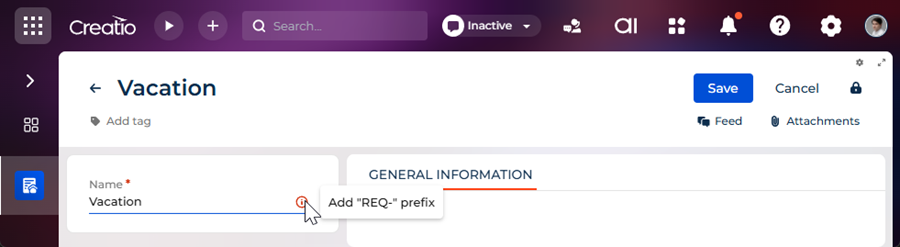
- Create a request that has an arbitrary name. For example, "Vacation."
As a result, Creatio will display an error message because the prefix in the Name field is omitted. The validator is implemented using a remote module created in the Angular framework. View the result >>>
Resources
*.zip archive that contains the implemented Freedom UI app (for Creatio version 8.3.4 and later)
Angular project that contains the implemented example (for Creatio version 8.3.4 and later)
Example implementation in Creatio 8.3.3 and earlier
1. Create an Angular project
To create an Angular project, follow the instructions: Create an Angular project.
For this example:
<%projectName%>macro is set to "sdk_custom_validator."<%vendorPrefix%>macro is set to "usr."
As a result, an Angular project to develop a custom validator using a remote module will be added.
2. Install npm packages
To install npm packages, follow the instructions: Install npm packages.
As a result, required npm packages are installed.
3. Create a custom validator
-
Run the
ng g class verify-request-name.validatorcommand in the Visual Studio Code terminal to create an Angular class in the project. This adds theVerifyRequestNameValidatorclass file to the "src/app" project directory. -
Implement the validator.
- Open the "verify-request-name.validator.ts" file.
- Flag the
VerifyRequestNameValidatorclass using the@CrtValidatordecorator. - Extend the
BaseValidatorclass from the@creatio-devkit/commonlibrary. - Override the
asyncfield. - Override the
validate()method that validates data in the field. - Import the required functionality from the libraries into the class.
- Save the file.
"verify-request-name.validator.ts" file/* Import the required functionality from the libraries. */import {BaseValidator,CrtControlState,CrtValidationErrors,CrtValidator,ValidatorParametersValues} from '@creatio-devkit/common';export const REQUEST_NAME_PREFIX = new InjectionToken<string>('REQUEST_NAME_PREFIX');/* Add the CrtValidator decorator to the VerifyRequestNameValidator class. */@CrtValidator({type: 'usr.VerifyRequestNameValidator',})export class VerifyRequestNameValidator extends BaseValidator {/* Inject the dependency using the @CrtInject decorator. */constructor(@CrtInject(REQUEST_NAME_PREFIX) private _prefix: string) {super();}protected override async = false;public validate(control: CrtControlState,params?: ValidatorParametersValues): CrtValidationErrors | null {const value = control.value as string;const maxLength = (params as { maxLength?: number } | undefined)?.maxLength;if (value &&(!value.startsWith(this._prefix) ||(typeof maxLength === 'number' && value.length > maxLength))) {return {error: {message: 'Add "REQ-" prefix',},};}return null;}} -
Inject dependencies.
- Open the "verify-request-name.validator.ts" file.
- Create the
REQUEST_NAME_PREFIXinjection token using theInjectionTokenclass. Use the token to work with Angular DI (dependency injection). - Inject the dependency into the constructor of the
VerifyRequestNameValidatorclass using the@CrtInjectdecorator. - Import the required functionality from the libraries into the class.
- Save the file.
"verify-request-name.validator.ts" file/* Import the required functionality from the libraries. */import { InjectionToken } from "@angular/core";import { CrtInject } from "@creatio-devkit/common";/* The REQUEST_NAME_PREFIX token that works with Angular DI (dependency injection). */export const REQUEST_NAME_PREFIX =new InjectionToken<string>('REQUEST_NAME_PREFIX');export class VerifyRequestNameValidator extends BaseValidator {/* Inject the dependency using the @CrtInject decorator. */constructor(@CrtInject(REQUEST_NAME_PREFIX) private _prefix: string) {super();}} -
Register the
VerifyRequestNameValidatorvalidator and theREQUEST_NAME_PREFIXtoken.-
Open the "app.module.ts" file.
-
Add the
VerifyRequestNameValidatorvalidator to thevalidatorssection in the@CrtModuledecorator. -
Add the configuration object to the
providerssection in the@NgModuledecorator.- Set the
provideproperty to "REQUEST_NAME_PREFIX." - Set the
useValueproperty to "REQ-."
- Set the
-
Implement the
resolveDependency()method in thebootstrapCrtModule()method of theAppModuleroot module. ThebootstrapCrtModule()method registers theVerifyRequestNameValidatorvalidator flagged using the@CrtModuledecorator. TheresolveDependency()method receives the dependencies of theVerifyRequestNameValidatorvalidator. -
Import the required functionality from the libraries into the class.
-
Save the file.
"app.module.ts" file/* Import the required functionality from the libraries. */import {DoBootstrap,Injector,NgModule,ProviderToken} from '@angular/core';import { BrowserModule } from '@angular/platform-browser';import { bootstrapCrtModule, CrtModule } from '@creatio-devkit/common';import {VerifyRequestNameValidator,REQUEST_NAME_PREFIX} from "./verify-request-name.validator";@CrtModule({/* Specify that VerifyRequestNameValidator is a validator. */validators: [VerifyRequestNameValidator],})@NgModule({imports: [BrowserModule],providers: [{provide: REQUEST_NAME_PREFIX,useValue: 'REQ-'}],})export class AppModule implements DoBootstrap {constructor(private _injector: Injector) { }ngDoBootstrap(): void {/* Bootstrap CrtModule definitions. */bootstrapCrtModule('sdk_custom_validator', AppModule, {resolveDependency: (token) => this._injector.get(<ProviderToken<unknown>>token)});}} -
-
Run the
npm run buildcommand in the Visual Studio Code terminal to build the project.
As a result, the build will be added to the "dist" directory of the Angular project. The build will have the "sdk_custom_validator" name.
4. Add the validator to the Freedom UI page
-
Repeat steps 1-5 of the instructions: Add the custom Freedom UI component to the Freedom UI page. For this example, create a Requests app.
-
Click
→ Source code to open the source code of the Freedom UI page. -
Bind the
usr.VerifyRequestNameValidatorvalidator to theUsrNamemodel attribute in theviewModelConfigDiffschema section.viewModelConfigDiff schema sectionviewModelConfigDiff: /**SCHEMA_VIEW_MODEL_CONFIG_DIFF*/[{"operation": "merge","path": ["attributes"],"values": {"UsrName": {"modelConfigDiff": {"path": "PDS.UsrName"},"validators": {"usr.VerifyRequestNameValidator": {"type": "usr.VerifyRequestNameValidator","params": {"maxLength": 10}}}},}}]/**SCHEMA_VIEW_MODEL_CONFIG_DIFF*/, -
Click Save.
As a result, the custom validator will be added to the request page.
View the result
- Open the Requests section.
- Create a request that has an arbitrary name. For example, "Vacation."
As a result, Creatio will display an error message because the prefix in the Name field is omitted. The validator is implemented using a remote module created in the Angular framework. View the result >>>
Resources
*.zip archive that contains the implemented Freedom UI app (for Creatio version 8.3.3 and earlier)
Angular project that contains the implemented example (for Creatio version 8.3.3 and earlier)