Implement a Freedom UI Designer setup area for a custom Freedom UI component
This functionality is available for Creatio 8.3.3 and later.
To implement the example:
- Create an Angular project. Read more >>>
- Install
npmpackages. Read more >>> - Create a custom Freedom UI component. Read more >>>
- Create the setup area component. Read more >>>
- Implement the business logic of the setup area component. Read more >>>
- Add the setup area component to the Freedom UI Designer. Read more >>>
- Add the custom Freedom UI component to the Freedom UI page. Read more >>>
Add a custom Rating component to the contact page. The component must be used to rate contacts directly on the contact page.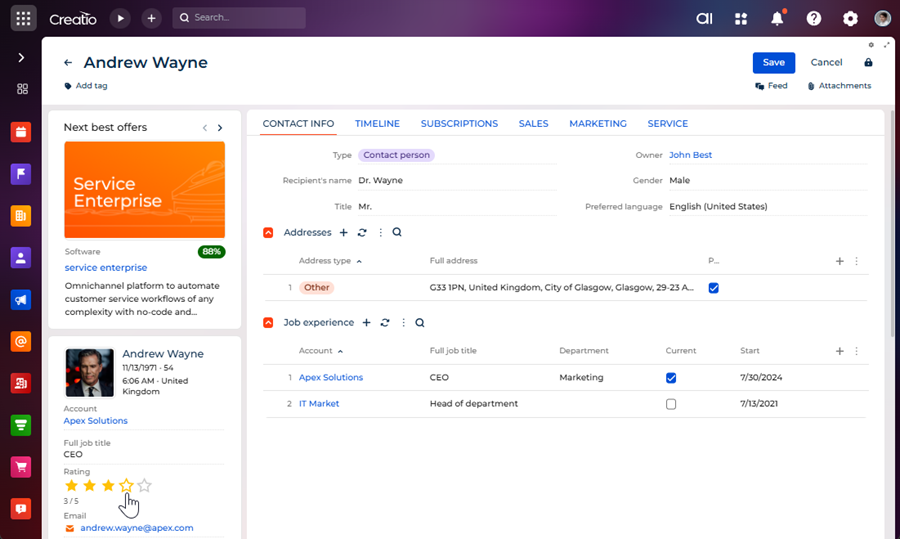
The component must have its own setup area to configure the following parameters directly in the Freedom UI Designer:
- Star count — the maximum number of stars to display.
- Star color (active) — the color of filled stars.
- Data source — the object that reflects rating.
- Data source attribute — the object column that stores rating value.
Implement the component and its setup area using a remote module created in the Angular framework.
Example implementation in Creatio 8.3.4 and later
1. Create an Angular project
To create an Angular project, follow the instructions: Create an Angular project.
For this example:
<%projectName%>macro is set to "sdk_custom_setup_area."<%vendorPrefix%>macro is set to "usr."
As a result, an Angular project to develop a custom UI component using a remote module will be added.
2. Install npm packages
To install npm packages, follow the instructions: Install npm packages.
As a result, required npm packages are installed.
3. Create a custom Freedom UI component
-
Ensure the project includes the "AGENTS.md" file. Instructions: Create a custom Freedom UI component (step 1).
-
Run the
ng g c features/runtime/view-elements/rating --view-encapsulation=ShadowDomcommand in the Visual Studio Code terminal to create an Angular component in the project. This adds theRatingComponentfiles to the "src/app/features/runtime/view-elements/rating" project directory. -
Define the component constants.
-
Go to the "app/features/runtime/view-elements/rating" directory.
-
Create the "rating.constants.ts" file.
-
Open the "rating.constants.ts" file.
-
Export the following constants that define:
- the view element type
- the view element selector
- the component icon
-
Save the file.
"rating.constants.ts" file/* Define the component type identifier. */export const RATING_COMPONENT_TYPE = 'usr.CustomRating';/* The selector of the view element. */export const RATING_COMPONENT_SELECTOR = 'usr-rating';/* Define the component icon as an inline SVG. */export const RATING_COMPONENT_ICON =`<svg xmlns="http://www.w3.org/2000/svg" width="24" height="24" ` +`viewBox="0 0 24 24" fill="none" stroke="currentColor" stroke-width="2">` +`<polygon points="12 2 15.09 8.26 22 9.27 17 14.14 18.18 21.02 ` +`12 17.77 5.82 21.02 7 14.14 2 9.27 8.91 8.26 12 2"/></svg>`; -
-
Define the runtime feature ID.
- Open the "src/app/features/runtime/runtime-feature.ids.ts" file.
- Export the constant that defines the runtime feature ID.
- Save the file.
"runtime-feature.ids.ts" file/* The ID of the runtime feature. */export const RUNTIME_FEATURE_ID = 'sdk_custom_setup_area-runtime'; -
Define the remote module package name.
- Go to the "app" directory.
- Create the "remote.constants.ts" file.
- Open the "remote.constants.ts" file.
- Export the constant that defines the remote module package name.
- Save the file.
"remote.constants.ts" file/* The name of the remote module package. */export const REMOTE_NAME = 'sdk_custom_setup_area'; -
Specify that the
RatingComponentis a view element.- Open the "rating.component.ts" file.
- Flag the component using the
@CrtViewElementdecorator. - Import the required functionality from the libraries to the component.
- Save the file.
"rating.component.ts" file/* Import the required functionality from the libraries. */import {Component,OnInit,ViewEncapsulation} from '@angular/core';import {CrtViewElement} from '@creatio-devkit/common';import { RATING_COMPONENT_SELECTOR, RATING_COMPONENT_TYPE } from './rating.constants';@Component({selector: 'usr-rating-internal',templateUrl: './rating.component.html',styleUrls: ['./rating.component.scss'],encapsulation: ViewEncapsulation.ShadowDom,changeDetection: ChangeDetectionStrategy.OnPush,standalone: false,})/* Register the component as a Freedom UI view element. */@CrtViewElement({/* The selector of the view element. */selector: RATING_COMPONENT_SELECTOR,type: RATING_COMPONENT_TYPE})export class RatingComponent {} -
Register the
RatingComponentview element as a component.The template already contains the runtime feature activation and
bootstrapCrtModule()call. Extend the existing files to register the custom component.-
Open the "runtime-feature.module.ts" file.
-
Add the
RatingComponentview element to the@CrtModuledecorator and Angular module declarations."runtime-feature.module.ts" file/* Import the required functionality from the libraries. */import { CUSTOM_ELEMENTS_SCHEMA, NgModule } from '@angular/core';import { CommonModule } from '@angular/common';import { CrtModule } from '@creatio-devkit/common';import { RatingComponent } from './view-elements/rating/rating.component';@CrtModule({/* Specify that RatingComponent is a view element. */viewElements: [RatingComponent]})@NgModule({declarations: [RatingComponent],imports: [CommonModule],schemas: [CUSTOM_ELEMENTS_SCHEMA],})export class RuntimeFeatureModule {} -
Open the "runtime.feature-definition.ts" file.
-
Define the
RatingComponentin thediscovery.viewElementssection."runtime.feature-definition.ts" file/* Import the required functionality from the libraries. */import type { RemoteFeatureDefinition } from '@creatio-devkit/common';import { RUNTIME_FEATURE_ID } from './runtime-feature.ids';import { RATING_COMPONENT_TYPE } from './view-elements/rating/rating.constants';/*** Root definition for the runtime feature.** Describes the view elements this remote package contributes at runtime and provides the entry* points used to load designer metadata and activate the feature.*/export const runtimeFeatureDefinition = {id: RUNTIME_FEATURE_ID,discovery: {viewElements: [{ type: RATING_COMPONENT_TYPE },],mobileViewElements: [],},loadDesignerDefinitions: (context) =>import('./runtime.designer-definitions').then((m) =>m.loadRuntimeDesignerDefinitions(context)),activate: () =>import('./runtime.feature-activation').then((m) => m.activateRuntimeFeature()),} satisfies RemoteFeatureDefinition; -
Open the "runtime.feature-activation.ts" file.
-
Define the
RatingComponentview element as an Angular Element. Learn more: Angular elements overview (official vendor documentation)."runtime.feature-activation.ts" file/* Import the required functionality from the libraries. */import { ProviderToken } from '@angular/core';import { createCustomElement } from '@angular/elements';import { bootstrapCrtModule } from '@creatio-devkit/common';import {ensureFeatureModuleRef} from '../../remote-app-context';import { RuntimeFeatureModule } from './runtime-feature.module';import { RatingComponent } from './view-elements/rating/rating.component';import { REMOTE_NAME } from '../../remote.constants';/* Initialize the runtime feature module and boots the Creatio runtime integration. */export async function activateRuntimeFeature(): Promise<void> {const moduleRef = await ensureFeatureModuleRef(RuntimeFeatureModule);const injector = moduleRef.injector;if (!customElements.get('usr-rating')) {const ratingElement = createCustomElement(RatingComponent, {injector,});customElements.define('usr-rating', ratingElement);}bootstrapCrtModule(REMOTE_NAME, RuntimeFeatureModule, {resolveDependency: (token) => injector.get(token as ProviderToken<unknown>),});} -
Save the files.
-
-
Implement the component business logic.
- Open the "rating.component.ts" file.
- Add the
rating(the current rating value),maxStars(the maximum number of stars), andfilledColor(the color of filled stars) properties to theRatingComponentclass. - Flag the properties using the
@Inputand@CrtInputdecorators. - Add the
ratingChangeevent to theRatingComponentclass. The event emits the new rating value when a star is clicked. - Flag the
ratingChangeevent using the@Outputand@CrtOutputdecorators. - Import the required functionality from the libraries into the component.
- Save the file.
"rating.component.ts" file/* Import the required functionality from the libraries. */import {ChangeDetectionStrategy,Component,EventEmitter,Input,OnInit,Output,ViewEncapsulation} from '@angular/core';import {CrtInput,CrtOutput,CrtViewElement} from '@creatio-devkit/common';import { RATING_COMPONENT_SELECTOR, RATING_COMPONENT_TYPE } from './rating.constants';@Component({selector: 'usr-rating-internal',templateUrl: './rating.component.html',styleUrls: ['./rating.component.scss'],encapsulation: ViewEncapsulation.ShadowDom,changeDetection: ChangeDetectionStrategy.OnPush,standalone: false,})/* Register the component as a Freedom UI view element. */@CrtViewElement({/* The selector of the view element. */selector: RATING_COMPONENT_SELECTOR,type: RATING_COMPONENT_TYPE})export class RatingComponent {/* The current rating value. */@Input()@CrtInput()public rating: number = 0;/* The maximum number of stars. */@Input()@CrtInput()public maxStars: number = 5;/* The color of filled stars. */@Input()@CrtInput()public filledColor: string = '#ffc107';/* Emit the new rating value when a star is clicked. */@Output()@CrtOutput()public readonly ratingChange = new EventEmitter<number>();protected get stars(): number[] {return Array(this.maxStars).fill(0).map((_, i) => i + 1);}protected isStarFilled(starIndex: number): boolean {return starIndex <= this.rating;}protected onStarClick(starIndex: number): void {this.ratingChange.emit(starIndex);}} -
Add the markup of the component to the "rating.component.html" file.
"rating.component.html" file<div class="custom-rating" data-testid="custom-rating"><div class="stars-container">@for (star of stars; track star) {<buttontype="button"class="star"[class.star--filled]="isStarFilled(star)"[style.color]="isStarFilled(star) ? filledColor : null"[attr.aria-label]="'Rate ' + star + ' stars'"(click)="onStarClick(star)">@if (isStarFilled(star)) {<svgxmlns="http://www.w3.org/2000/svg"width="24"height="24"viewBox="0 0 24 24"fill="currentColor"><polygonpoints="12 2 15.09 8.26 22 9.27 17 14.14 18.18 21.0212 17.77 5.82 21.02 7 14.14 2 9.27 8.91 8.26 12 2"/></svg>} @else {<svgxmlns="http://www.w3.org/2000/svg"width="24"height="24"viewBox="0 0 24 24"fill="none"stroke="currentColor"stroke-width="2"><polygonpoints="12 2 15.09 8.26 22 9.27 17 14.14 18.18 21.0212 17.77 5.82 21.02 7 14.14 2 9.27 8.91 8.26 12 2"/></svg>}</button>}</div><div class="rating-value">{{ rating }} / {{ maxStars }}</div></div> -
Add the styles of the component to the "rating.component.scss" file.
"rating.component.scss" file:host {display: block;}.custom-rating {display: flex;flex-direction: column;gap: 4px;}.stars-container {display: flex;gap: 4px;}.star {background: none;border: none;padding: 0;margin: 0;cursor: pointer;color: #ccc;line-height: 0;&:hover {color: #ffc107;}}.star--filled {color: #ffc107;}.rating-value {font-size: 12px;color: #666;}
4. Create the setup area component
-
Run the
ng g c features/design/property-panels/rating-setup-areacommand in the Visual Studio Code terminal to create an Angular class in the project. This adds theRatingSetupAreaComponentfiles to the "src/app/features/design/property-panels/rating-setup-area" project directory. -
Define the setup area contract.
- Go to the "app/features/" directory.
- Create the "rating.contract.ts" file.
- Open the "rating.contract.ts" file.
- Export the contract that defines the setup area type.
- Save the file.
"rating.contract.ts" file/* Define the setup area type identifier. */export const SETUP_AREA_TYPE = 'usr.RatingSetupArea'; -
Define the setup area constants.
-
Open the "src/app/features/runtime/view-elements/rating/rating.constants.ts" file.
-
Export the following constants that define:
- the property codes
- the default property values
-
Save the file.
"rating.constants.ts" file/* Define the property codes used in the Freedom UI page schema. */export const PROPERTY_RATING = 'rating';export const PROPERTY_MAX_STARS = 'maxStars';export const PROPERTY_FILLED_COLOR = 'filledColor';/* Define the default property values. */export const DEFAULT_MAX_STARS = 5;export const DEFAULT_FILLED_COLOR = '#ffc107'; -
-
Specify that the
RatingSetupAreaComponentis a view element.- Open the "rating-setup-area.component.ts" file.
- Flag the component using the
@CrtViewElementdecorator. - Import the required functionality from the libraries to the component.
- Save the file.
"rating-setup-area.component.ts" file/* Import the required functionality from the libraries. */import {Component,ViewEncapsulation} from '@angular/core';import {CrtViewElement} from '@creatio-devkit/common';import { SETUP_AREA_TYPE } from '../../../rating.contract';@Component({selector: 'usr-rating-setup-area-internal',templateUrl: './rating-setup-area.component.html',styleUrls: ['./rating-setup-area.component.scss'],encapsulation: ViewEncapsulation.Emulated,changeDetection: ChangeDetectionStrategy.OnPush,standalone: false,})/* Register the component as a Freedom UI view element. */@CrtViewElement({selector: 'usr-rating-setup-area',type: SETUP_AREA_TYPE})export class RatingSetupAreaComponent {}
5. Implement the business logic of the setup area component
-
Open the "rating-setup-area.component.ts" file.
-
Add the
viewNodeEditorsetter to implement thePropertyPanelinterface. -
Initialize
InterfaceDesignerSchemaServiceto access view model attributes and data sources. -
Implement the
_loadElementData()method to read the current property values from the schema asynchronously on setup area initialization. -
Implement the
_applyChanges()method to write the updated property values back to the schema when the user changes a field. -
Import the required functionality from the libraries into the component.
-
Save the file.
"rating-setup-area.component.ts" file/* Import the required functionality from the libraries. */import {ChangeDetectionStrategy,Component,Input,signal,ViewEncapsulation,WritableSignal} from '@angular/core';import {CrtInput,CrtViewElement} from '@creatio-devkit/common';import {DEFAULT_FILLED_COLOR,DEFAULT_MAX_STARS,PROPERTY_FILLED_COLOR,PROPERTY_MAX_STARS,PROPERTY_RATING} from '../../../runtime/view-elements/rating/rating.constants';import { SETUP_AREA_TYPE } from '../../../rating.contract';import {InterfaceDesignerSchemaService,PropertyPanel,ViewModelAttributeType,ViewNodeEditor,ViewNodePropertyValueType} from '@creatio/interface-designer';/* Describe the schema state read from the Freedom UI Designer. */interface RatingSetupAreaSchemaState {maxStars?: number;filledColor?: string;viewModelAttributeName?: string;dataSourceName?: string;dataSourceAttributeName?: string;}@Component({selector: 'usr-rating-setup-area-internal',templateUrl: './rating-setup-area.component.html',styleUrls: ['./rating-setup-area.component.scss'],encapsulation: ViewEncapsulation.Emulated,changeDetection: ChangeDetectionStrategy.OnPush,standalone: false,})/* Register the setup area as a Freedom UI view element. */@CrtViewElement({selector: 'usr-rating-setup-area',type: SETUP_AREA_TYPE,})export class RatingSetupAreaComponent implements PropertyPanel {/* Provide access to the schema editors for reading and modifying the page schema. */private readonly _schemaEditor = new InterfaceDesignerSchemaService().getSchemaEditor();/* Provide access to the selected component's view node in the schema. */private _viewNodeEditor!: ViewNodeEditor;/* Return the name of the view model attribute used to bind the rating property. */private get _viewModelAttributeName(): string {return `${this._viewNodeEditor.nodeName}_Rating`;}/* Indicate whether the setup area has finished loading the component's properties. */protected readonly isPanelReady = signal<boolean>(false);/* The current value of the maxStars property displayed in the setup area. */protected readonly maxStars = signal(DEFAULT_MAX_STARS);/* The current value of the filledColor property displayed in the setup area. */protected readonly filledColor = signal(DEFAULT_FILLED_COLOR);/* The code of the selected component instance on the canvas. */protected readonly elementCode = signal('');/* The name of the data source selected in the setup area. */protected readonly dataSourceName = signal('');/* The name of the data source attribute selected in the setup area. */protected readonly dataSourceAttributeName = signal('');/* Call by the Freedom UI Designer when a user selects the component on the canvas. */@Input()@CrtInput()public set viewNodeEditor(nodeEditor: ViewNodeEditor) {this._init(nodeEditor).catch((error) => console.error('Error initializing rating setup area:', error));}/* Store the view node editor and loads the current property values from the schema. */private async _init(nodeEditor: ViewNodeEditor): Promise<void> {this.isPanelReady.set(false);this._viewNodeEditor = nodeEditor;await this._loadElementData();this.isPanelReady.set(true);}/* Read the current property values from the schema. */private async _getStateFromSchema(): Promise<RatingSetupAreaSchemaState> {let maxStars: number | undefined;let filledColor: string | undefined;/* Read the maxStars and filledColor constant values from the view node. */const maxStarsPropertyValue = await this._viewNodeEditor.getPropertyValue(PROPERTY_MAX_STARS);const filledColorPropertyValue = await this._viewNodeEditor.getPropertyValue(PROPERTY_FILLED_COLOR);if (maxStarsPropertyValue?.type === ViewNodePropertyValueType.Constant) {maxStars = Number(maxStarsPropertyValue.value);}if (filledColorPropertyValue?.type === ViewNodePropertyValueType.Constant) {filledColor = filledColorPropertyValue.value as string;}/* Read the rating attribute binding from the view node. */const ratingPropertyValue = await this._viewNodeEditor.getPropertyValue(PROPERTY_RATING);if (ratingPropertyValue?.type !== ViewNodePropertyValueType.AttributeBinding) {return { maxStars, filledColor };}/* Resolve the view model attribute and its model binding. */const viewModelAttributePath = ratingPropertyValue.attributePath;const viewModelAttributeEditor = await this._schemaEditor.viewModelEditor.getAttributeEditor(viewModelAttributePath);if (!viewModelAttributeEditor) {return { maxStars, filledColor, viewModelAttributeName: viewModelAttributePath };}if (viewModelAttributeEditor.attributeType !== ViewModelAttributeType.ModelBindingValue) {return { maxStars, filledColor, viewModelAttributeName: viewModelAttributePath };}const modelBinding = await viewModelAttributeEditor.getModelBinding();return {maxStars,filledColor,viewModelAttributeName: viewModelAttributePath,dataSourceName: modelBinding.dataSourceName,dataSourceAttributeName: modelBinding.dataSourceAttributePath,};}/* Populate the setup area signals with the current property values from the schema. */private async _loadElementData(): Promise<void> {this.elementCode.set(this._viewNodeEditor.nodeName);const {maxStars,filledColor,dataSourceName,dataSourceAttributeName} = await this._getStateFromSchema();this.maxStars.set(maxStars ?? DEFAULT_MAX_STARS);this.filledColor.set(filledColor ?? DEFAULT_FILLED_COLOR);this.dataSourceName.set(dataSourceName ?? '');this.dataSourceAttributeName.set(dataSourceAttributeName ?? '');}/* Remove the existing rating attribute binding before creating a new one. */private async _unbindExisting(): Promise<void> {const attributeName = (await this._getStateFromSchema()).viewModelAttributeName;if (!attributeName) {return;}/* Clear the rating property binding in the view node. */await this._viewNodeEditor.setPropertyValue(PROPERTY_RATING, { constant: null });/* Remove the view model attribute if it is no longer in use. */if (await this._schemaEditor.viewModelEditor.canRemoveAttribute(attributeName)) {await this._schemaEditor.viewModelEditor.removeAttribute(attributeName);}}/* Create or update the view model attribute that binds the rating property to a data source. */private async _bindViewModelAttribute(viewModelAttributeName: string,dataSourceName: string,dataSourceAttributeName: string,): Promise<void> {const viewModelAttributeEditor = await this._schemaEditor.viewModelEditor.getAttributeEditor(viewModelAttributeName);const targetModelBinding = {dataSourceName,dataSourceAttributePath: dataSourceAttributeName};if (!viewModelAttributeEditor) {/* Create a new view model attribute bound to the selected data source attribute. */await this._schemaEditor.viewModelEditor.createAttribute(viewModelAttributeName, { bindToModel: targetModelBinding });} else if (viewModelAttributeEditor.attributeType === ViewModelAttributeType.ModelBindingValue) {/* Update the model binding of the existing attribute. */await viewModelAttributeEditor.bindToModel(targetModelBinding);}}/* Write the updated property values to the schema. */private async _applyChanges(): Promise<void> {/* Save the maxStars and filledColor constant values to the view node. */await this._viewNodeEditor.setPropertyValue(PROPERTY_MAX_STARS, { constant: this.maxStars() });await this._viewNodeEditor.setPropertyValue(PROPERTY_FILLED_COLOR, { constant: this.filledColor() });const dataSourceName = this.dataSourceName();const dataSourceAttributeName = this.dataSourceAttributeName();/* If both data source fields are set, update the rating attribute binding. */if (dataSourceName && dataSourceAttributeName) {await this._unbindExisting();await this._bindViewModelAttribute(this._viewModelAttributeName,dataSourceName,dataSourceAttributeName);await this._viewNodeEditor.setPropertyValue(PROPERTY_RATING, { bindToAttribute: this._viewModelAttributeName });}}/* Handle a property change triggered by user input in the setup area. */protected async handlePropertyChange(event: Event,signal: WritableSignal<string | number>,propertyName: string,): Promise<void> {const inputElement = event.target as HTMLInputElement;/* Convert the input value to a number if the input type is "number." */const value = inputElement.type === 'number'? Number(inputElement.value): inputElement.value;signal.set(value);try {await this._applyChanges();} catch (error) {console.error(`Error applying ${propertyName} change:`, error);}}} -
Add the markup of the setup area component to the "rating-setup-area.component.html" file.
"rating-setup-area.component.html" file@if (isPanelReady()) {<crt-interface-designer-properties-panel-wrapper[headerTitle]="'Rating settings'"[showHeader]="true"[canShowTooltip]="true"><div class="section"><h4 class="section-title">General</h4><div class="form-field"><label class="field-label" for="max-stars-input">Star count</label><inputid="max-stars-input"type="number"class="field-input"placeholder="Max star count"[value]="maxStars()"(change)="handlePropertyChange($event, maxStars, 'maxStars')"/></div><div class="form-field"><label class="field-label" for="filled-color-input">Star color (active)<inputid="filled-color-input"type="color"[value]="filledColor()"(change)="handlePropertyChange($event, filledColor, 'filledColor')"/></label></div><div class="form-field"><label class="field-label" for="data-source-input">Data source</label><inputid="data-source-input"type="text"class="field-input"placeholder="Data source name"[value]="dataSourceName()"(change)="handlePropertyChange($event, dataSourceName, 'dataSourceName')"/></div><div class="form-field"><labelclass="field-label"for="data-source-attribute-input">Data source attribute</label><inputid="data-source-attribute-input"type="text"class="field-input"placeholder="Data source attribute name"[value]="dataSourceAttributeName()"(change)="handlePropertyChange($event,dataSourceAttributeName,'dataSourceAttributeName')"/></div></div><hr class="section-divider" /><div class="section"><h4 class="section-title">Advanced</h4><div class="form-field"><labelclass="field-label"for="element-code-input">Element code</label><inputid="element-code-input"disabledtype="text"class="field-input"[value]="elementCode()"/></div></div></crt-interface-designer-properties-panel-wrapper>} -
Add the styles of the setup area component to the "rating-setup-area.component.scss" file. Use the "@creatio/interface-designer/styles/properties-panel-styles.scss" file to align the setup area styles with the visual style of the out-of-the-box setup areas.
"rating-setup-area.component.scss" file@use '@creatio/interface-designer/styles/properties-panel-styles';@import url('https://fonts.googleapis.com/css2?family=Montserrat:wght@400;500;600&display=swap');:host {--font-family: "Montserrat", sans-serif;--font-family-add: "Montserrat", sans-serif;--font-weight: 400;--font-weight-medium: 500;--font-weight-semibold: 600;--foreground-text: 68, 68, 68;--foreground-secondary-text: 117, 117, 117;--foreground-secondary-text-alpha: 1;--headline-3-font-family: "Montserrat", sans-serif;--headline-3-font-size: 18px;--headline-3-font-weight: 500;--headline-3-line-height: 24px;--headline-3-letter-spacing: 0;--crt-palette-foreground-contrast-500: #ffffff;--crt-expansion-btn-background-color: #f4480b;--headline-4-font-family: "Montserrat", sans-serif;--headline-4-font-size: 16px;--headline-4-font-weight: 500;--headline-4-line-height: 20px;--headline-4-letter-spacing: 0;--crt-palette-primary-500: #f4480b;font-family: "Montserrat", sans-serif;font-size: 14px;font-weight: 400;color: rgba(68, 68, 68, 1);display: block;}.section-title {font-family: "Montserrat", sans-serif;font-size: 14px;font-weight: 500;color: #0D2E4E;text-transform: uppercase;letter-spacing: normal;line-height: 18px;margin: 0;padding: 0 8px 14px 8px;display: block;overflow: hidden;text-overflow: ellipsis;white-space: nowrap;-webkit-font-smoothing: antialiased;}.section {padding: 0 0 8px 0;}.section-divider {border: none;border-top: 1px solid rgba(0, 0, 0, 0.1);margin: 15px 0 15px 0;}.form-field {padding: 0 8px 0 8px;display: flex;flex-direction: column;gap: 2px;}.field-label {font-family: "Montserrat", sans-serif;font-size: 12px;font-weight: 500;color: rgb(117, 117, 117);display: flex;align-items: center;justify-content: space-between;line-height: 17px;letter-spacing: 0.24px;margin-top: 15px;-webkit-font-smoothing: antialiased;}.field-input {font-family: "Montserrat", sans-serif;font-size: 13px;font-weight: 500;color: rgb(68, 68, 68);border: none;border-bottom: 1px solid #c8c8c8;outline: none;box-shadow: none;padding: 0;width: 100%;background: transparent;line-height: 20px;text-overflow: ellipsis;-webkit-font-smoothing: antialiased;caret-color: rgb(68, 68, 68);}.field-input:focus,.field-input:focus-visible {outline: none !important;box-shadow: none !important;border-bottom: 1px solid #c8c8c8 !important;background-color: transparent !important;}.field-input::placeholder {font-family: "Montserrat", sans-serif;color: rgba(117, 117, 117, 1);font-style: normal;}.field-input:disabled {color: rgba(117, 117, 117, 1);cursor: not-allowed;border-bottom-color: rgba(0, 0, 0, 0.1);}input[type="color"] {width: 20px;height: 20px;border: 1px solid #c8c8c8;border-radius: 3px;padding: 0;cursor: pointer;background: none;} -
Link the setup area to the Rating component.
- Open the "runtime.designer-definitions.ts" file.
- Set the
propertiesPanelproperty to "SETUP_AREA_TYPE." - Import the required functionality from the libraries into the file.
- Save the file.
"runtime.designer-definitions.ts" file/* Import the required functionality from the libraries. */import type {RemoteDesignerDefinitionsLoadContext,RemoteFeatureDesignerDefinitions,} from '@creatio-devkit/common';import {DEFAULT_FILLED_COLOR,DEFAULT_MAX_STARS,RATING_COMPONENT_ICON,RATING_COMPONENT_TYPE} from './view-elements/rating/rating.constants';import { SETUP_AREA_TYPE } from '../../../rating.contract';export async function loadRuntimeDesignerDefinitions(_context: RemoteDesignerDefinitionsLoadContext,): Promise<RemoteFeatureDesignerDefinitions> {return {viewElements: [{type: RATING_COMPONENT_TYPE,toolbarConfig: {caption: 'Rating',icon: RATING_COMPONENT_ICON,},defaultPropertyValues: {maxStars: DEFAULT_MAX_STARS,filledColor: DEFAULT_FILLED_COLOR,},propertiesPanel: SETUP_AREA_TYPE,},],mobileViewElements: [],};}
6. Add the setup area component to the Freedom UI Designer
-
Register the
RatingSetupAreaComponentview element in the design feature so that Freedom UI Designer can display it.-
Open the "design-feature.module.ts" file.
-
Add the
RatingSetupAreaComponentto the@CrtModuledecorator and Angular module declarations."design-feature.module.ts" file/* Import the required functionality from the libraries. */import { CUSTOM_ELEMENTS_SCHEMA, NgModule } from '@angular/core';import { CommonModule } from '@angular/common';import { CrtModule } from '@creatio-devkit/common';import { RatingSetupAreaComponent } from './property-panels/rating-setup-area/rating-setup-area.component';/* Register RatingSetupAreaComponent as a view element so that Freedom UI Designercan display it as a setup area when a user selects the Rating component on the canvas. */@CrtModule({viewElements: [RatingSetupAreaComponent],})/* Declare RatingSetupAreaComponent in the Angular module and allow custom element schemas. */@NgModule({declarations: [RatingSetupAreaComponent],imports: [CommonModule],schemas: [CUSTOM_ELEMENTS_SCHEMA],})export class DesignFeatureModule {} -
Open the "design.feature-activation.ts" file.
-
Define the
RatingSetupAreaComponentas an Angular Element. Learn more: Angular elements overview (official vendor documentation)."design.feature-activation.ts" file/* Import the required functionality from the libraries. */import { ProviderToken } from '@angular/core';import { bootstrapCrtModule } from '@creatio-devkit/common';import { DesignFeatureModule } from './design-feature.module';import { ensureFeatureModuleRef } from '../../remote-app-context';import { createCustomElement } from '@angular/elements';import { RatingSetupAreaComponent } from './property-panels/rating-setup-area/rating-setup-area.component';import { REMOTE_NAME } from '../../remote.constants';/* Initialize the runtime feature module and boots the Creatio runtime integration. */export async function activateDesignFeature(): Promise<void> {const moduleRef = await ensureFeatureModuleRef(DesignFeatureModule);if (!customElements.get('usr-rating-setup-area')) {const setupAreaElement = createCustomElement(RatingSetupAreaComponent, {injector: moduleRef.injector,});customElements.define('usr-rating-setup-area', setupAreaElement);}bootstrapCrtModule(REMOTE_NAME, DesignFeatureModule, {resolveDependency: (token: unknown) => moduleRef.injector.get(token as ProviderToken<unknown>),});} -
Open the "design.feature-definition.ts" file.
-
Define the
RatingSetupAreaComponentin thediscovery.viewElementssection."design.feature-definition.ts" file/* Import the required functionality from the libraries. */import type { RemoteFeatureDefinition } from '@creatio-devkit/common';import { DESIGN_FEATURE_ID } from './design-feature.ids';import { SETUP_AREA_TYPE } from '../rating.contract';/*** Root definition for the design-time feature.** Describes the elements this remote package contributes to the designer, such as property panels,* and provides the activation entry point for the feature.*/export const designFeatureDefinition = {id: DESIGN_FEATURE_ID,discovery: {viewElements: [{ type: SETUP_AREA_TYPE }],},activate: () =>import('./design.feature-activation').then(({ activateDesignFeature }) => activateDesignFeature()),} satisfies RemoteFeatureDefinition;- Save the files.
-
-
Run the
npm run buildcommand in the Visual Studio Code terminal to build the project.
As a result, the build will be added to the "dist" directory of the Angular project. The build will have the "sdk_custom_setup_area" name.
7. Add the custom Freedom UI component to the Freedom UI page
-
Repeat step 2 of the add the custom Freedom UI component to the Freedom UI page instructions to upload packages to Creatio using the Clio utility.
-
Open the Customer 360 app in the Application Designer.
-
Open the Contacts form page.
-
Add a data source for contact rating.
-
Go to the element library.
-
Click Add data source → New data source.
-
Fill out the data source properties.
Property
Value
Name
Contact rating
-
Click Save.
-
Go to the setup area → Relations setup.
-
Go to the Add relation criteria → click
 .
. -
Fill out the relation properties.
Parameter
Value
Contact
Select "Id"
Contact rating
Select "Id"
-
Click Save.
-
Add a column to the object that determines data source.
-
Open the Customer 360 app in the Application Designer.
-
Go to the Package settings tab → corresponding app package.
-
Open the "Contact rating" (
UsrContactRatingcode) schema of the "Object" type. -
Go to the Columns node →
UsrNamecolumn → click .
. -
Go to the Columns node → click
 → Number → Integer.
 -
Fill out the column properties.
Property
Value
Code
UsrRatingValue
Title
Rating value
-
Click Save and publish.
-
-
-
Refresh the Contacts form page.
-
Add a label of the contact rating.
-
Drag the Label component to the canvas.
-
Fill out the component parameters.
Parameter
Value
Text
Rating
Style
Caption
Text color
#757575 Element code
UsrRating
-
-
Add a Rating component.
-
Drag the Rating component to the canvas.
-
Fill out the component parameters.
Parameter
Value
Data source
UsrContactRatingDS
Data source attribute
UsrRatingValue
Leave default values for component properties.
-
-
Click Save.
As a result, the custom Rating component will be configured directly in the Freedom UI Designer via a setup area. The setup area includes the parameters described in the example conditions.
Changes made in the setup area are reflected on the canvas immediately.
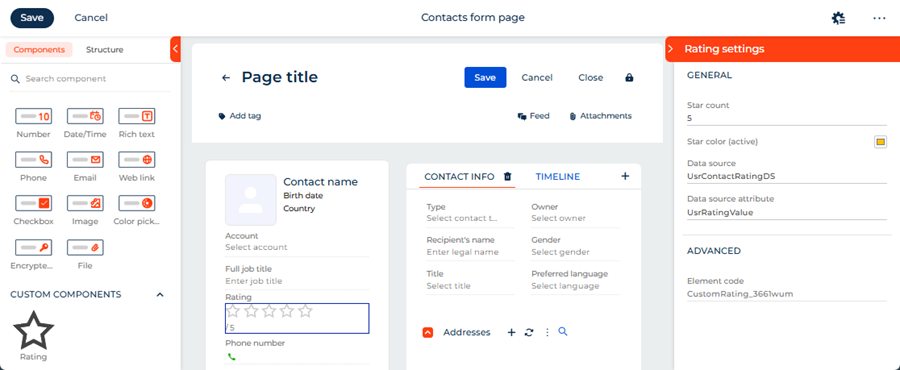
View the result
- Open the Contacts section.
- Open a contact that has an arbitrary name. For example, "Andrew Wayne."
As a result, Creatio will display the custom Rating component in the contact profile on the contact page. The component enables rating contacts. The component has its own setup area that is displayed in the Freedom UI Designer. Both the component and the setup area are implemented using a remote module created in the Angular framework. View the result >>>
Resources
*.zip archive that contains the implemented Freedom UI app (for Creatio version 8.3.4 and later)
Angular project that contains the implemented example (for Creatio version 8.3.4 and later)
Example implementation in Creatio 8.3.3 only
1. Create an Angular project
To create an Angular project, follow the instructions: Create an Angular project.
For this example:
<%projectName%>macro is set to "sdk_custom_setup_area."<%vendorPrefix%>macro is set to "usr."
As a result, an Angular project to develop a custom UI component using a remote module will be added.
2. Install npm packages
To install npm packages, follow the instructions: Install npm packages.
As a result, required npm packages are installed.
3. Create a custom Freedom UI component
-
Run the
ng g c view-elements/rating --view-encapsulation=ShadowDomcommand in the Visual Studio Code terminal to create an Angular component in the project. This adds theRatingComponentfiles to thesrc/app/view-elements/ratingproject directory. -
Define the component constants.
-
Go to the "src/app/" directory.
-
Create the "constants" directory → "rating.constants.ts" file.
-
Open the "rating.constants.ts" file.
-
Export the following constants that define:
- the component type
- the view element selector
- the component icon
-
Save the file.
"rating.constants.ts" file/* Define the component type identifier. */export const RATING_COMPONENT_TYPE = 'usr.CustomRating';/* The selector of the view element. */export const RATING_COMPONENT_SELECTOR = 'usr-rating';/* Define the component icon as an inline SVG. */export const RATING_COMPONENT_ICON =`<svg xmlns="http://www.w3.org/2000/svg" width="24" height="24" ` +`viewBox="0 0 24 24" fill="none" stroke="currentColor" stroke-width="2">` +`<polygon points="12 2 15.09 8.26 22 9.27 17 14.14 18.18 21.02 ` +`12 17.77 5.82 21.02 7 14.14 2 9.27 8.91 8.26 12 2"/></svg>`; -
-
Specify that the
RatingComponentis a view element.- Open the "rating.component.ts" file.
- Flag the component using the
@CrtViewElementdecorator. - Import the required functionality from the libraries to the component.
- Save the file.
"rating.component.ts" file/* Import the required functionality from the libraries. */import {Component,OnInit,ViewEncapsulation} from '@angular/core';import {CrtViewElement} from '@creatio-devkit/common';@Component({selector: 'usr-rating-internal',templateUrl: './rating.component.html',styleUrls: ['./rating.component.scss'],encapsulation: ViewEncapsulation.ShadowDom,changeDetection: ChangeDetectionStrategy.OnPush,})/* Register the component as a Freedom UI view element. */@CrtViewElement({/* The selector of the view element. */selector: RATING_COMPONENT_SELECTOR,type: RATING_COMPONENT_TYPE})export class RatingComponent {} -
Register the
RatingComponentview element as a component.- Open the "app.module.ts" file.
- Add the
RatingComponentview element to the@CrtModuledecorator. - Register the
RatingComponentview element as a component, i.e., Angular Element, in the module constructor. - Save the file.
"app.module.ts" file/* Import the required functionality from the libraries. */import {DoBootstrap,Injector,NgModule,ProviderToken} from '@angular/core';import { createCustomElement } from '@angular/elements';import { BrowserModule } from '@angular/platform-browser';import { bootstrapCrtModule, CrtModule } from '@creatio-devkit/common';import { RatingComponent } from './view-elements/rating/rating.component';@CrtModule({/* Specify that RatingComponent is a view element. */viewElements: [RatingComponent]})@NgModule({declarations: [RatingComponent],imports: [BrowserModule],providers: [],})export class AppModule implements DoBootstrap {constructor(private _injector: Injector) {}ngDoBootstrap(): void {/* Register RatingComponent as an Angular Element. */const ratingElement = createCustomElement(RatingComponent, {injector: this._injector,});customElements.define('usr-rating', ratingElement);/* Bootstrap CrtModule definitions. */bootstrapCrtModule('sdk_custom_setup_area', AppModule, {resolveDependency: (token) => this._injector.get(<ProviderToken<unknown>>token)});}} -
Implement the component business logic.
- Open the "rating.component.ts" file.
- Add the
rating(the current rating value),maxStars(the maximum number of stars), andfilledColor(the color of filled stars) properties to theRatingComponentclass. - Flag the properties using the
@Inputand@CrtInputdecorators. - Add the
ratingChangeevent to theRatingComponentclass. The event emits the new rating value when a star is clicked. - Flag the
ratingChangeevent using the@Outputand@CrtOutputdecorators. - Register the component in the Freedom UI Designer element library using the
@CrtInterfaceDesignerItemdecorator. - Import the required functionality from the libraries into the component.
- Save the file.
"rating.component.ts" file/* Import the required functionality from the libraries. */import {ChangeDetectionStrategy,Component,EventEmitter,Input,OnInit,Output,ViewEncapsulation} from '@angular/core';import {CrtInput,CrtInterfaceDesignerItem,CrtOutput,CrtViewElement} from '@creatio-devkit/common';import {RATING_COMPONENT_SELECTOR,RATING_COMPONENT_ICON,RATING_COMPONENT_TYPE} from '../../constants/rating.constants';import { SETUP_AREA_TYPE } from 'src/app/features/rating.contract';/* Register the component in the Freedom UI Designer element library. */@CrtInterfaceDesignerItem({toolbarConfig: {caption: 'Rating',icon: RATING_COMPONENT_ICON,},propertiesPanel: SETUP_AREA_TYPE,})/* Register the component as a Freedom UI view element. */@CrtViewElement({selector: RATING_COMPONENT_SELECTOR,type: RATING_COMPONENT_TYPE,})@Component({selector: 'usr-rating-internal',templateUrl: './rating.component.html',styleUrls: ['./rating.component.scss'],encapsulation: ViewEncapsulation.ShadowDom,changeDetection: ChangeDetectionStrategy.OnPush,})export class RatingComponent {/* The current rating value. */@Input()@CrtInput()public rating: number = 0;/* The maximum number of stars. */@Input()@CrtInput()public maxStars: number = 5;/* The color of filled stars. */@Input()@CrtInput()public filledColor: string = '#ffc107';/* Emit the new rating value when a star is clicked. */@Output()@CrtOutput()public readonly ratingChange = new EventEmitter<number>();protected get stars(): number[] {return Array(this.maxStars).fill(0).map((_, i) => i + 1);}protected isStarFilled(starIndex: number): boolean {return starIndex <= this.rating;}protected onStarClick(starIndex: number): void {this.ratingChange.emit(starIndex);}} -
Add the markup of the component to the "rating.component.html" file.
"rating.component.html" file<div class="custom-rating" data-testid="custom-rating"><div class="stars-container">@for (star of stars; track star) {<buttontype="button"class="star"[class.star--filled]="isStarFilled(star)"[style.color]="isStarFilled(star) ? filledColor : null"[attr.aria-label]="'Rate ' + star + ' stars'"(click)="onStarClick(star)">@if (isStarFilled(star)) {<svg xmlns="http://www.w3.org/2000/svg" width="24" height="24" viewBox="0 0 24 24" fill="currentColor"><polygon points="12 2 15.09 8.26 22 9.27 17 14.14 18.18 21.02 12 17.77 5.82 21.02 7 14.14 2 9.27 8.91 8.26 12 2"/></svg>} @else {<svg xmlns="http://www.w3.org/2000/svg" width="24" height="24" viewBox="0 0 24 24" fill="none" stroke="currentColor" stroke-width="2"><polygon points="12 2 15.09 8.26 22 9.27 17 14.14 18.18 21.02 12 17.77 5.82 21.02 7 14.14 2 9.27 8.91 8.26 12 2"/></svg>}</button>}</div><div class="rating-value">{{ rating }} / {{ maxStars }}</div></div> -
Add the styles of the component to the "rating.component.scss" file.
"rating.component.scss" file:host {display: block;}.custom-rating {display: flex;flex-direction: column;gap: 4px;}.stars-container {display: flex;gap: 4px;}.star {background: none;border: none;padding: 0;margin: 0;cursor: pointer;color: #ccc;line-height: 0;&:hover {color: #ffc107;}}.star--filled {color: #ffc107;}.rating-value {font-size: 12px;color: #666;}
4. Create the setup area component
-
Run the
ng g c view-elements/rating-setup-areacommand in the Visual Studio Code terminal to create an Angular component in the project. This adds theRatingSetupAreaComponentclass files to the "src/app/view-elements/rating-setup-area" project directory. -
Define the setup area contract.
- Go to the "app/view-elements/" directory.
- Create the "rating.contract.ts" file.
- Open the "rating.contract.ts" file.
- Export the contract that defines the setup area type.
- Save the file.
"rating.contract.ts" file/* Define the setup area type identifier. */export const SETUP_AREA_TYPE = 'usr.RatingSetupArea'; -
Define the setup area constants.
-
Open the "src/app/constants/rating.constants.ts" file.
-
Export the following constants that define:
- the property codes
- the default property values
-
Save the file.
"rating.constants.ts" file/* Define the property codes used in the Freedom UI page schema. */export const PROPERTY_RATING = 'rating';export const PROPERTY_MAX_STARS = 'maxStars';export const PROPERTY_FILLED_COLOR = 'filledColor';/* Define the default property values. */export const DEFAULT_MAX_STARS = 5;export const DEFAULT_FILLED_COLOR = '#ffc107'; -
-
Specify that the
RatingSetupAreaComponentis a view element.- Open the "rating-setup-area.component.ts" file.
- Flag the component using the
@CrtViewElementdecorator. - Import the required functionality from the libraries to the component.
- Save the file.
"rating-setup-area.component.ts" file/* Import the required functionality from the libraries. */import {Component,ViewEncapsulation} from '@angular/core';import {CrtViewElement} from '@creatio-devkit/common';import {SETUP_AREA_TYPE} from '../rating.contract';@Component({selector: 'usr-rating-setup-area-internal',templateUrl: './rating-setup-area.component.html',styleUrls: ['./rating-setup-area.component.scss'],encapsulation: ViewEncapsulation.None})/* Register the component as a Freedom UI view element. */@CrtViewElement({selector: 'usr-rating-setup-area',type: SETUP_AREA_TYPE})export class RatingSetupAreaComponent {}
5. Implement the business logic of the setup area component
-
Open the "rating-setup-area.component.ts" file.
-
Add the
viewNodeEditorsetter to implement thePropertyPanelinterface. -
Initialize
InterfaceDesignerSchemaServiceto access view model attributes and data sources. -
Implement the
_loadElementData()method to read the current property values from the schema asynchronously on setup area initialization. -
Implement the
_applyChanges()method to write the updated property values back to the schema when the user changes a field. -
Import the required functionality from the libraries into the component.
-
Save the file.
"rating-setup-area.component.ts" file/* Import the required functionality from the libraries. */import {ChangeDetectionStrategy,Component,Input,signal,ViewEncapsulation,WritableSignal} from '@angular/core';import {InterfaceDesignerSchemaService,PropertyPanel,ViewModelAttributeType,ViewNodeEditor,ViewNodePropertyValueType,} from '@creatio/interface-designer';import {CrtInput,CrtViewElement} from '@creatio-devkit/common';import {DEFAULT_MAX_STARS,DEFAULT_FILLED_COLOR,PROPERTY_MAX_STARS,PROPERTY_RATING,PROPERTY_FILLED_COLOR,} from 'src/app/constants/rating.constants';import {SETUP_AREA_TYPE} from '../rating.contract';/* Describe the schema state read from the Freedom UI Designer. */interface RatingSetupAreaSchemaState {maxStars?: number;filledColor?: string;viewModelAttributeName?: string;dataSourceName?: string;dataSourceAttributeName?: string;}@Component({selector: 'usr-rating-setup-area-internal',templateUrl: './rating-setup-area.component.html',styleUrls: ['./rating-setup-area.component.scss'],encapsulation: ViewEncapsulation.None,})/* Register the setup area as a Freedom UI view element. */@CrtViewElement({selector: 'usr-rating-setup-area',type: SETUP_AREA_TYPE,})export class RatingSetupAreaComponent implements PropertyPanel {/* Provide access to the schema editors for reading and modifying the page schema. */private readonly _schemaEditor = new InterfaceDesignerSchemaService().getSchemaEditor();/* Provide access to the selected component's view node in the schema. */private _viewNodeEditor!: ViewNodeEditor;/* Return the name of the view model attribute used to bind the rating property. */private get _viewModelAttributeName(): string {return `${this._viewNodeEditor.nodeName}_Rating`;}/* Indicate whether the setup area has finished loading the component's properties. */protected readonly isPanelReady = signal<boolean>(false);/* The current value of the maxStars property displayed in the setup area. */protected readonly maxStars = signal(DEFAULT_MAX_STARS);/* The current value of the filledColor property displayed in the setup area. */protected readonly filledColor = signal(DEFAULT_FILLED_COLOR);/* The code of the selected component instance on the canvas. */protected readonly elementCode = signal('');/* The name of the data source selected in the setup area. */protected readonly dataSourceName = signal('');/* The name of the data source attribute selected in the setup area. */protected readonly dataSourceAttributeName = signal('');/* Call by the Freedom UI Designer when a user selects the component on the canvas. */@Input()@CrtInput()public set viewNodeEditor(nodeEditor: ViewNodeEditor) {this._init(nodeEditor).catch((error) => console.error('Error initializing rating setup area:', error));}/* Store the view node editor and loads the current property values from the schema. */private async _init(nodeEditor: ViewNodeEditor): Promise<void> {this.isPanelReady.set(false);this._viewNodeEditor = nodeEditor;await this._loadElementData();this.isPanelReady.set(true);}/* Read the current property values from the schema. */private async _getStateFromSchema(): Promise<RatingSetupAreaSchemaState> {let maxStars: number | undefined;let filledColor: string | undefined;/* Read the maxStars and filledColor constant values from the view node. */const maxStarsPropertyValue = await this._viewNodeEditor.getPropertyValue(PROPERTY_MAX_STARS);const filledColorPropertyValue = await this._viewNodeEditor.getPropertyValue(PROPERTY_FILLED_COLOR);if (maxStarsPropertyValue?.type === ViewNodePropertyValueType.Constant) {maxStars = Number(maxStarsPropertyValue.value);}if (filledColorPropertyValue?.type === ViewNodePropertyValueType.Constant) {filledColor = filledColorPropertyValue.value as string;}/* Read the rating attribute binding from the view node. */const ratingPropertyValue = await this._viewNodeEditor.getPropertyValue(PROPERTY_RATING);if (ratingPropertyValue?.type !== ViewNodePropertyValueType.AttributeBinding) {return { maxStars, filledColor };}/* Resolve the view model attribute and its model binding. */const viewModelAttributePath = ratingPropertyValue.attributePath;const viewModelAttributeEditor = await this._schemaEditor.viewModelEditor.getAttributeEditor(viewModelAttributePath);if (!viewModelAttributeEditor) {return { maxStars, filledColor, viewModelAttributeName: viewModelAttributePath };}if (viewModelAttributeEditor.attributeType !== ViewModelAttributeType.ModelBindingValue) {return { maxStars, filledColor, viewModelAttributeName: viewModelAttributePath };}const modelBinding = await viewModelAttributeEditor.getModelBinding();return {maxStars,filledColor,viewModelAttributeName: viewModelAttributePath,dataSourceName: modelBinding.dataSourceName,dataSourceAttributeName: modelBinding.dataSourceAttributePath,};}/* Populate the setup area signals with the current property values from the schema. */private async _loadElementData(): Promise<void> {this.elementCode.set(this._viewNodeEditor.nodeName);const {maxStars,filledColor,dataSourceName,dataSourceAttributeName} = await this._getStateFromSchema();this.maxStars.set(maxStars ?? DEFAULT_MAX_STARS);this.filledColor.set(filledColor ?? DEFAULT_FILLED_COLOR);this.dataSourceName.set(dataSourceName ?? '');this.dataSourceAttributeName.set(dataSourceAttributeName ?? '');}/* Remove the existing rating attribute binding before creating a new one. */private async _unbindExisting(): Promise<void> {const attributeName = (await this._getStateFromSchema()).viewModelAttributeName;if (!attributeName) {return;}/* Clear the rating property binding in the view node. */await this._viewNodeEditor.setPropertyValue(PROPERTY_RATING, { constant: null });/* Remove the view model attribute if it is no longer in use. */if (await this._schemaEditor.viewModelEditor.canRemoveAttribute(attributeName)) {await this._schemaEditor.viewModelEditor.removeAttribute(attributeName);}}/* Create or update the view model attribute that binds the rating property to a data source. */private async _bindViewModelAttribute(viewModelAttributeName: string,dataSourceName: string,dataSourceAttributeName: string,): Promise<void> {const viewModelAttributeEditor = await this._schemaEditor.viewModelEditor.getAttributeEditor(viewModelAttributeName);const targetModelBinding = {dataSourceName,dataSourceAttributePath: dataSourceAttributeName};if (!viewModelAttributeEditor) {/* Create a new view model attribute bound to the selected data source attribute. */await this._schemaEditor.viewModelEditor.createAttribute(viewModelAttributeName, { bindToModel: targetModelBinding });} else if (viewModelAttributeEditor.attributeType === ViewModelAttributeType.ModelBindingValue) {/* Update the model binding of the existing attribute. */await viewModelAttributeEditor.bindToModel(targetModelBinding);}}/* Write the updated property values to the schema. */private async _applyChanges(): Promise<void> {/* Save the maxStars and filledColor constant values to the view node. */await this._viewNodeEditor.setPropertyValue(PROPERTY_MAX_STARS, { constant: this.maxStars() });await this._viewNodeEditor.setPropertyValue(PROPERTY_FILLED_COLOR, { constant: this.filledColor() });const dataSourceName = this.dataSourceName();const dataSourceAttributeName = this.dataSourceAttributeName();/* If both data source fields are set, update the rating attribute binding. */if (dataSourceName && dataSourceAttributeName) {await this._unbindExisting();await this._bindViewModelAttribute(this._viewModelAttributeName,dataSourceName,dataSourceAttributeName);/* Bind the rating property to the view model attribute. */await this._viewNodeEditor.setPropertyValue(PROPERTY_RATING, { bindToAttribute: this._viewModelAttributeName });}}/* Handle a property change triggered by user input in the setup area. */protected async handlePropertyChange(event: Event,signal: WritableSignal<string | number>,propertyName: string,): Promise<void> {const inputElement = event.target as HTMLInputElement;/* Convert the input value to a number if the input type is "number." */const value = inputElement.type === 'number'? Number(inputElement.value): inputElement.value;signal.set(value);try {await this._applyChanges();} catch (error) {console.error(`Error applying ${propertyName} change:`, error);}}} -
Add the markup of the setup area component to the "rating-setup-area.component.html" file.
"rating-setup-area.component.html" file@if (isPanelReady()) {<crt-interface-designer-properties-panel-wrapper[headerTitle]="'Rating settings'"[showHeader]="true"[canShowTooltip]="true"><div class="section"><h4 class="section-title">General</h4><div class="form-field"><label class="field-label" for="max-stars-input">Star count</label><inputid="max-stars-input"type="number"class="field-input"placeholder="Max star count"[value]="maxStars()"(change)="handlePropertyChange($event, maxStars, 'maxStars')"/></div><div class="form-field"><label class="field-label" for="filled-color-input">Star color (active)<inputid="filled-color-input"type="color"[value]="filledColor()"(change)="handlePropertyChange($event, filledColor, 'filledColor')"/></label></div><div class="form-field"><label class="field-label" for="data-source-input">Data source</label><inputid="data-source-input"type="text"class="field-input"placeholder="Data source name"[value]="dataSourceName()"(change)="handlePropertyChange($event, dataSourceName, 'dataSourceName')"/></div><div class="form-field"><label class="field-label" for="data-source-attribute-input">Data source attribute</label><inputid="data-source-attribute-input"type="text"class="field-input"placeholder="Data source attribute name"[value]="dataSourceAttributeName()"(change)="handlePropertyChange($event,dataSourceAttributeName,'dataSourceAttributeName')"/></div></div><hr class="section-divider" /><div class="section"><h4 class="section-title">Advanced</h4><div class="form-field"><label class="field-label" for="element-code-input">Element code</label><inputid="element-code-input"disabledtype="text"class="field-input"[value]="elementCode()"/></div></div></crt-interface-designer-properties-panel-wrapper>} -
Add the styles of the setup area component to the "rating-setup-area.component.scss" file.
"rating-setup-area.component.scss" file@import url('https://fonts.googleapis.com/css2?family=Montserrat:wght@400;500;600&display=swap');:host {--font-family: "Montserrat", sans-serif;--font-family-add: "Montserrat", sans-serif;--font-weight: 400;--font-weight-medium: 500;--font-weight-semibold: 600;--foreground-text: 68, 68, 68;--foreground-secondary-text: 117, 117, 117;--foreground-secondary-text-alpha: 1;--headline-3-font-family: "Montserrat", sans-serif;--headline-3-font-size: 18px;--headline-3-font-weight: 500;--headline-3-line-height: 24px;--headline-3-letter-spacing: 0;--crt-palette-foreground-contrast-500: #ffffff;--crt-expansion-btn-background-color: #f4480b;--headline-4-font-family: "Montserrat", sans-serif;--headline-4-font-size: 16px;--headline-4-font-weight: 500;--headline-4-line-height: 20px;--headline-4-letter-spacing: 0;--crt-palette-primary-500: #f4480b;font-family: "Montserrat", sans-serif;font-size: 14px;font-weight: 400;color: rgba(68, 68, 68, 1);display: block;}.section-title {font-family: "Montserrat", sans-serif;font-size: 14px;font-weight: 500;color: #0D2E4E;text-transform: uppercase;letter-spacing: normal;line-height: 18px;margin: 0;padding: 0 8px 14px 8px;display: block;overflow: hidden;text-overflow: ellipsis;white-space: nowrap;-webkit-font-smoothing: antialiased;}.section {padding: 0 0 8px 0;}.section-divider {border: none;border-top: 1px solid rgba(0, 0, 0, 0.1);margin: 15px 0 15px 0;}.form-field {padding: 0 8px 0 8px;display: flex;flex-direction: column;gap: 2px;}.field-label {font-family: "Montserrat", sans-serif;font-size: 12px;font-weight: 500;color: rgb(117, 117, 117);display: flex;align-items: center;justify-content: space-between;line-height: 17px;letter-spacing: 0.24px;margin-top: 15px;-webkit-font-smoothing: antialiased;}.field-input {font-family: "Montserrat", sans-serif;font-size: 13px;font-weight: 500;color: rgb(68, 68, 68);border: none;border-bottom: 1px solid #c8c8c8;outline: none;box-shadow: none;padding: 0;width: 100%;background: transparent;line-height: 20px;text-overflow: ellipsis;-webkit-font-smoothing: antialiased;caret-color: rgb(68, 68, 68);}.field-input:focus,.field-input:focus-visible {outline: none !important;box-shadow: none !important;border-bottom: 1px solid #c8c8c8 !important;background-color: transparent !important;}.field-input::placeholder {font-family: "Montserrat", sans-serif;color: rgba(117, 117, 117, 1);font-style: normal;}.field-input:disabled {color: rgba(117, 117, 117, 1);cursor: not-allowed;border-bottom-color: rgba(0, 0, 0, 0.1);}input[type="color"] {width: 20px;height: 20px;border: 1px solid #c8c8c8;border-radius: 3px;padding: 0;cursor: pointer;background: none;} -
Link the setup area to the Rating component.
- Open the "rating.component.ts" file.
- Set the
propertiesPanelproperty toSETUP_AREA_TYPEin the@CrtInterfaceDesignerItemdecorator. - Import the required functionality from the libraries into the component.
- Save the file.
"rating.component.ts" fileimport { SETUP_AREA_TYPE } from '../rating.contract';/* Register the component in the Freedom UI Designer element library. */@CrtInterfaceDesignerItem({propertiesPanel: SETUP_AREA_TYPE,})
6. Add the setup area component to the Freedom UI Designer
-
Register the
RatingSetupAreaComponentview element in the design feature so that Freedom UI Designer can display it.-
Go to the "src/app" directory.
-
Create the "rating.design-time.module.ts" file.
-
Add
RatingSetupAreaComponentso that the Freedom UI Designer can display it as a setup area when a user selects the Rating component on the canvas. -
Register
RatingSetupAreaComponentas a custom element so that the browser can render it inside the Freedom UI Designer."rating.design-time.module.ts" file/* Import the required functionality from the libraries. */import { CommonModule } from '@angular/common';import { CUSTOM_ELEMENTS_SCHEMA, inject, Injector, NgModule } from '@angular/core';import { createCustomElement } from '@angular/elements';import { Type } from '@creatio-devkit/common';import { RatingSetupAreaComponent } from './view-elements/rating-setup-area/rating-setup-area.component';/* Declare RatingSetupAreaComponent in the Angular module and allow custom element schemas. */@NgModule({declarations: [RatingSetupAreaComponent],imports: [CommonModule],exports: [RatingSetupAreaComponent],schemas: [CUSTOM_ELEMENTS_SCHEMA],})export class RatingDesignTimeModule {/* Injector is used to create Angular Elements from components. */private readonly _injector = inject(Injector);constructor() {/* Register RatingSetupAreaComponent as a custom element on module initialization. */this._registerCustomElement('usr-rating-setup-area', RatingSetupAreaComponent);}/* Register a component as a custom element so that the browser can render itinside Freedom UI Designer if it has not been registered yet. */private _registerCustomElement(selector: string, component: Type): void {if (!customElements.get(selector)) {/* Convert the Angular component to a custom element and define it in the browser registry. */const elementConstructor = createCustomElement(component, { injector: this._injector });customElements.define(selector, elementConstructor);}}} -
Open the "app.module.ts" file.
-
Add
RatingDesignTimeModuleto theimportsarray."app.module.ts" file/* Import the required functionality from the libraries. */import {DoBootstrap,NgModule} from '@angular/core';import {BrowserModule} from '@angular/platform-browser';import {CrtModule} from '@creatio-devkit/common';import {RatingComponent} from './view-elements/rating/rating.component';import {RatingSetupAreaComponent} from './view-elements/rating-setup-area/rating-setup-area.component';import {RatingDesignTimeModule} from './rating.design-time.module';@CrtModule({/* Specify that RatingComponent and RatingSetupAreaComponent are view elements. */viewElements: [RatingComponent, RatingSetupAreaComponent]})@NgModule({declarations: [RatingComponent],imports: [BrowserModule, RatingDesignTimeModule],providers: [],})export class AppModule implements DoBootstrap {} -
Save the files.
-
-
Run the
npm run buildcommand in the Visual Studio Code terminal to build the project.
As a result, the build will be added to the "dist" directory of the Angular project. The build will have the "sdk_custom_setup_area" name.
7. Add the custom Freedom UI component to the Freedom UI page
-
Repeat step 2 of the add the custom Freedom UI component to the Freedom UI page instructions to upload packages to Creatio using the Clio utility.
-
Open the Customer 360 app in the Application Designer.
-
Open the Contacts form page.
-
Add data source for contact rating.
-
Go to the element library.
-
Click Add data source → New data source.
-
Fill out the data source properties.
Property
Value
Name
Contact rating data
-
Click Save.
-
Go to the setup area → Relations setup.
-
Go to the Add relation criteria → click
. -
Fill out the relation properties.
Property
Value
Contact
Select "Id"
Contact rating data
Select "Id"
-
Click Save.
-
Add a column to the object that determines data source.
-
Open the Customer 360 app in the Application Designer.
-
Go to the Package settings tab → corresponding app package.
-
Open the "Contact rating data" (
UsrContactRatingDatacode) schema of the "Object" type. -
Go to the Columns node →
UsrNamecolumn → click. -
Go to the Columns node → click
→ Number → Integer. -
Fill out the column properties.
Property
Value
Code
UsrRatingValue
Title
Rating value
-
Click Save and publish.
-
-
-
Refresh the Contacts form page.
-
Add a label of the contact rating.
-
Drag the Label component to the canvas.
-
Fill out the component parameters.
Parameter
Value
Text
Rating
Style
Caption
Text color
#757575 Element code
UsrRating
-
-
Add a Rating component.
-
Drag the Rating component to the canvas.
-
Fill out the component parameters.
Parameter
Value
Data source
UsrContactRatingDataDS
Data source attribute
UsrRatingValue
Leave default values for component parameters.
-
-
Click Save.
As a result, the custom Rating component will be configured directly in the Freedom UI Designer via a setup area implemented using a remote module. The setup area includes the following parameters:
- Star count — the maximum number of stars to display.
- Star color (active) — the color of filled stars.
- Data source — the object that implements rating functionality.
- Data source attribute — the column of the object that implements the data source. The column stores rating value.
Changes made in the setup area are reflected on the canvas immediately.
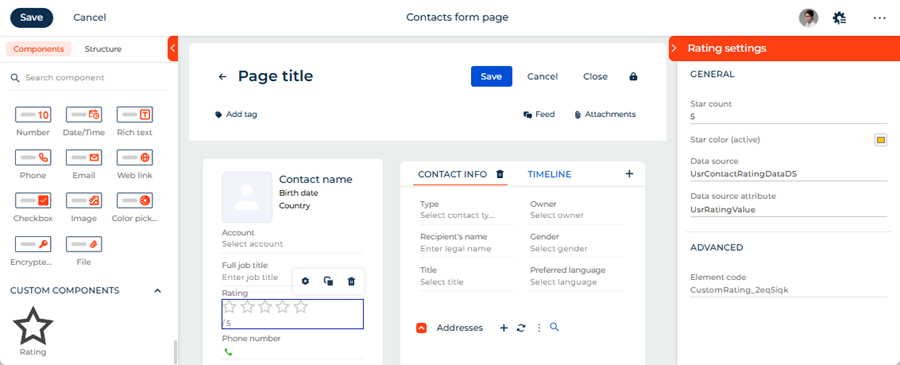
View the result
- Open the Contacts section.
- Open a contact that has an arbitrary name. For example, "Andrew Wayne."
As a result, Creatio will display the custom Rating component in the contact profile on the contact page. The component enables rating contacts. The component has its own setup area that is displayed in the Freedom UI Designer. Both the component and the setup area are implemented using a remote module created in the Angular framework. View the result >>>
Resources
*.zip archive that contains the implemented Freedom UI app (for Creatio version 8.3.3 only)
Angular project that contains the implemented example (for Creatio version 8.3.3 only)