Validate a sender domain for marketing emails
Validate a sender domain to ensure that emails sent from Creatio on behalf of your organization are recognized as authentic and trustworthy. This improves email deliverability and prevents messages from displaying additional routing information, for example, "via mail.sender.com."
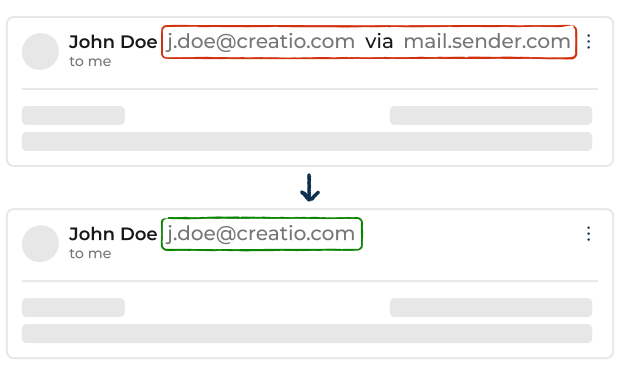
If the domain is not verified, the email provider limits the number of emails you can send per day to 500.
Only custom company domains can be validated. Public email domains, for example, gmail.com or yahoo.com, cannot be verified. Using public domains for marketing communications significantly increases the risk of emails being marked as spam and can impact your sender reputation.
Validate a sender domain
-
Open the Email marketing workplace → Sender domains.
-
Click Add domain.
-
Enter the domain or subdomain you are going to use for sending emails. Each domain and subdomain must be verified separately. Make sure the domain name meets the following requirements:
Parameter
Requirement
Format
Must contain at least one dot (.)
Length
Between 1 and 255 characters
Allowed characters
Letters (a–z, A–Z), numbers (0–9), hyphens (-), and dots (.)
-
Click Proceed to setup.
-
Open the record of the added domain. This opens a window.
-
Click Download settings for Admin to download the DNS configuration instructions. You can also copy the required DNS records directly from the tabs at the bottom. If you have access to your DNS provider, add the records yourself. Otherwise, forward the instructions to your DNS administrator.
-
Add the provided DNS records to your DNS provider exactly as described in the instructions.
-
Return to "Email marketing" workplace → Sender domains section.
-
Select the domain → Check. Domain validation can take up to 48 hours depending on DNS propagation.
As a result, the sender domain will be validated and be able to be used to send marketing emails from Creatio.
If a DNS record is configured incorrectly, Creatio displays an error message on the Sender domains page indicating which record requires correction. Learn more: DNS record specifications for sending emails via Creatio.
Validate the same sender domain in another Creatio instance
You can use the same sender domain across multiple instances, for example, test, development, and production environments.
Sending marketing emails from non-production environments to inactive addresses for testing purposes can harm your sender reputation. If the same domain is later used in production, previous poor sending behavior might affect deliverability.
To validate the same sender domain:
- Open the "Email marketing" workplace on the target environment → Sender domains.
- Click Add domain.
- Enter the domain or subdomain that has already been validated in another Creatio instance → Proceed to setup. This opens a window requesting a sharing authorization token from the administrator of the original instance.
- Click Cancel. The domain will appear in the list and have the "Requested" status.
- Select Allow multi-site use on the original Creatio instance to generate an authorization token.
- Send the token to the user who requested the domain validation in the new instance.
- Open the "Email marketing" workplace on the target environment → Sender domains.
- Enter the received authorization token.
- Click Validate. If the token is invalid, Creatio will display the following message: "Authorization key is invalid or does not match the requesting site." The domain remains in the Requested status until a valid token is entered.
- Click Validate domain again to confirm the configuration after the token is accepted.
As a result, you will be able to use the same sender domain across multiple Creatio instances. Repeat the setup process for each instance where you need to use the domain. Repeat the setup process for each instance where you need to use the domain.