Asterisk integration basics
Use Asterisk Manager Interface (AMI) to interact with the Asterisk server. The API enables client programs to connect to the Asterisk server over TCP/IP, process call events, and send commands to control calls. Learn more: Asterisk Manager Interface (official vendor documentation). AMI uses a simple text protocol. Each line of a message has the "parameter: value" format and ends with a carriage return and line feed (CRLF).
Creatio provides the Asterisk V2 and Asterisk V1 (legacy) connectors for Asterisk integration. The Asterisk V2 connector supports Asterisk 13, 16, and 18. The connector uses AMI events introduced in Asterisk 12, for example, DialBegin, DialEnd, Hold, and Unhold. The Asterisk V1 (legacy) connector supports Asterisk up to version 13. Agent status management is available only in the Asterisk V2 connector. Creatio uses the Asterisk V2 connector as the main connector. The Asterisk V1 connector applies only if an administrator selects the legacy library manually.
Asterisk connector classes
The integration part of the Messaging Service is implemented in the main Creatio solution kernel. The Asterisk V2 connector is implemented in the Terrasoft.Messaging.Asterisk.V2 library, and the Asterisk V1 connector is implemented in the Terrasoft.Messaging.Asterisk library. Both connectors use the Terrasoft.Messaging.Asterisk.Common library.
The table describes the main classes of the connectors.
Class | Connector version | Description |
|---|---|---|
AsteriskConnector | V2 | The main class of the connector. Creates and manages operator connections and controls the CTI state machine. |
AsteriskConnection | V2 | Interacts with Asterisk. Subscribes to AMI events, passes them to the state machine, and sends AMI actions, for example, |
CtiConnection | V2 | Represents the operator connection on the Creatio side. Receives commands from the "Calls" sidebar of the communication panel, for example, |
CtiStateMachine | V2 | Changes the state of operator extensions. Does not store the state. |
OperatorExtension | V2 | Represents an operator extension. Stores the call state and a copy of the agent status that Asterisk events keep up to date. |
OperatorExtensionListener | V2 | Connects operator extension events to Creatio and Asterisk. Sends call events and the |
AsteriskAdapter | V1 | Transforms Asterisk events to the top-level call model events used in Creatio integration. In the Asterisk V2 connector, the |
AsteriskManager | V1 | Creates and deletes user connections to the Asterisk server. The main class of the connector. |
AsteriskConnection | V1 | Represents the user connection for integration with Asterisk. |
AsteriskClient | V2, V1 | Maintains the AMI connection to the Asterisk server and reconnects if the connection is lost. Sends AMI actions, and receives, parses, and filters AMI events. |
Configure Creatio Messaging Service for Asterisk
-
Install Creatio Messaging Service (CMS) on a dedicated computer that serves as the integration server.
-
Open the "Terrasoft.Messaging.Service.exe.config" file on the integration server.
-
Set the parameters of the
<asterisk>element."Terrasoft.Messaging.Service.exe.config" file<asteriskurl="{Name or address of Asterisk server}"port="{Asterisk server port}"userName="{Asterisk login}"secret="{Asterisk password}"originateContext="{Originate context}"autoPauseOnCommutationStart="true"queueExtensionFormat="Local/{0}@from-queue/n"protocol="PJSIP/"asyncOriginate="true"packetInfoConfig="{Additional package parameters to process}"agentStatusManagementEnabled="false"agentReadyStateCode="Active"agentNotReadyStateCode="NotReady"autoPauseQueueOnAllCalls="true" />The table describes the parameters of the
<asterisk>element. Since version 10.1, the Asterisk V2 connector supports agent status management.Parameter
Description
Default value
url
Name or IP address of the Asterisk server.
—
port
Port of the Asterisk server for AMI connections.
5038
userName
Login of the AMI user.
—
secret
Password of the AMI user.
—
originateContext
Dialplan context that CMS uses for outgoing calls (
OriginateAMI action) and for transfers started in Creatio (BlindTransferandAtxferAMI actions).—
queueExtensionFormat
Format of the queue member interface.
{0}is replaced with the operator extension. Learn more: Manage agent status.Local/{0}@from-queue/n
protocol
Prefix of the operator channel name. Set "SIP/" if Asterisk uses the chan_sip channel driver.
PJSIP/
asyncOriginate
Sends the
OriginateAMI action asynchronously. If the value is "true," Asterisk responds immediately and reports the result later in theOriginateResponseAMI event.true
packetInfoConfig
Additional AMI event parameters that CMS passes to the client in the additional data (
privateData) of the event. The value is a JSON object. Each key is a regular expression for the AMI event name, and each value is an array of regular expressions for the parameter names. For example,{"DialBegin|Newstate": ["Uniqueid", "Linkedid"]}. The patterns must not match theChannel,CallerIDNum, andConnectedLineNumparameters. Otherwise, the connector does not process the event.—
agentStatusManagementEnabled
Enables agent status management. If the value is "false," the connector:
- Does not send queue pause actions to Asterisk.
- Ignores queue member events.
- Does not send the
AgentStateChangedevent to Creatio. - Does not apply the automatic pause.
Learn more: Manage agent status.
false
agentReadyStateCode
Code of the agent status that removes the agent from pause in Asterisk queues. Creatio compares the code case-insensitively. The value must match the code of the agent status in the User statuses while exchanging messages lookup. Out of the box, the code matches the "Active" status.
Active
agentNotReadyStateCode
Code of the agent status that Creatio uses for the automatic pause and for pauses without a reason received from Asterisk. The value must match the code of the agent status in the User statuses while exchanging messages lookup. Out of the box, the code matches the "Busy" status.
NotReady
autoPauseOnCommutationStart
Pauses the agent automatically when an incoming call connects and removes the pause when the call ends. Works only if
agentStatusManagementEnabledis "true."true
autoPauseQueueOnAllCalls
Applies the automatic pause to all incoming calls. If the value is "false," Creatio pauses the agent only for calls delivered from a queue.
true
The Asterisk V1 (legacy) connector also uses the following parameters:
parkingLotContext. Dialplan context of the parking lot. The connector uses it to retrieve the parked call when the operator takes the call off hold.sendRingStartedOnRingingState. Reports an incoming call when the channel switches to the ringing state. If the value is "false," the connector reports the incoming call from theDialBeginevent. Out of the box, "true."traceQueuesState. Writes the state of Asterisk queues to the CMS log on call events. Use for troubleshooting. Out of the box, "false."amiVersion. If the value starts with "1.", the connector reads the event parameters of AMI 1.x used in Asterisk 11 and earlier. Out of the box, empty.
In the Asterisk V1 (legacy) connector, the
autoPauseOnCommutationStartparameter pauses the agent when any call connects, both incoming and outgoing. -
Set up the integration ports.
- Allow incoming WebSocket connections to CMS on TCP port 2013.
- Allow connections from CMS to the Asterisk server on the port specified in the
portparameter. Out of the box, 5038.
-
Restart CMS to apply the changes.
As a result, CMS connects to the Asterisk server when the first user with the Asterisk library connects to CMS, and Creatio users can manage calls in the "Calls" sidebar of the communication panel. To check the connection, run the manager show connected command in the Asterisk CLI. The command output must include the AMI user. If CMS runs on .NET Framework, you can also check the "CMS_Logs\<date>\asterisk\asteriskV2" folder in the temporary folder of the CMS service account. The log must include the "Connected to Asterisk. Subscribe to Asterisk events." line.
Manage agent status
Since version 10.1, the Asterisk V2 connector enables contact center administrators to control queue call distribution by agent availability. The connector implements the SetMsgUserState() and QueryMsgUserState() methods based on the QueuePause and QueueStatus AMI actions.
To manage agent status:
-
Add the agents to the Asterisk queues as members. Make sure the member interface matches the value of the
queueExtensionFormatparameter (out of the box,Local/<extension>@from-queue/n). Otherwise, the connector cannot find the queue member in Asterisk and does not receive the agent status. Until the connector receives the status, it does not apply status changes, so the agent status toggle does not pause the agent. We recommend adding queue members asLocal/<extension>@<context>. If queue members use thePJSIP/orSIP/format, set thequeueExtensionFormatparameter to match them, for example, "PJSIP/{0}." In this case, agent status management works, but the connector does not recognize queue calls. The call data does not include theQueuekey, and Creatio does not apply the automatic pause to these calls if theautoPauseQueueOnAllCallsparameter is "false." -
Grant the AMI user permissions. In the "manager.conf" file on the Asterisk server, add the "agent" class to the
readandwriteoptions of the AMI user. Instructions: Set up integration with Asterisk (user documentation).The "agent" write class enables the
QueuePauseAMI action. The "agent" read class enables theQueueMemberPauseandAgentCalledAMI events. -
Set the
agentStatusManagementEnabledparameter to "true" in the<asterisk>element of the "Terrasoft.Messaging.Service.exe.config" file.
As a result, agents can change their status using the agent status toggle, and Asterisk distributes queue calls only to agents in the ready status.
The ready status is the agent status whose code matches the agentReadyStateCode parameter value. When agent status management is enabled, any agent status except the ready status pauses the agent in all of their Asterisk queues. The ready status removes the pause. The connector passes the status code as the Reason AMI parameter. Asterisk returns the code in the PausedReason parameter of its events, so Creatio receives the exact status code. If Asterisk returns a pause without a reason, Creatio uses the agentNotReadyStateCode value.
Asterisk is the single source of truth for the agent status. The connector keeps only an in-memory copy that Asterisk events update. It reads the actual status from the QueueMemberPause event and the QueueMember event that Asterisk sends in response to the QueueStatus action. The connector processes these events only if agent status management is enabled. Creatio applies pauses set by a supervisor or the Asterisk server as is and sends the AgentStateChanged event to the "Calls" sidebar of the communication panel. When the agent connects or reloads the page, the connector returns the known status. The connector requests the status from Asterisk using the QueueStatus AMI action only if the status is not known yet. After CMS reconnects to Asterisk, the status updates with the next QueueMemberPause event.
The table describes how Creatio changes the agent status during calls.
Situation | Behavior |
|---|---|
An incoming call connects | Creatio pauses the agent with the
|
An outgoing call connects | Creatio does not change the status. |
A call ends | Creatio removes the automatic pause. |
The agent changes the status manually during the call | The manual status takes priority. Creatio does not remove the pause after the call. |
Wrap-up in the Agent Inbox panel does not change the agent status in Asterisk. Asterisk can deliver the next queue call while the agent is in wrap-up. To give agents time after a queue call, set the wrapuptime option of the queue in the "queues.conf" file on the Asterisk server.
A pause affects only the distribution of queue calls. Calls routed directly to the extension still reach the agent.
Track queue calls
The Asterisk V2 connector shows calls delivered from a queue in Creatio while they ring if all of the following conditions are met:
- The queue member is set as
Local/<extension>@<context>. - The agent is connected and has no active or ringing call.
- The AMI user has the "agent" read class. This condition applies even if agent status management is disabled.
The connector adds the Queue key to the additional data of the RingStarted event. The connector passes the additional data to the client in the privateData object. In client code, privateData is a plain JavaScript object that contains key-value pairs. The Queue key contains the queue name or number from the Queue parameter of the AgentCalled AMI event. If the AgentCalled AMI event has no Queue parameter, the object does not include the Queue key. Creatio does not save privateData to the database, and later events of the same call do not include the Queue key. This behavior does not depend on the agentStatusManagementEnabled parameter.
To read the queue of the call in client code, use the second argument of the callStarted event of the CtiModel class.
Terrasoft.CtiModel.on("callStarted", function(call, privateData) {
    var queue = privateData && privateData.Queue;
}, this);
Process an outgoing call
The examples describe an outgoing call. The operator calls a subscriber, puts the call on hold, takes it off hold, and ends the call. The Asterisk V2 and Asterisk V1 connectors process the call differently.
Process an outgoing call using the Asterisk V2 connector
In the example, the operator puts the call on hold and takes it off hold using the phone.
The figure below shows the order of events during the call.
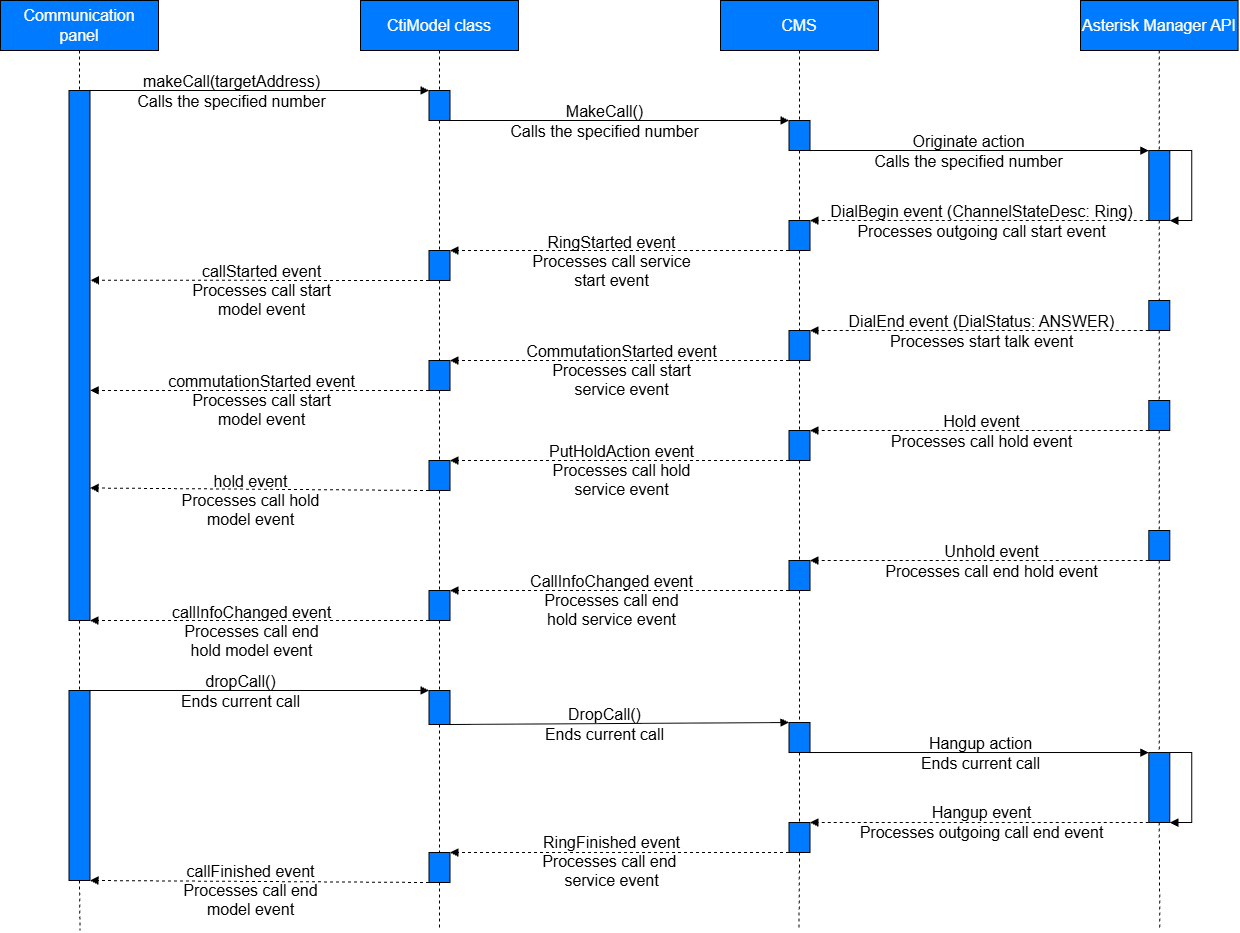
In the Asterisk V2 connector, the AsteriskConnection class maps AMI events to commands, the CtiStateMachine class changes the operator state, and the OperatorExtensionListener class sends events to the client. After each event, CMS also sends the LineStateChanged event with the call actions available in the "Calls" sidebar of the communication panel. The connector does not process the Newchannel AMI event.
The table shows which events CMS sends to the client for Asterisk events during the call.
Asterisk event | Event sent to client | CtiModel class |
|---|---|---|
| RingStarted | Generates the |
| CommutationStarted | Generates the |
| PutHoldAction | Generates the |
| CallInfoChanged | Generates the |
| RingFinished | Generates the |
Process an outgoing call using the Asterisk V1 connector
In the example, the operator puts the call on hold and takes it off hold in the "Calls" sidebar of the communication panel. The Asterisk V1 connector puts the call on hold using the Park AMI action.
The figure below shows the order of events during the call.
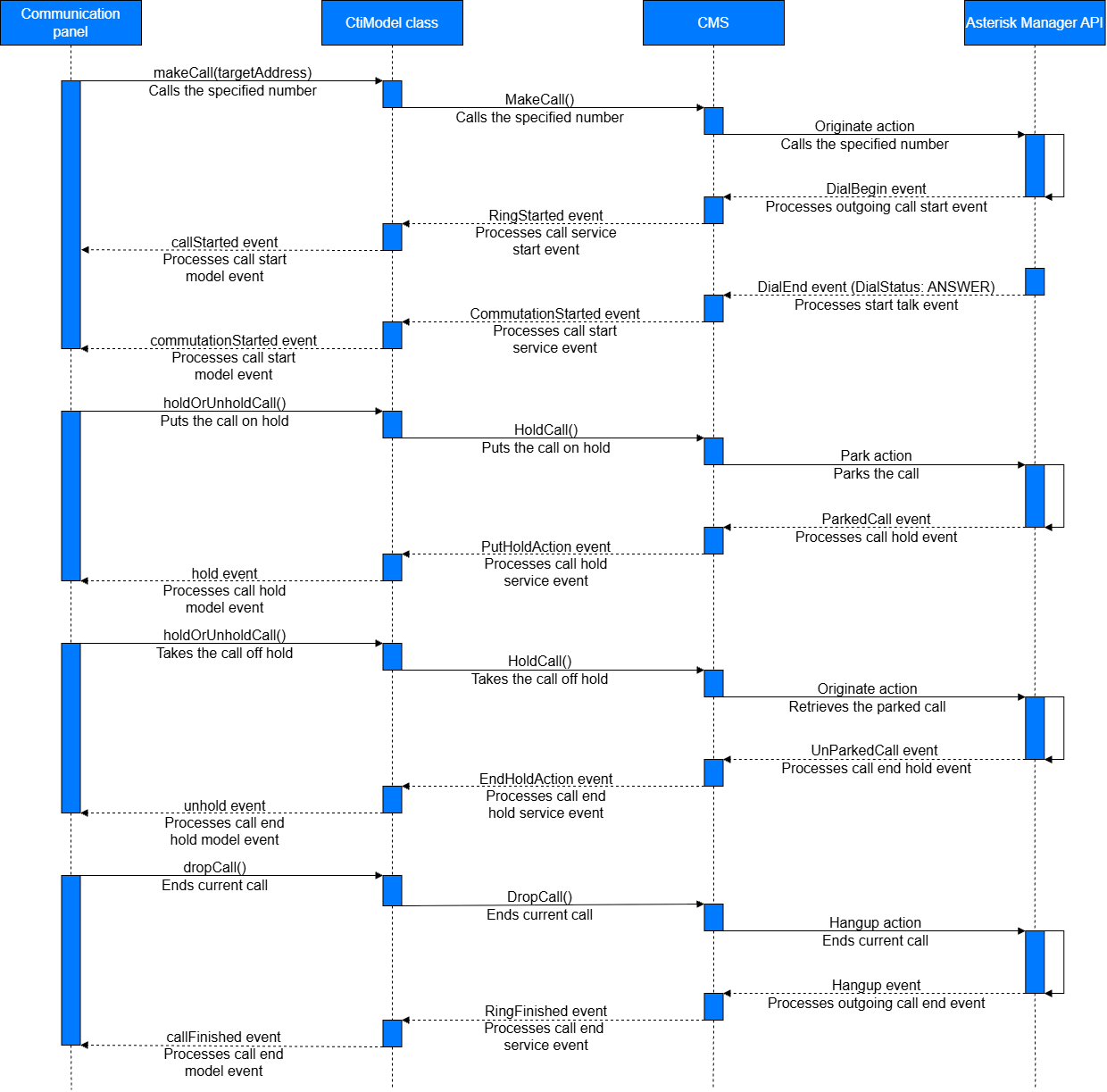
The table shows how CMS processes Asterisk events during the call and which events it sends to the client. The connector processes both the DialBegin event and the Dial event with SubEvent: Begin. If the amiVersion parameter starts with "1.", the connector reads the event parameters of AMI 1.x, for example, Bridgestate: Link instead of DialStatus: ANSWER.
Asterisk event | CMS | Event sent to client | CtiModel class |
|---|---|---|---|
| Adds the channel to the collection. | — | — |
| Finds the channel by | RingStarted | Generates the |
| Finds the channel by | CommutationStarted | Generates the |
| Receives the event after CMS sends the | PutHoldAction | Generates the |
| Receives the event after CMS sends the | EndHoldAction | Generates the |
| Finds the channel by | RingFinished | Generates the |
See also
Set up integration with Asterisk (user documentation)
Resources
Asterisk Manager Interface (official vendor documentation)
AMI events (official vendor documentation)