"Localization" type schema
When working on multilingual composable apps, developers and no-code creators need a clear way to review and track all translatable content within a package without navigating individual schemas. The "Localization" type of configuration schema centralizes all localizable resource values for a specific language in one place. "Localization" type schemas are available in the Configuration section and in the Package settings tab of the Application Designer.
Unlike other configuration schema types, a "Localization" type schema cannot be added manually. Creatio generates it automatically whenever a package contains localizable resources. The table below lists templates used by Creatio for properties of "Localization" type schemas.
Property | Template | Example |
|---|---|---|
Title | {SomePackageName} localization ({SomeLanguageCultureCode}) | UsrCrtCustomer360App localization (en-US) |
Code | {SomePackageName}_Localization_{SomeLanguageCultureCode} | UsrCrtCustomer360App_Localization_en-US |
Where:
{SomePackageName}— the name of the package that contains the localizable resources.{SomeLanguageCultureCode}— the culture code of the language, for example, "en-US."
Each schema corresponds to a single language and consolidates all localizable values from that package. Creatio adds the corresponding localization schemas to all existing packages automatically.
View examples of "Localization" type schemas in the Configuration section in the figure below.
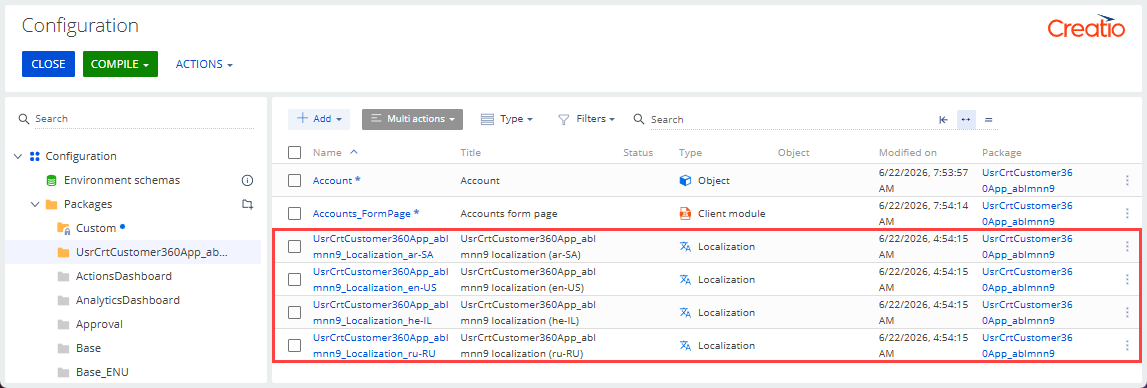
When you select a "Localization" type schema, Creatio opens the Localization Designer. This page helps you review which localizable content is included in the selected package for a specific language.
Learn how to work with the "Localization" type schemas in the Localization Designer below.
The Configuration elements tab contains a list of all localizable strings from configuration elements, such as object and column titles, business process element titles, button labels, page tab names, and more for the specified language culture. The table below lists default list columns.
Column | Description |
|---|---|
Element | The title of the configuration element schema. |
Key | The unique identifier of the UI caption. |
Value | The translation for the currently opened language culture. |
Localizable values may be replaced when a parent schema is replaced in the package or when translations are applied from the Translation section. The data in this list is read-only. To change a value, edit it in the designer of the related schema, for example, the Freedom UI Designer, or in the Translation section. Learn more: Localize UI via the Translation section (user documentation).
Creatio hides "Localization" type schemas for inactive languages out of the box. This applies both to the Configuration section and to the Package settings tab of the Application Designer. To stop using this functionality, select the Default value checkbox of the "Show localization schemas for inactive languages" (ShowLocalizationSchemasForInactiveLanguages) system setting. Out of the box, the value is set to "false," which hides configuration schemas of the "Localization" type for inactive languages.
Creatio automatically keeps object and column codes in the SysDataLocalizableValue database table synchronized with current metadata. The following update procedures are available for the SysDataLocalizableValue table:
- A global procedure that updates all records.
- A per-object procedure for targeted updates.
Both procedures are idempotent and safe for translation values. Unresolved references are logged to help you identify and resolve any inconsistencies.
If the Localization Designer displays incorrect codes after renaming an object or column, run the "Actualize Localization Codes" business process to trigger both procedures. The per-object update procedure can also be triggered automatically on "Object" type schema save using the ActualizeLocalizationCodesOnSchemaSave additional feature. To remove orphaned localization records, use the DeleteOrphanedLocalizationRecords additional feature. Out of the box, both features are registered and disabled.
See also
Localize UI via the Translation section (user documentation)