8.3.4 Twin release notes
At Creatio, we are committed to empowering our customers with industry-leading product innovations for workflow automation, no-code development, and modern CRM. Today we are advancing new forms of innovation with Creatio version 8.3.4 "Twin," featuring the following new capabilities and enhancements.
A comprehensive overview of technical changes and enhancements can be found in the 8.3.4 Twin changelog.
The update guide for the on-site applications is available in a separate article.
Creatio.ai
Updated Creatio.ai terminology. You can now configure and maintain AI-related logic more intuitively thanks to updated terminology in Creatio.ai interfaces that aligns with widely used industry standards. The following items were renamed:
- Skills changed to Sub-agents
- Call Creatio.ai process element changed to Sub-agent element in the Process Designer
- AI Actions as part of sub-agents changed to AI Tools
Learn more: Creatio.ai.
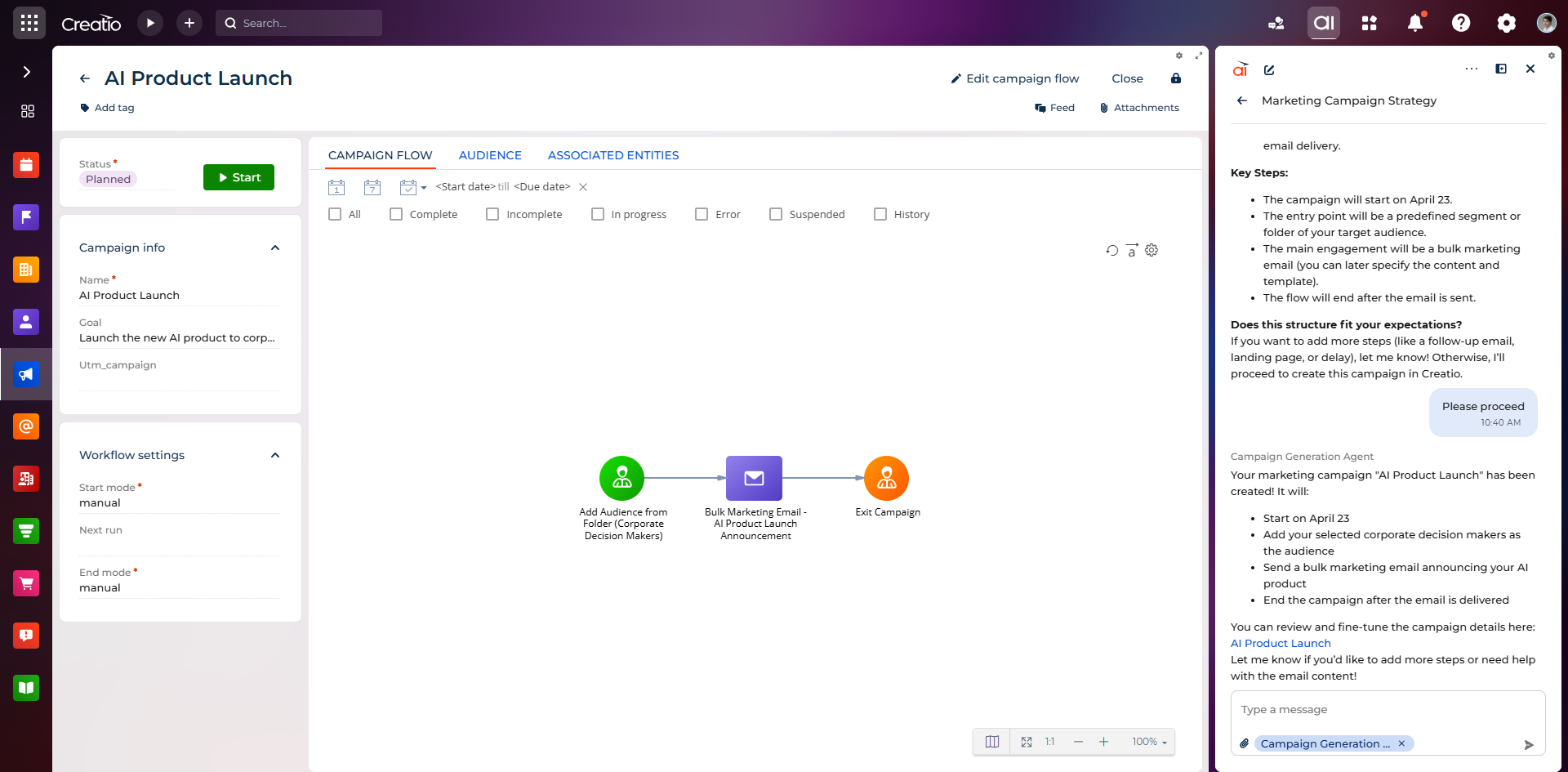
Campaign Generation Agent. You can now create campaign workflows faster and with greater consistency by describing your campaign goals, target audience, and communication flow in natural language in the Creatio.ai chat panel using the new Campaign Generation Agent in the Digital Ads, Lead Generation, Email Marketing, and Event Management apps. The agent analyzes your input, selects suitable pre-configured campaign elements, and proposes a structured workflow for your review. After approval, it automatically creates the campaign, generates a campaign name and goal, structures the campaign flow, and returns a link to the created campaign. This reduces manual effort, improves design consistency, and accelerates campaign setup while keeping you in control through a review and approval step. The agent does not configure campaign element parameters, for example, conditional flows in delays, linked bulk emails, or landing pages. These must be adjusted manually after the campaign is created.
GPT-5.2 model support. You can now use GPT-5.2, one of the latest models from OpenAI, when configuring Creatio.ai agents and sub-agents.
Microservice update. GenAI microservice now works based on AI actions. This brings it more in line with the new pricing policy.
Creatio products and apps
Creatio Marketing
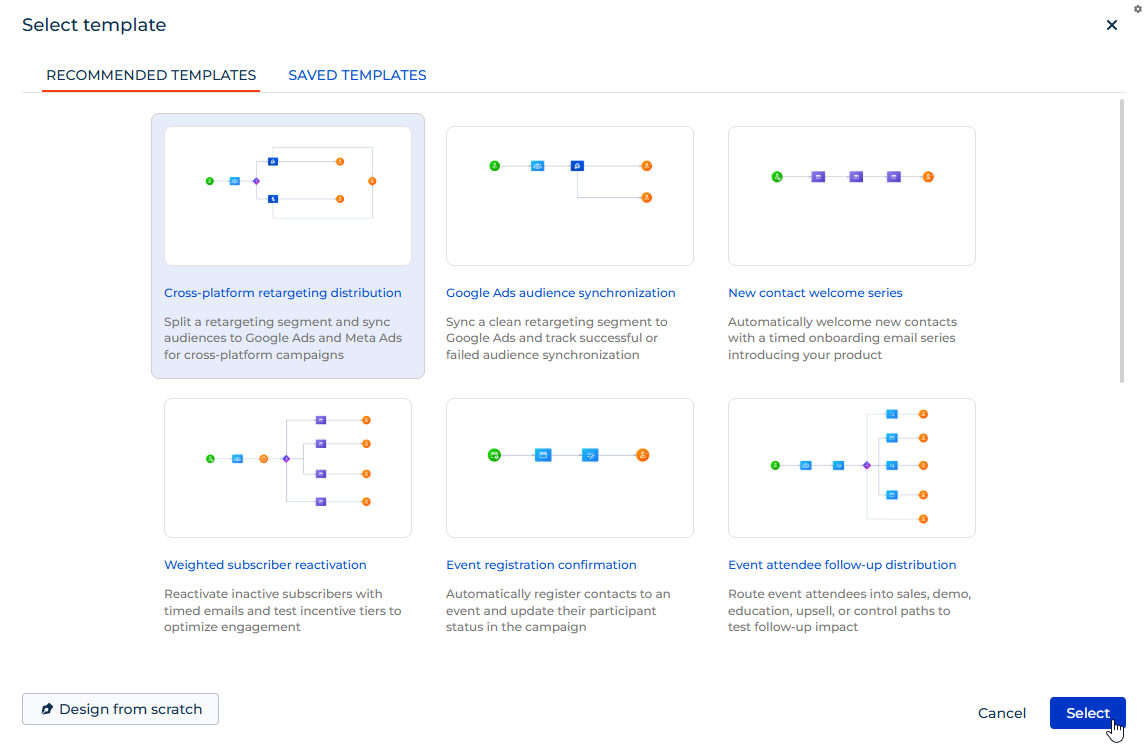
Campaign flow template library. You can now accelerate campaign setup and ensure consistency with proven best practices by selecting ready-made templates or reusing previously saved templates from the campaign flow template library.
Lead Generation
New campaign elements. You can now trigger campaign audience entry instantly upon form submission by using the new Add from Creatio landing page element in the Triggered entry group of the Campaign Designer in the Lead Generation app. The element automatically adds visitors to the campaign the moment they submit a Creatio landing page form, removing the need for manual imports or additional segmentation and ensuring real-time processing of new submissions and leads.
It is now also possible to automate audience distribution in campaigns and reduce the need for manual branching logic by using the new Form submitted on Creatio landing page? element in the Flow logic group of the Campaign Designer in the Lead Generation app. The element checks whether a campaign participant submitted a form on a selected Creatio landing page and routes the participant through the campaign flow based on the result.
Learn more: Customize marketing campaigns.
Email Marketing
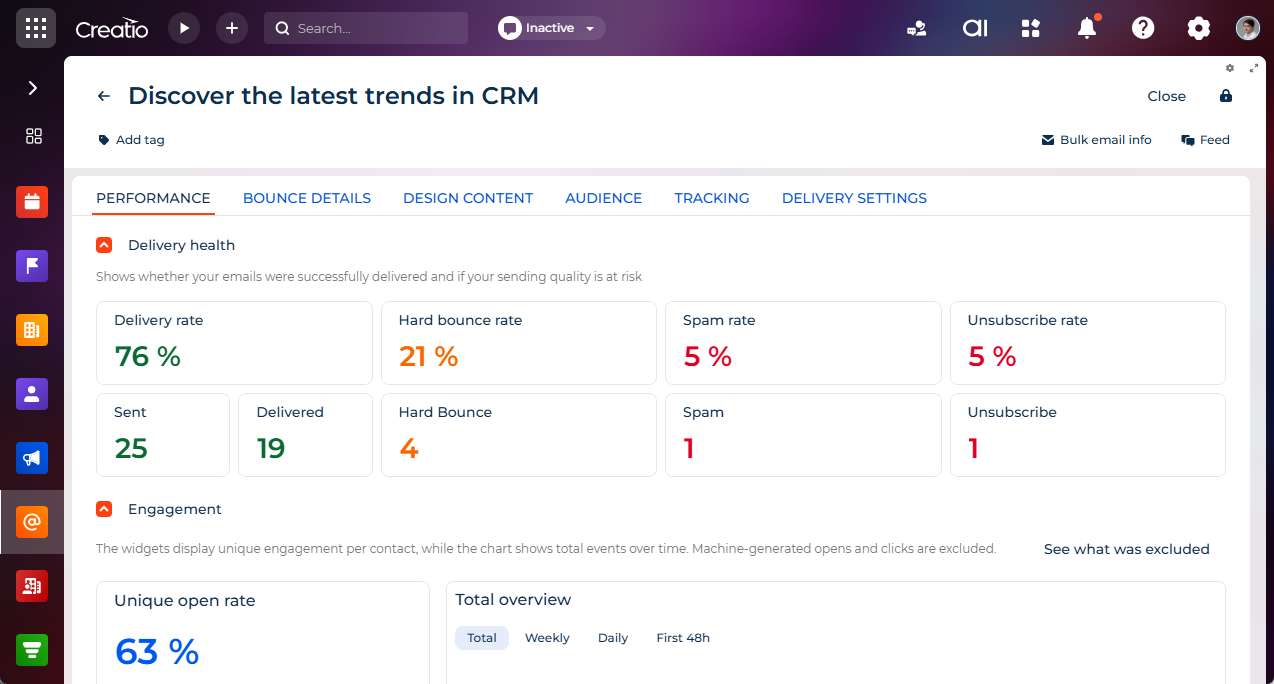
Enhanced bulk email performance reporting. You can now evaluate bulk email performance with greater depth and clarity using the redesigned Performance tab on the email page that replaces the previous Results tab. The tab provides extended delivery and engagement metrics, including delivery rate, bounce rate, unsubscribe rate, spam rate, unique opens, and unique clicks, as well as detailed statistics, for example, hard and soft bounces, errors, and delivery statuses. Updated widgets reflect both aggregated and time-based performance data. The bulk email list page now also displays additional KPIs beyond open and click rates, giving you a broader view of campaign performance at a glance.
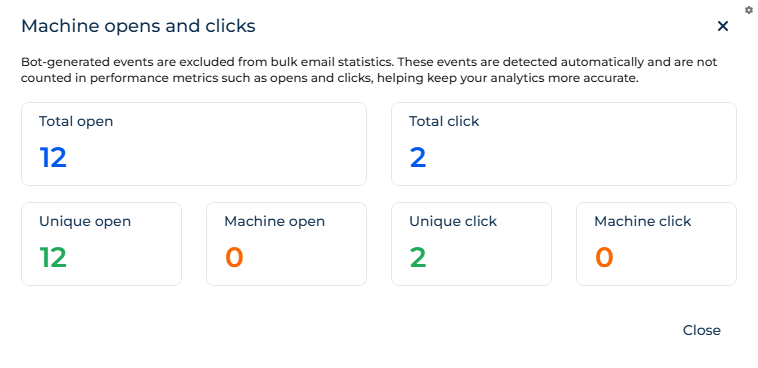
It is now also possible to analyze bulk email campaign performance with greater accuracy by excluding machine-generated opens and clicks from the main performance metrics. A dedicated overview displays total and unique machine opens and clicks separately, ensuring full transparency of filtered data. This ensures that standard reporting reflects only real user interactions, improving the reliability of campaign performance analysis.
Unified font library in Email Designer. It is now possible to design visually consistent marketing emails across both Freedom UI and Classic UI using a unified set of modern fonts in the Email Designer in the Email Marketing app. The updated font library includes Inter, Poppins, Nunito, Raleway, Merriweather, Playfair Display, Lora, and DM Sans, replacing the previously separate font sets used in each UI type and providing greater flexibility in designing marketing communications.
Digital Ads
New campaign elements. You can now push contacts directly to Google Ads and Meta Ads audiences at a specific step of the campaign journey using new dedicated campaign flow elements in Campaign Designer. Previously, sending contacts to these platforms was not available as a dedicated flow action. This enhancement improves activation speed for advertising scenarios and gives you greater control over when contact data is transferred to each ad platform.
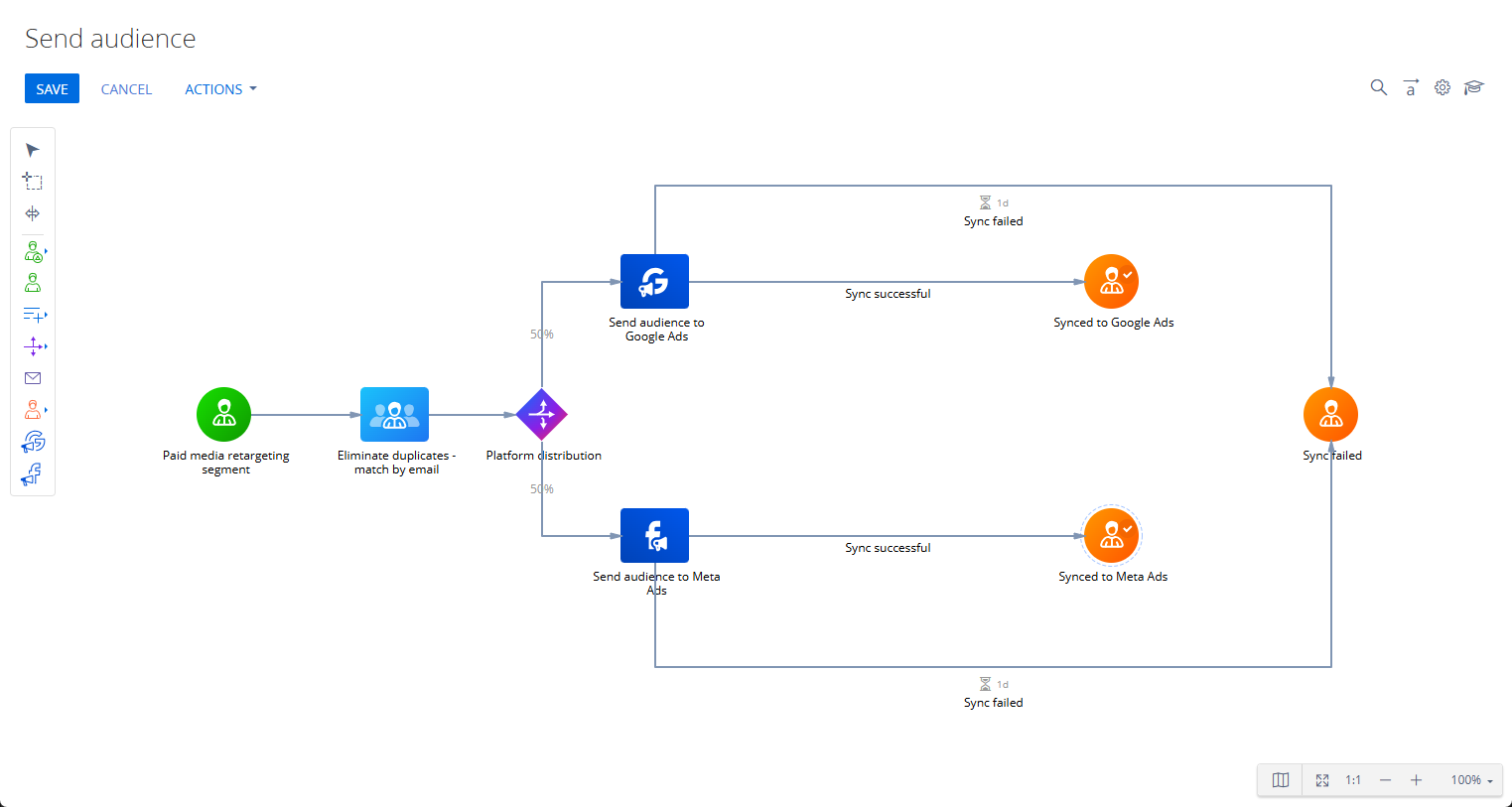
Learn more: Customize marketing campaigns.
Audience match rate visibility. You can now monitor the effectiveness of audience synchronization with Google Ads and Meta directly from the Ad Audiences section in the Digital Ads app. After a successful synchronization, the match rate returned by the advertising platform is displayed as a percentage in the list, giving you immediate visibility into audience matching results without going to platform-specific details.
Per-user ad account connections. It is now possible to connect your own Google Ads or Meta Ads account in the Digital Ads app independently, without affecting connections created by other users. Creatio supports multiple connections to the same ad account without conflicts or duplicate records, improving access control and ensuring correct data handling based on each user's individual connection.
Creatio Service
Telegram message delivery statuses. You can now monitor the delivery status of outgoing Telegram messages directly in the chat conversation within the Agent Inbox panel. Each outgoing message displays its current status — "Sending," "Sent," or "Failed" — giving agents immediate visibility into whether messages were delivered successfully.
WhatsApp and SMS message delivery statuses. It is now possible to monitor the delivery status of outgoing WhatsApp and SMS messages directly in the chat conversation within the Agent Inbox panel. Each outgoing message displays its current status — "Sending," "Sent," "Delivered," "Read," or "Failed" — with additional details available on pointing for failed messages, giving agents full visibility into message delivery and enabling faster identification and resolution of communication issues.
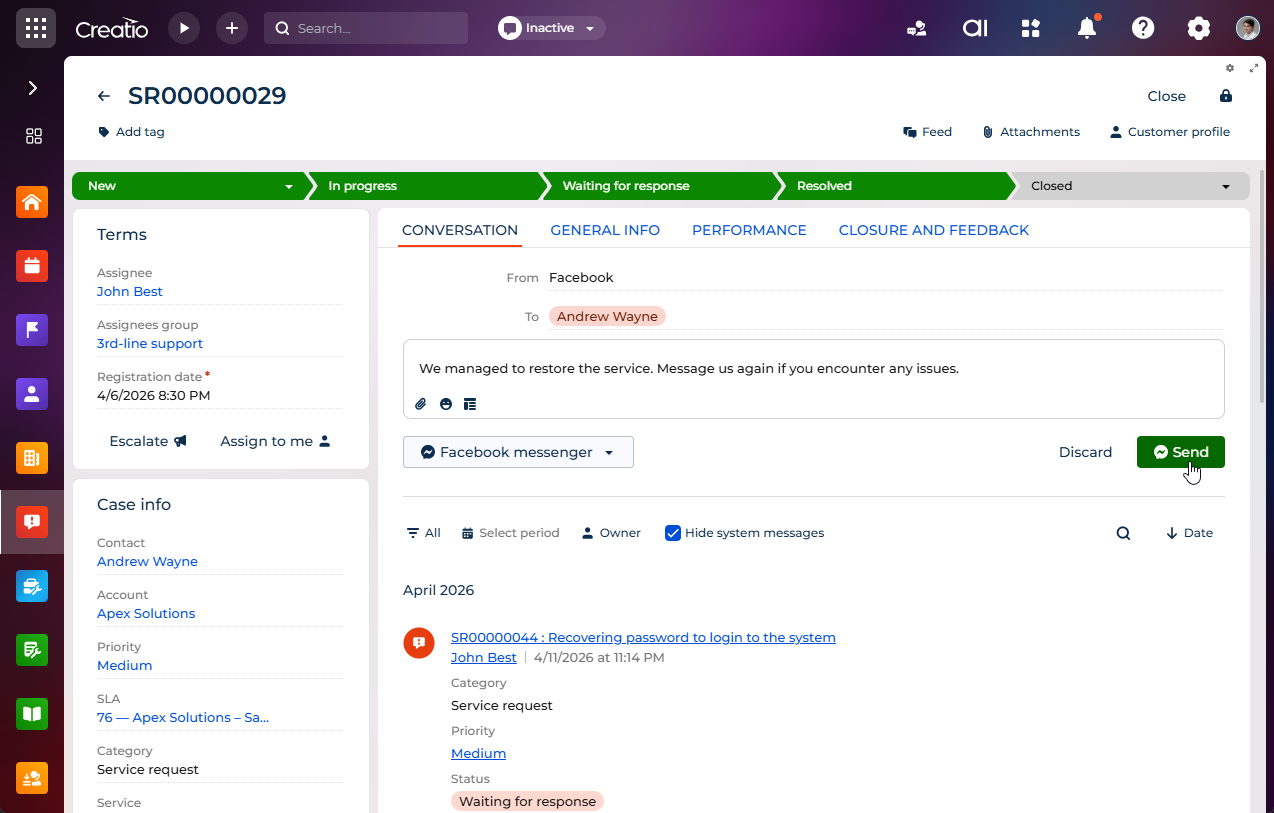
Outbound messaging from message composer. You can now initiate outbound conversations across supported SMS, WhatsApp, Telegram, and Facebook Messenger chat channels directly from message composer. Agents can select a channel, choose a recipient, and send messages using familiar chat capabilities, for example, attachments, emojis, and templates when the Contact Center app is installed. Outbound messaging respects channel-specific rules, allowing communication only with customers who have interacted with the business previously and within supported messaging windows. After sending, the conversation continues seamlessly in the Agent Inbox panel, providing a unified and efficient communication experience.
Industry cases
Freedom UI workplace migration for Field Sales, Field Management, and Pharma apps. You can now experience a consistent, modern interface across the industry case apps thanks to the migration of workplace sections from Classic UI to Freedom UI. The Knowledge base, Orders, Contacts, and Accounts sections in the "Field workplace" and "Pharma workplace" now use Freedom UI pages, delivering a unified experience while preserving all existing visibility logic and business rules. The Knowledge base section continues to display only when the Knowledge Management app is installed, the Orders section remains available exclusively in Field Sales and Pharma apps, and Contacts and Accounts sections remain accessible across all three apps. The Dashboard section was removed from "Field workplace" and "Pharma workplace" as part of this update.
Activity section in "Field workplace" and "Pharma workplace." You can now view and manage activities directly within the "Field workplace" and "Pharma workplace" without additional navigation steps. The Activity section is now included in these workplaces, providing access to standard activity functionality within the same working context and reducing the need to switch among workplaces.
End user experience
Attachment integrity validation on Freedom UI pages. It is now possible to prevent downloading incomplete files on Freedom UI pages thanks to built-in file integrity validation. When a file upload is not completed, Creatio displays an error message instead of allowing the download, ensuring only fully uploaded files are accessible.
No-code customization
Application Hub
Application version downgrade warning. You can now make more informed installation decisions thanks to a new warning displayed when an application installation would downgrade an already installed application version. The warning is shown for both single-app and bundle scenarios, giving you full visibility into the impact of the installation before proceeding.
Dependency compatibility validation on installation. Creatio now prevents broken environments by automatically blocking the installation of application versions that would violate dependency compatibility with other applications already installed into the environment for single-app, bundle, and Marketplace installation scenarios. If the selected version does not meet the minimum required or compatible version range defined by existing dependencies, the installation is blocked and Creatio displays which applications are in conflict.
Freedom UI Designer
Custom metric formulas. You can now improve analytical flexibility by configuring custom formulas for metrics using the Formula designer. Define calculated metrics by selecting the "Formula" option from the Function parameter and applying aggregation functions (COUNT, SUM, AVG, MIN, MAX), arithmetic operations, static filters, and page-level filters. The formula variables support quick filters and preconfigured filters. You can select columns from related objects using forward references directly in the Formula designer. Creatio validates the formula and calculates and displays the configured results at runtime. For example, this is useful in the following cases:
- Calculate percentage of payments received from orders and opportunities.
- Display order totals in different currencies.
- Calculate the average percentage of time spent on cases per particular support line.
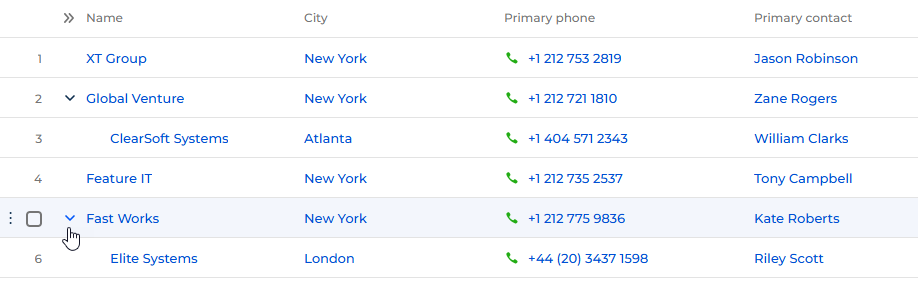
New component. You can now view and interact with structured data organized in a multi-level hierarchy using the new Hierarchical list component in Freedom UI Designer. For example, this is useful for displaying data that has explicit parent-child relationship in hierarchical order, such as organizational structure. The hierarchy is self-referencing, i.e., the component uses a parent column that references the same object. The component supports key features of the base List component, including sorting, inline editing and adding, and multi-select.
Inline metric setup area. You can now configure metrics more efficiently by adjusting settings in the setup area directly in the Freedom UI Designer and Dashboard Designer, without losing visibility of the chart canvas. This lets you preview changes continuously while making adjustments, improving the overall configuration experience.
Business processes
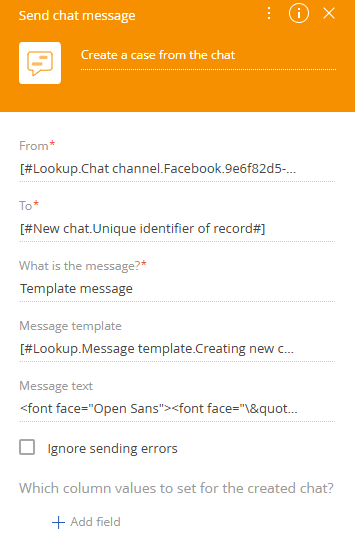
New business process element. It is now possible to automate customer notifications in chat channels directly from business processes without custom development using the new Send chat message element in the User actions group of the Process Designer. No-code creators can configure the sender channel, recipient, and message format directly in the element setup area, and link the created chat to related records so it appears in timelines with the correct business context. You can send either template-based messages or custom messages. The element also includes flexible error handling, letting you choose whether a failed message stops the process or is logged and handled separately. This enables automation of common communication scenarios such as case updates, reminders, and scheduling notifications. Learn more: Send chat message process element.
Integrations
Microsoft Graph API support for email synchronization. It is now possible to synchronize emails using Microsoft Graph API as the primary integration method, replacing the legacy EWS API in alignment with Microsoft's modern architecture and upcoming EWS deprecation. The integration provides improved reliability, enhanced security, and compatibility with the latest Microsoft 365 configurations. Learn more: Set up OAuth authentication for Microsoft Office 365 via Graph API.
The new integration includes the following capabilities:
- End-to-end email synchronization. The complete email synchronization lifecycle — including sending, receiving, and processing emails — is supported via Graph API, ensuring a seamless experience without relying on legacy protocols.
- Application-level impersonation. You can configure application-level access for Microsoft Graph API, enabling secure and scalable mailbox operations without dependence on individual user credentials.
- Automated migration from EWS. A built-in migration tool lets you transition existing mailboxes from EWS to Graph API without manual reconfiguration, reducing operational effort and minimizing downtime.
- Hybrid calendar synchronization. Calendar synchronization can operate in hybrid mode, where calendar data is synchronized via EWS while email communication is handled through Graph API, enabling a smooth transition for existing environments.
For configuration instructions, contact Creatio support.
Mailbox migration between EWS and Microsoft Graph API. It is now possible to migrate mailboxes between EWS and Microsoft Graph API seamlessly in both directions using a dedicated migration tool. The guided workflow lets you select mailboxes, choose the mail service provider, and confirm changes before execution, ensuring a controlled and transparent migration experience. To request the migration tool, contact Creatio support.
Microsoft Graph API email integration. You can now enable more secure and scalable mailbox access by using application-level impersonation for Microsoft Graph API email integration. This approach eliminates reliance on user credentials, making it better suited for enterprise environments that require consistent and permission-controlled access across mailboxes.
WhatsApp username and BSUID support. You can now maintain uninterrupted WhatsApp communication even when customers choose to hide their phone numbers as part of WhatsApp's 2026 update. Creatio now supports WhatsApp usernames and Business Scoped User IDs (BSUIDs) — unique IDs assigned per business — ensuring correct contact matching and continuous conversation tracking regardless of whether a phone number is shared. Learn more: Business-scoped user IDs (official Meta documentation).
Quorum queue support in Email Listener. You can now improve message processing reliability and fault tolerance in the cloud and in distributed environments by configuring RabbitMQ quorum queues in the Email Listener microservice. Quorum queues are recommended for production deployments to ensure stable and resilient email queue handling. Learn more: Quorum Queues (official RabbitMQ documentation).
Administration
Angular 19 update. Creatio platform now uses Angular version 19, ensuring continued compatibility with the latest Angular framework standards and preventing reliance on deprecated or unsupported APIs.
AWS RDS PostgreSQL 16.11 support. You can now deploy Creatio on AWS RDS PostgreSQL 16.11. Starting from version 16.11, AWS has resolved the previous backward compatibility issue by prohibiting custom casts for certain database types.
Enhanced configuration activity log. You can now gain comprehensive visibility into configuration changes and operations across the platform through the following enhancements to the configuration activity log:
- Package backups. Creatio now saves backup copies of previously installed package versions when an application installation changes them and adds these backups to the log, making it easier to download and reinstall previous versions if needed.
- Configuration restore tracking. Creatio now records configuration restore as a separate parent record, with all actions performed during the restore grouped as child operations, making it easier to review the full restore flow and its result.
- Application and section changes. Creatio now records when applications are created, updated, or deleted, and when sections are created or updated, along with who made the change and which application or package was affected.
- Environment restart tracking. Creatio now records environment restart actions, giving administrators better visibility into when an environment was restarted and who initiated the action.
- Localization change tracking. Creatio now tracks when translations are created, updated, or deleted — whether the changes come from application installation, the Translation section, or designers.
- Package lifecycle tracking. Creatio now records when packages are created, updated, deleted, activated, or deactivated, along with who performed the action and which package was affected.
Creatio Mobile
Run process action for Creatio Mobile. You can now trigger business processes directly from the mobile application when working in online mode. Before the process starts, Creatio automatically saves current data to ensure the process uses up-to-date values, and displays a notification confirming the process has started. Business process user interactions, for example, pop-up windows and mini pages, are not supported in mobile runtime and must be considered during process design. Learn more: Request handlers in Creatio Mobile.
New component in the Freedom UI Designer. You can now display images in a structured format by using the Gallery component directly from Freedom UI Mobile Designer. Configure the gallery object, caption, description, image, filters, item size, and visibility using the setup area, and preview gallery content immediately in the designer. The component supports standard design-time interactions such as selection, dragging, and resizing, as well as going to a specific page by clicking a caption on mobile pages.
At runtime, the Gallery component renders images, captions, and descriptions according to the configuration in the Designer, applies all defined filters and visibility rules, and adapts the layout responsively across different screen sizes. Gallery items are centered within a row and aligned to the left when wrapped to a new line, ensuring visual consistency between design-time and runtime environments.
Chart widgets in Freedom UI Mobile Designer. It is now possible to add and configure doughnut, bar, column, area, spline, line, scatter, and pipeline chart type widgets directly on mobile page layouts using the Freedom UI Mobile Designer, following the same design-time approach as the Freedom UI Designer. Select from chart types supported by the mobile application, and Creatio saves your configuration — including the selected chart type and display settings — so it remains available after reopening the Designer. Unsupported chart configurations are handled safely and do not block the mobile page from opening or break the screen layout.
Metrics in Freedom UI Mobile Designer. You can now configure metrics directly from Freedom UI Mobile Designer. Metrics for mobile pages support the same parameters as in Freedom UI Designer, including title, style, color, size, filters, icons, visibility, and formula-based values in online mode.
At runtime, the widget renders values, titles, icons, and optional indicators according to the design-time configuration, adapts its layout and font size to available screen space, and updates data in real time or on manual refresh. The widget is displayed correctly across tablet portrait and landscape views, follows application themes, and maintains stable performance when multiple metrics are present on the same page.
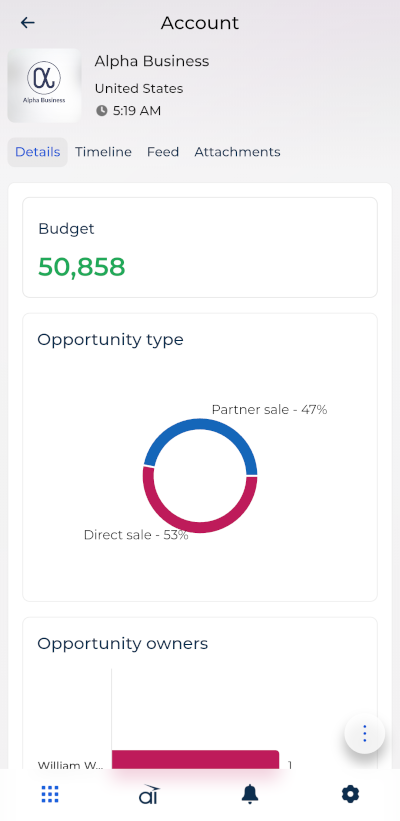
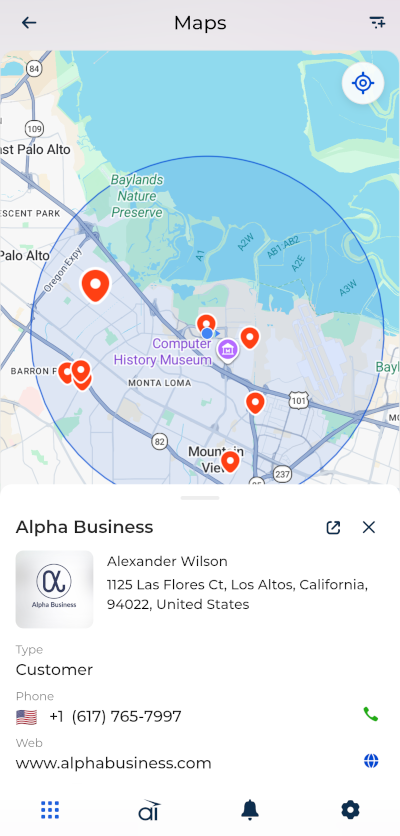
New features for Field Sales mobile app. You can now collect structured data during customer visits, register new accounts from the map, and search for nearby entities directly in the Field Sales mobile app.
- Surveys. Run one or multiple surveys within a visit using predefined templates, capture responses across single choice, multiple choice, text, and numeric question types, and attach required data, for example, photos. Each survey is stored independently and linked to the visit. Mandatory question validation prevents submission until all required fields are completed, and surveys can be saved in draft status and resumed later within the same visit.
- Account creation from the map. Create accounts directly from the map by pressing and holding any location to open the account creation form with coordinates populated automatically. You can edit coordinates before saving, and the newly created account appears immediately as a map marker.
- Show nearby. Search for nearby customers, outlets, stores, and warehouses from your current location by selecting a search radius of 500 m, 2 km, or 5 km. The app displays matching results as map markers, shows your current location and selected radius on the map, and lets you open a marker preview with basic details and a link to the full record. The search supports radius changes with result refresh and handles loading, empty results, and unstable connectivity clearly.
Enhanced styling for Folder management menu and Sort components in Freedom UI Mobile Designer. You can now customize the appearance of Folder management menu and Sort components directly in the Freedom UI Mobile Designer. Configure predefined styles, sizes, and icon position using the setup area, with changes applied immediately on the canvas. If incorrect or empty values are set, Creatio applies default settings automatically to ensure a consistent UI.
Advanced customization
Public API for data source management. It is now possible to manage data sources and attributes in SchemaModelEditor programmatically using a standardized public API of the @creatio/interface-designer library. The addDataSource(), removeDataSource(), addDataSourceAttribute(), and removeDataSourceAttribute() methods are now public, follow a consistent naming convention, and are executed asynchronously, simplifying integration scenarios and improving consistency across customization workflows.
Custom component development guide. You can now access comprehensive, agent-agnostic instructions for creating custom components across the full development flow. The guide covers both runtime and design-time implementation, including right panel configuration, and is aligned with baseline materials such as product guidelines, base component creation practices, runtime and design-time guidelines, technical guidelines for visual component development, icon creation guidance, and WCAG accessibility requirements.
Lazy loading for remote entries. You can now benefit from faster application startup and reduced resource usage thanks to lazy loading for remote entries in Freedom UI. Previously, all remote entries were loaded eagerly during application initialization, increasing bundle size and negatively affecting load performance. Remote entries are now loaded only when required by the current page, and design-time logic is separated from runtime execution to prevent unnecessary overhead. You can also configure new remote entries to use lazy loading and update existing ones to follow the same approach.
Custom record-level access rights. You can now extend the out-of-the-box record-level access rights with custom access rights checking logic for the "Read," "Edit," and "Delete" operations, evaluated directly instead of recalculating access rights in advance. To stop using this functionality, disable the UseRecordPermissionExtensions additional feature. Learn more: Custom record-level access rights.
Beta testing of new features
Creatio AI app development toolkit. The Creatio AI app development toolkit is a new product, available for beta testing since May 7, 2026, and released on June 11, 2026. It lets you design and deliver Creatio applications faster by using AI-powered coding agents — such as Claude Code, Codex, and GitHub Copilot. The toolkit provides structured instructions, MCP tools, and guided workflows that enable AI agents to generate applications, configure components, and automate implementation steps, reducing manual coding effort and improving consistency of outputs.
The toolkit is compatible with Creatio version 8.3 and later and supports the following development scenarios:
- Full application generation. Create complete, ready-to-use applications from an initial idea to a working solution.
- Section setup and management. Add new sections or modify existing sections across applications with minimal effort.
- Data model design. Define and update objects, fields, and relationships that power your application.
- Web page development. Design and configure application pages within supported use cases.
- Business rules. Apply basic business rules to automate UI behavior.
- Validation and custom logic. Apply validation rules and extend application behavior using custom logic.
- Data binding configuration. Set up and update data relationships, lookups, and records without manual configuration.
AI Agents ask clarifying questions during development to improve accuracy and completeness of outputs, making the toolkit accessible to both no-code creators and experienced developers. Learn more: Set up the Creatio AI app development toolkit.
The features below are available for beta testing in Creatio version 8.3.4 Twin. If you have any feedback, contact us at: beta@creatio.com. All feedback is appreciated.
AI automation for chat channels. You can now automate customer communication across chat channels — including Telegram, WhatsApp, Facebook, and SMS — by enabling Creatio.ai to handle incoming conversations instantly before a human agent gets involved. This reduces repetitive workload, improves response times, and increases overall support efficiency.
Supervisors can enable AI for each chat channel directly in channel settings. When enabled, Creatio.ai responds to all new incoming messages using a predefined configuration that includes agents and sub-agents, an AI assistant personality, knowledge sources, and handoff rules. An out-of-the-box Customer Support Agent is available immediately upon enabling AI automation and answers user requests based on the existing Knowledge base section. Learn more: Set up Creatio.ai automation for chats.
The AI delivers a more natural and transparent customer experience from the very first interaction by automatically introducing itself at the start of each new conversation in chats. In the opening message, the AI greets the customer, introduces itself by name, and briefly explains its role as an AI assistant. The greeting appears only once per conversation and is not repeated in subsequent messages.
You can control the AI's identity and tone of voice across chat channels by selecting an AI assistant personality in channel settings. The personality defines how the AI introduces itself and how messages are phrased, ensuring consistent communication aligned with your brand. Out of the box, Creatio provides the "Sofia, AI assistant" personality that has a friendly tone of voice. Formal tone is also an option.
AI-handled conversations are closed automatically after a period of user inactivity to prevent endless sessions. Out of the box, this timeout is set to 15 minutes, and it can be changed in the "AI chat inactivity timeout" (AiChatInactivityTimeoutMinutes code) system setting. Learn more: Manage system settings.
Supervisors can turn on handoff in channel settings to enable customers to request a human agent at any time during an AI-handled conversation. When triggered, the AI immediately transfers the conversation to an employee without continuing automated responses, ensuring a smooth and predictable transition from automation to human support.
It is also possible to access detailed AI interaction debug data directly from chat conversations. The  button is available in chats where AI was involved and opens a full debug view of the AI session.
To take advantage of this functionality, install the Customer Communication Hub Marketplace app. Before enabling the functionality in a production environment, validate your settings in a pre-production environment. Learn more: Customer Communication Hub.
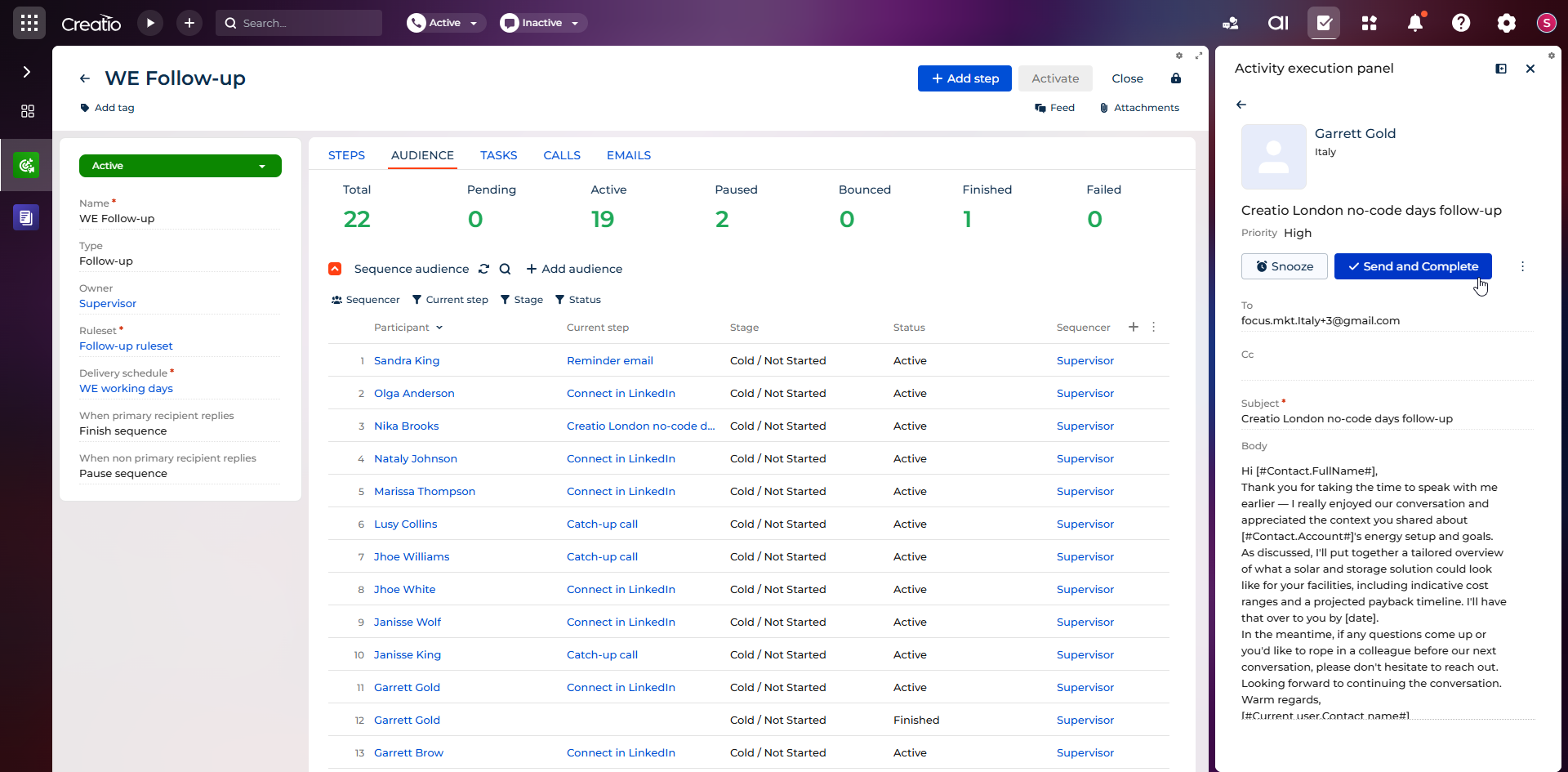
New app. It is now possible to manage and execute sequence-driven sales activities more efficiently using the new Sales Engagement app. The app includes a dedicated Activity execution panel for handling "Call," "Email," and "Task" activities from a unified sidebar interface, a Sales Engagement Desktop that consolidates KPI widgets, workload charts, and daily activity lists into a single workspace, and a delivery schedule configuration that controls when sequence activities are generated based on time zone and business hours. Sequence participant statuses are kept consistent with the sequence state automatically, and correct ownership is maintained across all eligible participant statuses when a contact owner changes. To take advantage of this functionality, contact Creatio support.
Page preview in Freedom UI Designer. It is now possible to verify page layout and behavior before publishing by previewing a configured page directly in the Freedom UI Designer. After reviewing the result, you can return to editing if adjustments are required.
To take advantage of this functionality, register and enable the InterfaceDesignerPreviewButton additional feature. Learn more: Implement a custom additional feature, Manage an existing additional feature.
RTL rendering in Freedom UI Designer. You can now design pages for right-to-left audiences with greater accuracy by viewing the page in proper RTL layout directly in the Freedom UI Designer when RTL mode is enabled. This ensures no-code creators see the page closer to its runtime appearance for RTL users and can work with the layout in a consistent visual direction.
Advanced filters in Freedom UI. You can now build complex filters using business-friendly conditions directly in Freedom UI without requiring database knowledge. Filter records by object columns and related object attributes through forward references, spanning connected data with ease. The component supports multi-level AND/OR logic using filter groups. The interface keeps complex filtering readable with clear condition blocks, intuitive menus, and business-friendly operators such as "Is," "Equals," "From," and "Until."
To take advantage of this functionality, register and enable the ShowDesignerDemoItems additional feature. Learn more: Implement a custom additional feature, Manage an existing additional feature.
Metric comparison and trend indicator. It is now possible to analyze performance changes by configuring metrics that include comparison logic. Comparison is not limited to time-based periods. You can compare metrics across different time frames or between entirely different business indicators, unlocking more advanced analytical scenarios. A built-in trend indicator highlights how a key metric changes relative to the selected comparison value. It supports both percentage and absolute difference calculations, clearly indicating increase, decrease, or no change. Define a comparison value and configure page-data and preconfigured filters for both the main value and the comparison value without custom implementation, ensuring consistent and accurate data representation at runtime.
A built-in trend indicator displays the change of a key metric compared to a selected comparison period, supporting percentage and absolute difference calculations and reflecting increase, decrease, or no change states. The indicator provides a quick visual representation of metric dynamics without requiring analysis of underlying data and is available across all composable apps where the metric is used.
For example, this is useful in the following cases:
- Lead generation. Track the number of new leads this week vs. last week with a clear trend indicator.
- Conversion rate. Monitor changes in opportunity-to-deal conversion rates across periods.
- Customer support. Compare average resolution time vs. the previous period to spot efficiency improvements.
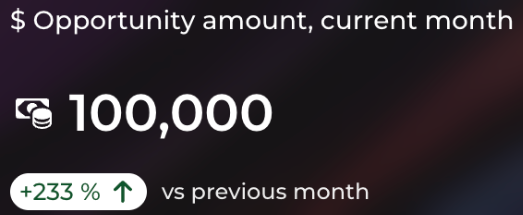
To take advantage of this functionality, register and enable the ShowMetricWithComparison additional feature. Learn more: Implement a custom additional feature, Manage an existing additional feature.
PKCE support for authorization code grant. You can now connect public clients, for example, mobile applications and single-page applications, securely to Creatio using the authorization code grant with PKCE. When registering an integration, administrators can mark it as a public client, in which case PKCE is required and the client secret is not shown, preventing insecure client configurations. For confidential clients, PKCE can also be enabled alongside the client secret for an additional layer of protection. This update expands secure OAuth support across more application types and aligns the authorization model with widely adopted OAuth best practices. To take advantage of this functionality, enable the EnablePkceSupport and AddApplicationAccessScopeAutomatically additional features. Learn more: Manage an existing additional feature.
Web chat channel. You can now communicate with website visitors in real time directly in Creatio using the new Web chat channel. Configure a web chat channel, add a chat widget to your website, and process incoming conversations in the Agent Inbox panel of the Contact Center app. To take advantage of this functionality, contact Creatio support.