Handle sensitive data shared by customers during chat sessions
During omnichannel chat sessions, customers might share sensitive information such as document numbers, personal IDs, payment details, email addresses, or phone numbers. This information is often required temporarily to complete verification, security checks, or compliance-related workflows.
However, storing such data across storage surfaces such as chat history, message storage tables, transcripts, or analytical reports, introduces significant security, privacy, and compliance risks. Persisting sensitive information beyond its immediate business purpose increases the likelihood of unauthorized access, data leaks, and regulatory violations. At the same time, avoiding the collection of sensitive data entirely is impractical, since it is often required during an active conversation.
Creatio provides a built-in, extensible post-conversation handling mechanism that masks sensitive data in omnichannel chat messages. This capability allows third-party developers to configure and extend how sensitive data is masked, while ensuring that original values are not stored after the chat session is completed.
The mechanism supports collecting required sensitive information during an active conversation and automatically masking it once the business purpose is fulfilled. As a result, sensitive data is handled only in real time and does not remain accessible in plain text in chat history, message storage tables, transcripts, or analytics. This approach enables verification and compliance workflows in chat channels while minimizing security and privacy risks and aligning with data protection requirements.
The implemented Creatio mechanism for handling sensitive chat data is designed to comply with the following requirements:
- Data minimization — sensitive information must not be stored longer than necessary.
- Post-conversation anonymization — masking is applied only after the chat reaches a final state.
- Consistency across storage layers — all message storage surfaces are handled in a uniform manner.
- Idempotency — repeated execution produces no additional side effects.
- Extensibility — new masking targets can be added without changing orchestration logic.
- Predictable performance — rule evaluation has deterministic complexity.
These requirements ensure protection of sensitive information without compromising chat usability or extensibility. To meet these requirements, Creatio applies a post-conversation handling approach that masks sensitive data only after a chat session is completed.
While a chat session is active, messages remain unchanged. Once the chat transitions to a final status, incoming customer messages are scanned for sensitive content. Detected fragments are replaced with a fixed masking token ("********").
This ensures that sensitive data is available only for the duration of the conversation and is not persisted after the chat ends. After chat completion, sensitive values are masked across all storage surfaces, including chat history, message storage tables, serialized conversation snapshots, transcripts, and analytical reports. No original sensitive values remain accessible in plain text.
Entities that store chat messages
Creatio stores chat message data in dedicated objects and database tables. Each entity represents a specific storage layer of the omnichannel messaging subsystem and serves a distinct purpose in message processing and persistence.
View entities used for storing chat message data in the table below.
Entity | Entity column | Description |
|---|---|---|
"Chat messages" ( | "Message" ( | Stores dedicated chat messages exchanged during the conversation. |
|
| Stores omnichannel messages used by the messaging infrastructure across different channels. |
"Chat" ( | "Chat conversation" ( | Stores a serialized snapshot of the entire closed conversation, including all exchanged messages. |
This solution allows anonymizing sensitive message data according to configurable detection rules across all chat-related storage entities.
General procedure to set up sensitive chat data handling
To enable sensitive chat data handling, perform the following steps:
- Define sensitive data detection rules — configure regular-expression patterns that identify fragments of message text containing sensitive information.
- Register masking providers (optional) — register additional providers if your implementation stores chat messages in extra storage surfaces that must be masked.
Once these steps are completed, Creatio applies sensitive data masking automatically as part of post-conversation handling after a chat session reaches a final state.
1. Define sensitive data detection rules
To enable sensitive data detection, define one or more regular-expression rules that identify sensitive fragments in customer message text. To do this, add the OmniSensitiveRegexRule object and configure the rules within this object. Each rule represents a single detection pattern and can be enabled or disabled independently.
Creatio evaluates detection rules sequentially and stops at the first enabled rule that matches the message text. Rules do not have explicit priorities, which ensures predictable and deterministic runtime behavior.
Each rule consists of a regular-expression pattern used for detection and a flag that determines whether the rule participates in evaluation. Disabled rules are ignored without being deleted, which allows temporary deactivation without configuration changes.
The following example illustrates a reference implementation of a rule model used to store regular-expression patterns and control whether a rule participates in sensitive data detection.
public class SensitiveRule {

    /* Primary key of the rule record. */
    public Guid Id { get; set; }

    /* Rule name. */
    public string Name { get; set; }

    /* Regular expression pattern used to detect sensitive fragments. */
    public string Pattern { get; set; }

    /* Enables or disables the rule without deleting it. */
    public bool Enabled { get; set; } = true;

    /* Convenience string representation for debugging. */
    public override string ToString() => Name;
}
2. Register masking providers (optional)
If your implementation stores chat message content in additional objects or custom storage structures, register masking providers for those storage surfaces that contain customer message text.
To extend sensitive data handling, implement the ISensitiveDataProvider interface and register your provider in the post-conversation processing pipeline.
During post-conversation handling, Creatio invokes all registered masking providers for each detected sensitive fragment. Each provider is responsible for applying masking to its specific storage surface.
Providers must be idempotent. Before persisting changes, each provider must verify that masking produces a modified value. This guarantees safe repeated execution and prevents unnecessary database updates.
View the interface that defines a common contract for all masking providers and allows the post-conversation handling workflow to apply masking uniformly across different storage layers.
/* Implement this interface to apply masking logic to a specific message storage surface. */
public interface ISensitiveDataProvider {

    /* Masks sensitive fragments for a single storage surface.
    Implementation must be idempotent. */
    void WipeSensitiveData(
        Guid chatId,
        Guid messageId,
        string originalText,
        SensitiveRule rule,
        IMaskingService maskingService);
}
Creatio provides out-of-the-box masking providers listed in the table below. Use them or implement additional providers if required.
Provider | Required | Purpose |
|---|---|---|
ChatMessagesProvider | Yes | Masks sensitive fragments in individual customer chat messages by updating the "Message" ( |
OmniChatConversationProvider | Yes | Masks sensitive fragments in the serialized conversation snapshot by updating the "Chat conversation" ( |
OmnichannelMessagesProvider | No | Masks sensitive fragments in individual omnichannel message records by updating the |
In a minimal configuration, no custom development is required. ChatMessagesProvider and OmniChatConversationProvider are sufficient to mask the core chat storage surfaces. Implement additional providers only if your solution persists customer messages outside of these objects.
Each provider builds a regular expression based on the matched rule, produces the masked text, and updates data only if the value changes. Since masking always results in the same deterministic value, repeated execution yields the same outcome. As a result, no additional processed flags are required to track whether a message has already been masked.
The following example illustrates a reference implementation of a masking provider for individual chat messages stored in the "Chat messages" (ChatMessages code) object. The provider applies sensitive data masking at message level, updates the message text only when masking produces a modified value, and demonstrates idempotent, row-level processing suitable for safe repeated execution.
public class ChatMessagesProvider : ISensitiveDataProvider {

    protected readonly UserConnection _uc;

    public ChatMessagesProvider(UserConnection uc) {
        _uc = uc;
    }

    /* Storage-specific update for "ChatMessages" object.
    Virtual to allow reusing logic in derived providers. */
    public virtual void UpdateEntity(string masked, Guid messageId) {
        new Update(_uc, "ChatMessages")
            .Set("Message", Column.Parameter(masked))
            .Where("Id").IsEqual(Column.Parameter(messageId))
            .Execute();
    }

    public void WipeSensitiveData(
        Guid chatId,
        Guid messageId,
        string originalText,
        SensitiveRule rule,
        IMaskingService maskingService) {

        /* Build regex from the matched rule. */
        var regex = maskingService.BuildRegex(rule);

        /* Replace sensitive fragments using a fixed masking token. */
        var masked = maskingService.MaskSubstring(originalText, regex);

        /* Idempotency guard: if masking does not change the text, do nothing
        (prevents unnecessary database writes on repeated runs). */
        if (masked == originalText) {
            return;
        }

        /* Persist masked value for this storage surface. */
        UpdateEntity(masked, messageId);
    }
}
The following example illustrates a reference implementation of a masking provider for serialized conversation snapshots stored in the "Chat" (OmniChat code) object. The provider rewrites the aggregated conversation data in sync with per-message masking to prevent residual sensitive data from remaining in historical chat snapshots and demonstrates idempotent, snapshot-level processing suitable for safe repeated execution.
public class OmniChatConversationProvider : ISensitiveDataProvider {

    private readonly UserConnection _uc;

    public OmniChatConversationProvider(UserConnection uc) {
        _uc = uc;
    }

    public void WipeSensitiveData(
        Guid chatId,
        Guid messageId,
        string originalText,
        SensitiveRule rule,
        IMaskingService maskingService) {

        /* Load the chat record that stores the serialized conversation snapshot. */
        var chat = _uc.EntitySchemaManager
            .GetInstanceByName("OmniChat")
            .CreateEntity(_uc);

        /* If chat does not exist, nothing to process. */
        if (!chat.FetchFromDB(chatId)) {
            return;
        }

        /* Serialized snapshot of the whole conversation. */
        var conversation = chat.GetColumnValue("Conversation") as string;
        if (string.IsNullOrEmpty(conversation)) {
            return;
        }

        /* Use the same rule-based regex to mask sensitive fragments inside the snapshot. */
        var regex = maskingService.BuildRegex(rule);
        var maskedConversation = regex.Replace(conversation, _ => "********");

        /* Idempotency guard: skip save if no changes were produced. */
        if (maskedConversation == conversation) {
            return;
        }

        /* Persist masked snapshot. */
        chat.SetColumnValue("Conversation", maskedConversation);
        chat.Save(false);
    }
}
The following example illustrates a reference implementation of a masking provider for individual omnichannel message records stored in the OmnichannelMessages database table. The provider extends the base chat message provider, applies the same masking logic and idempotent update semantics, and ensures consistent sensitive data handling across multiple message storage tables.
public class OmnichannelMessagesProvider : ChatMessagesProvider {

    public OmnichannelMessagesProvider(UserConnection uc)
        : base(uc) { }

    /* Same masking logic as "ChatMessagesProvider," but updates "OmnichannelMessages"
    database table. */
    public override void UpdateEntity(string masked, Guid messageId) {
        new Update(_uc, "OmnichannelMessages")
            .Set("Message", Column.Parameter(masked))
            .Where("Id").IsEqual(Column.Parameter(messageId))
            .Execute();
    }
}
Handling of sensitive chat data
After the required configuration is completed, Creatio masks sensitive data automatically as part of the chat lifecycle. The process is triggered by the OmniChat status transition to a terminal state. No masking is applied while the chat is active. Customer messages remain unchanged during the conversation and are processed only after the chat reaches a final status.
The class chart below illustrates how this post-conversation masking process is executed internally after a chat session reaches a final state.
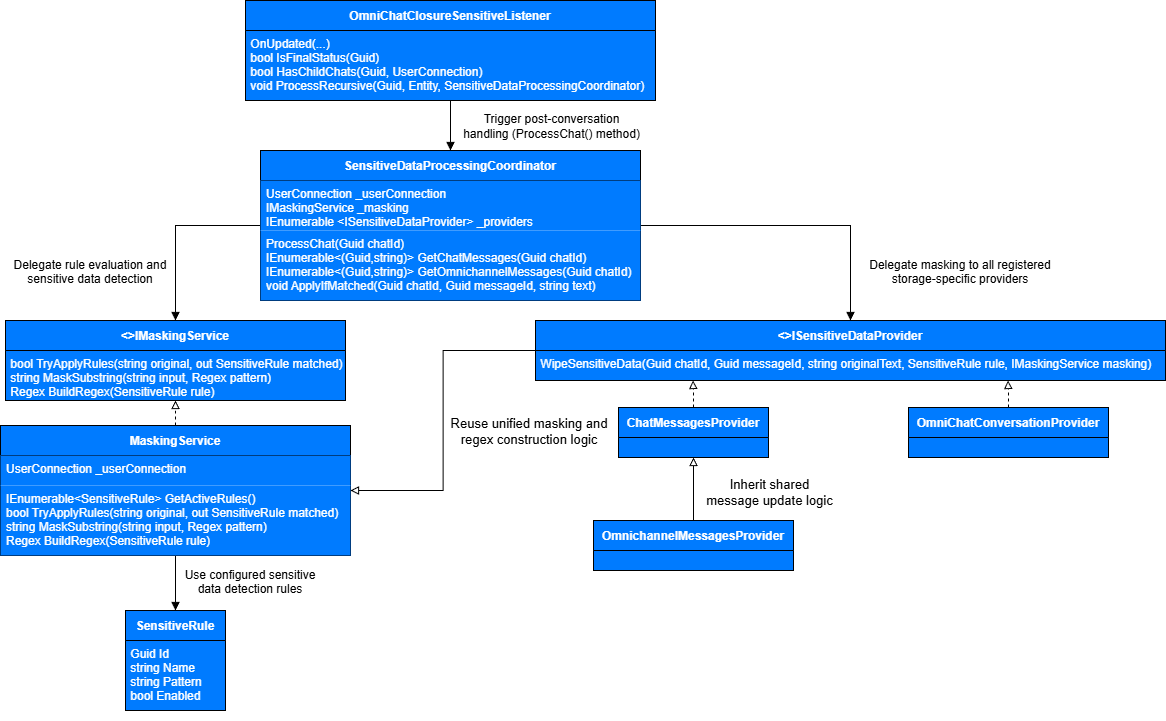
When a chat transitions to a terminal status, the OmniChatClosureSensitiveListener is triggered as part of the chat lifecycle. The listener validates that the chat represents a completed conversation (including transfer-chain checks) and initiates post-conversation handling by invoking the ProcessChat() method on the SensitiveDataProcessingCoordinator.
The SensitiveDataProcessingCoordinator orchestrates the masking workflow for a single chat instance. It retrieves incoming customer messages from configured storage surfaces and delegates sensitive data detection to the MaskingService. Rule evaluation is performed sequentially, and processing stops at the first enabled rule that matches the message text, ensuring predictable and deterministic behavior.
When sensitive data is detected, the coordinator delegates masking to all registered masking providers through the common ISensitiveDataProvider interface. Each provider applies anonymization to its own storage surface, while the coordinator itself remains unaware of storage-specific update logic.
Message-level providers (ChatMessagesProvider, OmnichannelMessagesProvider) update individual message records, while OmniChatConversationProvider operates independently on the aggregated serialized conversation snapshot. All providers reuse the same regex construction and masking logic exposed by the MaskingService, ensuring consistent handling across all storage layers.
Once configuration is complete, sensitive data handling becomes a fully automated part of the chat lifecycle: the listener reacts to chat completion, the coordinator performs rule evaluation and dispatch, and providers apply masking across all configured storage surfaces. Extending masking coverage requires only registering additional providers, without modifying the existing execution flow.
Sensitive data masking service
The masking service is responsible for evaluating sensitive data detection rules and applying masking to message text. It replaces detected sensitive fragments with a fixed-length masking token to prevent leaking information about original values.
The service operates in a stateless manner. This design ensures safe repeated execution and makes the masking logic idempotent, which is critical when processing chat data across multiple storage surfaces.
The following example illustrates a reference implementation of the masking service, including the service contract and its default implementation.
public interface IMaskingService {

    /* Finds the first enabled rule that matches the input text. */
    bool TryApplyRules(string original, out SensitiveRule matchedRule);

    /* Replaces sensitive fragments matched by regex using a fixed masking token. */
    string MaskSubstring(string input, Regex pattern);

    /* Builds a Regex instance from rule pattern. */
    Regex BuildRegex(SensitiveRule rule);
}

public class MaskingService : IMaskingService {

    private readonly UserConnection _userConnection;

    public MaskingService(UserConnection userConnection) {
        _userConnection = userConnection;
    }

    public bool TryApplyRules(string original, out SensitiveRule matchedRule) {
        matchedRule = null;

        /* Fast exit for empty inputs. */
        if (string.IsNullOrEmpty(original)) {
            return false;
        }

        /* Deterministic evaluation: sequential scan, stop on the first match. */
        foreach (var rule in GetActiveRules()) {
            var regex = BuildRegex(rule);
            if (regex.IsMatch(original)) {
                matchedRule = rule;
                return true;
            }
        }

        return false;
    }

    public string MaskSubstring(string input, Regex pattern) =>
        string.IsNullOrEmpty(input)
            ? input
            : pattern.Replace(input, _ => "********");

    /* Compiled regex improves performance for repeated use. */
    public Regex BuildRegex(SensitiveRule rule) =>
        new Regex(rule.Pattern, RegexOptions.Compiled);

    private IEnumerable<SensitiveRule> GetActiveRules() {
        /* Reads enabled rules from the "OmniSensitiveRegexRule" object. */
        var esq = new EntitySchemaQuery(
            _userConnection.EntitySchemaManager,
            "OmniSensitiveRegexRule");

        esq.AddColumn("Id");
        esq.AddColumn("Name");
        esq.AddColumn("Pattern");
        esq.AddColumn("Enabled");

        esq.Filters.Add(
            esq.CreateFilterWithParameters(
                FilterComparisonType.Equal,
                "Enabled",
                true));

        foreach (var e in esq.GetEntityCollection(_userConnection)) {
            yield return new SensitiveRule {
                Id = e.GetTypedColumnValue<Guid>("Id"),
                Name = e.GetTypedColumnValue<string>("Name"),
                Pattern = e.GetTypedColumnValue<string>("Pattern"),
                Enabled = e.GetTypedColumnValue<bool>("Enabled")
            };
        }
    }
}
Masking providers and storage surfaces
From an implementation perspective, the mechanism relies on existing objects. Individual chat messages are stored in the "Chat messages" (ChatMessages code) object and linked to a chat via the OmniChatId column. Only incoming customer messages, i.e., MessageDirection = 1, are evaluated for sensitive data detection and masking.
Chat-level information is stored in the "Chat" (OmniChat code) object, which includes columns such as Id, StatusId, CloseDate, and optionally ParentId columns for transferred or chained chats.
The processing coordinator is responsible for orchestrating sensitive data handling for a single chat instance. It retrieves customer messages, evaluates them using the masking service, and delegates masking operations to registered providers.
The coordinator does not contain storage-specific logic. Instead, it relies on provider interfaces to apply masking across different storage surfaces. This design ensures extensibility and allows new masking targets to be added without changing the core orchestration logic.
After sensitive data detection rules are evaluated, the mechanism must traverse chat messages and apply masking where a match is found. The processing coordinator acts as a facade that isolates message iteration and provider invocation logic. It retrieves incoming customer messages, requests rule evaluation from the masking service, and, when a match is detected, delegates masking operations to all registered providers.
The following example illustrates a reference implementation of the processing coordinator that coordinates rule evaluation and masking across chat message sources.
public class SensitiveDataProcessingCoordinator {

    private readonly UserConnection _userConnection;
    private readonly IMaskingService _masking;
    private readonly IEnumerable<ISensitiveDataProvider> _providers;

    public SensitiveDataProcessingCoordinator(
        UserConnection userConnection,
        IMaskingService masking,
        IEnumerable<ISensitiveDataProvider> providers) {

        _userConnection = userConnection;
        _masking = masking;
        _providers = providers;
    }

    /* Retrieves incoming customer messages from "ChatMessages" storage surface. */
    private IEnumerable<(Guid messageId, string text)> GetCustomerMessages(Guid chatId) {
        var esq = new EntitySchemaQuery(
            _userConnection.EntitySchemaManager,
            "ChatMessages");

        esq.AddColumn("Id");
        esq.AddColumn("Message");

        esq.Filters.Add(esq.CreateFilterWithParameters(
            FilterComparisonType.Equal, "OmniChatId", chatId));
        esq.Filters.Add(esq.CreateFilterWithParameters(
            FilterComparisonType.Equal, "MessageDirection", 1));

        foreach (var e in esq.GetEntityCollection(_userConnection)) {
            yield return (
                e.GetTypedColumnValue<Guid>("Id"),
                e.GetTypedColumnValue<string>("Message"));
        }
    }

    /* Retrieves incoming customer messages from "OmnichannelMessages" storage surface. */
    private IEnumerable<(Guid messageId, string text)> GetOmnichannelMessages(Guid chatId) {
        var select = new Select(_userConnection)
            .Column("Id")
            .Column("Message")
            .From("OmnichannelMessages")
            .Where("ChatId").IsEqual(Column.Parameter(chatId))
            .And("MessageDirection").IsEqual(Column.Parameter(1)) as Select;

        using (var dbExec = _userConnection.EnsureDBConnection())
        using (var reader = select.ExecuteReader(dbExec))
        {
            while (reader.Read())
            {
                yield return (
                    reader.GetGuid(0),
                    reader.GetString(1)
                );
            }
        }
    }

    public void ProcessChat(Guid chatId) {

        /* Process per-message records in "ChatMessages." */
        foreach (var (messageId, text) in GetCustomerMessages(chatId)) {

            /* Evaluate rules and find the first matching rule. */
            if (_masking.TryApplyRules(text, out var rule)) {

                /* Apply masking to all registered storage surfaces (providers). */
                foreach (var provider in _providers) {
                    provider.WipeSensitiveData(
                        chatId, messageId, text, rule, _masking);
                }
            }
        }

        /* Process per-message records in "OmnichannelMessages" (if used). */
        foreach (var (messageId, text) in GetOmnichannelMessages(chatId)) {
            if (_masking.TryApplyRules(text, out var rule)) {
                foreach (var provider in _providers) {
                    provider.WipeSensitiveData(
                        chatId, messageId, text, rule, _masking);
                }
            }
        }
    }
}
Masking provider factory
In practice, providers are composed through a factory to keep registration centralized and extensible. The provider factory centralizes the creation of masking providers and defines which storage surfaces participate in sensitive data handling. This approach simplifies configuration and makes it easier to extend masking coverage by registering additional providers.
The following example illustrates a reference implementation of a masking provider factory that centralizes creation and registration of sensitive data masking providers. The factory defines which storage surfaces participate in post-conversation handling and enables extensible composition of masking providers without changing the core orchestration logic.
public static class SensitiveDataProviderFactory {

    /* Central place to define which storage surfaces participate in masking. */
    public static IEnumerable<ISensitiveDataProvider> GetProviders(UserConnection uc) {
        return new ISensitiveDataProvider[] {

            /* Updates "ChatMessages" object. */
            new ChatMessagesProvider(uc),

            /* Updates "OmnichannelMessages" database table (optional surface). */
            new OmnichannelMessagesProvider(uc),

            /* Updates serialized conversation snapshot in "OmniChat." */
            new OmniChatConversationProvider(uc)
        };
    }
}
Chat closure trigger and execution flow
The chat closure trigger is responsible for initiating sensitive data handling when a chat session reaches a final state. It listens for chat status changes and starts post-conversation handling only after the conversation is fully completed.
The trigger ensures that masking is not applied prematurely. Before handling starts, it verifies that the chat has no active child chats and that the current status represents a terminal state. This behavior is especially important for transferred chats and multi-stage conversations.
When triggered, the listener initializes the required services and delegates further handling to the processing coordinator. If the chat is part of a transfer chain, sensitive data handling is applied recursively to parent chats that are already completed.
Duplicate executions are safe because masking is idempotent. Before starting the wipe, the listener checks that the closed chat has no descendants in the transfer chain (a SELECT COUNT(*) query where ParentId equals the current chat). If child chats exist, the chat is treated as a transfer node and its cleanup is deferred until the last child chat is completed. After processing the closed chat, the listener recursively evaluates ParentId: if a parent chat exists and is already in a final status, it is handled as well.
The following example illustrates a reference implementation of a chat closure listener that initiates sensitive data handling after chat completion.
[EntityEventListener(SchemaName = "OmniChat")]
public class OmniChatClosureSensitiveListener : BaseEntityEventListener {

    public override void OnUpdated(object sender, EntityAfterEventArgs e) {

        var entity = (Entity)sender;
        var uc = entity.UserConnection;

        /* Run only when chat status changes. */
        if (!e.ModifiedColumnValues.Any(c => c.Name == "StatusId")) {
            return;
        }

        /* Start post-conversation handling only for terminal statuses. */
        var statusId = entity.GetTypedColumnValue<Guid>("StatusId");
        if (!IsFinalStatus(statusId)) {
            return;
        }

        /* For transfer chains: process only the leaf chat (the last child). */
        if (HasChildChats(entity.PrimaryColumnValue, uc)) {
            return;
        }

        /* Compose services and providers. */
        var masking = new MaskingService(uc);
        var providers = SensitiveDataProviderFactory.GetProviders(uc);
        var coordinator = new SensitiveDataProcessingCoordinator(
            uc, masking, providers);

        /* Process current chat and, if needed, walk up the "ParentId" chain. */
        ProcessRecursive(entity.PrimaryColumnValue, entity, coordinator);
    }

    /* Detect whether the chat has any child chats in the transfer chain. */
    private bool HasChildChats(Guid chatId, UserConnection uc) {
        var select = new Select(uc)
            .Column(Func.Count(Column.Const(1)))
            .From("OmniChat")
            .Where("ParentId").IsEqual(Column.Parameter(chatId)) as Select;

        return select.ExecuteScalar<int>() > 0;
    }

    /* Define terminal statuses that trigger post-conversation handling. */
    private bool IsFinalStatus(Guid statusId) {
        return statusId == OmnichannelMessagingConsts.CompletedChatStatus
            || statusId == OmnichannelMessagingConsts.CompletedByBotChatStatus;
    }

    /* Apply masking to the current chat and recursively to completed parents. */
    private void ProcessRecursive(
        Guid chatId,
        Entity chatEntity,
        SensitiveDataProcessingCoordinator coordinator) {

        /* Run the idempotent masking workflow. */
        coordinator.ProcessChat(chatId);

        /* "ParentId" may not exist in customized schemas. */
        if (chatEntity.Schema.Columns.FindByName("ParentId") == null) {
            return;
        }

        var parentId = chatEntity.GetTypedColumnValue<Guid>("ParentId");
        if (parentId == Guid.Empty) {
            return;
        }

        /* Load parent chat. */
        var parent = chatEntity.Schema
            .CreateEntity(chatEntity.UserConnection);

        if (!parent.FetchFromDB(parentId)) {
            return;
        }

        /* Process parent only if it is already completed. */
        if (IsFinalStatus(parent.GetTypedColumnValue<Guid>("StatusId"))) {
            ProcessRecursive(parentId, parent, coordinator);
        }
    }
}
See also
Chat access (user documentation)
Work with chats (user documentation)