Schemas overview
In Creatio, schemas define how platform functionality, data structures, and behavior are described and extended. The Configuration section organizes schemas based on how and when they are created. This helps distinguish between app-level changes and end-user customizations.
Creatio supports the following kinds of schemas:
- Configuration schemas. Schemas that form the platform logic and structure.
- Environment schemas. Schemas that capture runtime customizations made directly in the UI.
Learn more about common schema operations: Operations with schemas in Creatio IDE, Operations with packages in Creatio IDE.
Configuration schemas
Configuration schemas describe objects, processes, UI logic, integrations, and other elements that define how the platform works.
These schemas are created as part of app development and customization and are always associated with packages. Package binding ensures that configuration changes can be versioned, transferred between environments, and maintained consistently.
Configuration schemas can be added in the following ways:
- Manually while implementing or customizing the functionality using Configuration section or Package settings tab in the Application Designer. Learn more: Schemas, Manage app elements in the Application Designer (user documentation).
- Automatically while creating the app using the Application Hub section or customizing the functionality using the Pages tab in the Application Designer. Learn more: Create an app manually, Manage app elements in the Application Designer (user documentation).
Creatio displays configuration schemas in the Packages directory of the Configuration section.

Configuration schemas can have the following types:
- Object
- Client module
- Source code
- Business-process
- Web service
- Case
- User task
- Marketing campaign
- SQL script
- Data
- Addon
- Reference assembly
- Creatio.ai skill
Environment schemas
Environment schemas capture changes made directly in the UI at runtime. Unlike configuration schemas, environment schemas are added automatically and are not bound to packages. They exist only within the environment where they were created. Since environment schemas are implemented without package binding, Creatio stores environment schemas in the database independently of packages, reducing confusion for system administrators expecting package-level edits. Environment schemas are available in the current environment only.
Creatio displays environment schemas in the Environment schemas group of the Configuration section.
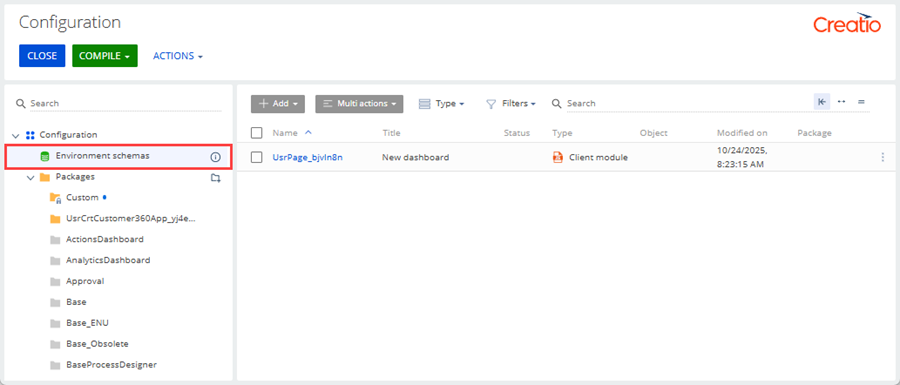
Environment schemas can have the following types:
- Client module
- Object
"Client module" type schemas
Environment schemas of the "Client module" type store dashboard customization implemented by end users in the dashboards section view. This allows users to adapt dashboards to their needs without modifying packages. Learn more: Dashboard types (user documentation).
If you need to transfer environment schemas of the "Client module" type between environments, convert the environment schema to the configuration schema that can be transferred between environments. To do this, move the environment schema to the package. Instructions: Move a schema to another package.
"Object" type schemas
Environment schemas of the "Object" type store permission attributes and change log settings that must take precedence over package-based customizations.
Creatio adds a replaced environment schema of the "Object" type when you:
- change the Use column permissions, Use record permissions, or Use operation permissions setting on the Permissions tab of the object page in the Object permissions section
- modify the change log property of an object or the list of logged object columns in the Change log section
The replaced environment schema is placed last in the hierarchy automatically. This ensures your changes take priority, even if the same object is replaced in other packages. The schema overrides only the modified settings while preserving all other object properties inherited from higher-level packages. If such a replaced environment schema already exists, its permission and change log settings continue to take priority and are always applied. If it is removed, the standard object hierarchy rules apply again.
To prevent unintended changes, only users that have the "System administrators" role can manage environment schemas of the "Object" type in the Configuration section, and some schema operations are restricted. Learn more: Operations with schemas in Creatio IDE.
If you need to transfer changes stored in environment schemas of the "Object" type between environments, configure the replacing object within a package that can be transferred between environments. Instructions: Implement a replacing object.
See also
Operations with schemas in Creatio IDE
Operations with packages in Creatio IDE
Manage app elements in the Application Designer (user documentation)
Manage apps (user documentation)
Dashboards basics (user documentation)