Add an action panel
Case description
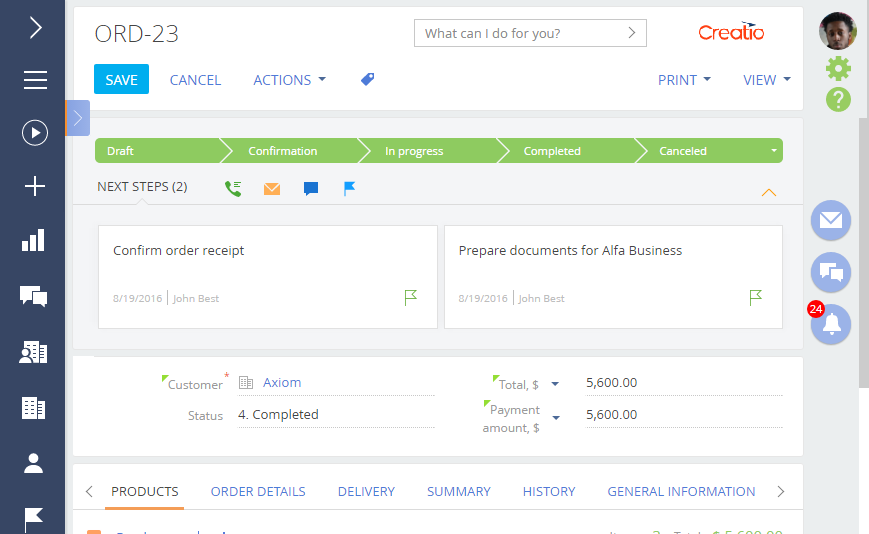
Add an action panel to the order edit page.
Source code
You can download the package with case implementation using the following link.
Case implementation algorithm
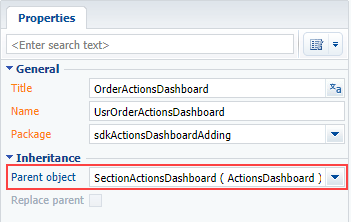
1. Create a client schema of the OrderActionsDashboard view model
Specify the SectionActionsDashboard schema as a parent object (Fig. 1).
define("UsrOrderActionsDashboard", [], function () {
    return {
        details: /**SCHEMA_DETAILS*/{}/**SCHEMA_DETAILS*/,
        methods: {},
        diff: /**SCHEMA_DIFF*/[]/**SCHEMA_DIFF*/
    };
});
2. Create a replacing order edit page
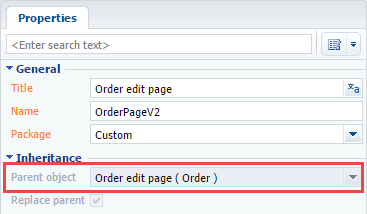
A replacing client module must be created and Order edit page (OrderPageV2) must be specified as the parent object in it (Fig. 2). Creating a replacing page is covered in the Client module article.
3. Add a configuration object with the module settings in the modules collection of the page schema
Add the code of the page replacing module to the Source code tab: Add a configuration object with the module settings in it to the modules collection of the view model.
4. Add a configuration object with the settings determining the module position in the diff array
define("OrderPageV2", [],
    function () {
        return {
            entitySchemaName: "Order",
            attributes: {},
            modules: /**SCHEMA_MODULES*/{
                "ActionsDashboardModule": {
                    "config": {
                        "isSchemaConfigInitialized": true,
                        // Schema name.
                        "schemaName": "UsrOrderActionsDashboard",
                        "useHistoryState": false,
                        "parameters": {
                            // Configuration object of the view model.
                            "viewModelConfigDiff": {
                                // Schema name of the page entity.
                                "entitySchemaName": "Order",
                                // Configuration object of the Actions block.
                                "actionsConfig": {
                                    // Schema name for loading items to Actions.
                                    "schemaName": "OrderStatus",
                                     // Column name in the parent schema that references the schema that contains Actions elements.
                                     // If not specified, takes the schemaName value.
                                    "columnName": "Status",
                                    // Column name for element sorting.
                                    "orderColumnName": "Position",
                                    // Column name for item sorting in the item menu.
                                    "innerOrderColumnName": "Position"
                                },
                                // Displaying the action panel module, the value is [true] by default.
                                "useDashboard": true,
                                // Displaying the Content block, [true] by default.
                                "contentVisible": true,
                                // Risplaying the Header block, [true] by default.
                                "headerVisible": true,
                                // The configuration object of the panel elements.
                                "dashboardConfig": {
                                    // Connection between activities and page object.
                                    "Activity": {
                                        // Page object column name.
                                        "masterColumnName": "Id",
                                        // Clumn name in the [Activity] object.o
                                        "referenceColumnName": "Order"
                                    }
                                }
                            }
                        }
                    }
                }
            }/**SCHEMA_MODULES*/,
            details: /**SCHEMA_DETAILS*/{}/**SCHEMA_DETAILS*/,
            methods: {},
            diff: /**SCHEMA_DIFF*/[
                {
                    "operation": "insert",
                    "name": "ActionsDashboardModule",
                    "parentName": "ActionDashboardContainer",
                    "propertyName": "items",
                    "values": {
                        "classes": { wrapClassName: ["actions-dashboard-module"] },
                        "itemType": Terrasoft.ViewItemType.MODULE
                    }
                }
            ]/**SCHEMA_DIFF*/
        };
    });
After saving the schema and updating the Creatio web page, the action panel will be added to the order page. The action panel will contain the order status and connected uncompleted activities (Fig. 3).