Integration tools overview
Integration is data exchange between systems with or without subsequent data processing. The purpose of integration is to transfer custom data automatically between apps.
Creatio has a wide range of integrations with external apps. Creatio's open API lets you implement integration solutions of any complexity.
Creatio has the following ways to integrate:
- Integration of external apps with Creatio.
- Creatio integration with external apps.
The choice of the integration method depends on the following features:
- client needs
- external app type and architecture
- developer expertise level
Integration of external apps with Creatio
The integration of external apps with Creatio solves the following problems:
- execute CRUD operations with Creatio objects
- launch business processes
- implement custom tasks that you can solve using Creatio's open API
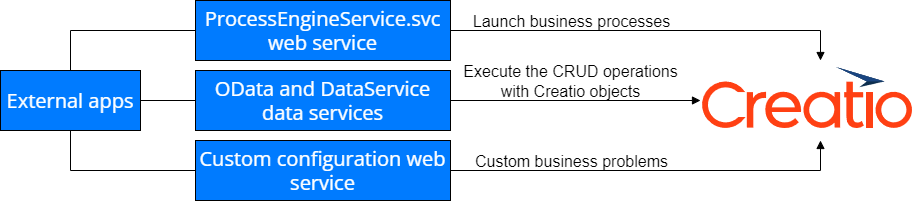
We recommend using multithreaded integration to maximize Creatio throughput. Learn more in a separate article: Integration options.
Data services
The purpose of data services is to execute CRUD operations with Creatio objects. Learn more in separate articles: Access data directly, Data access through ORM.
Creatio lets you use the following data services:
- OData protocol
- DataService service
OData protocol
OData (Open Data Protocol) is an ISO/IEC-approved OASIS standard. It defines a set of best practices for building and using REST API. Use OData to create REST-based services that let you publish and edit resources using simple HTTP requests. Such resources should be identified with a URL and defined in the data model. Learn more in a separate article: OData.
Creatio supports OData 4 and OData 3 protocols. OData 4 has more features than OData 3. The main difference between the protocols is the data format of the server's response. Learn more about the differences between OData 3 and OData 4 protocols in the official OData documentation. Use the protocol version 4 when you integrate with Creatio via the OData protocol.
Learn more about the detailed protocol description in the official OData documentation.
DataService service
DataService (developed by Creatio) is a service that implements communication between front-end and back-end app parts. DataService lets you transfer custom data to back-end app part to be processed and saved to a database. Learn more in a separate article: DataService.
Service that runs business processes
Use the ProcessEngineService.svc system web service to run business processes from an external app. Learn more in a separate article: Service that runs business processes.
Custom web service
Users can create custom web services to solve integration problems. The configuration web service is RESTful service based on WCF technology. Learn more in a separate article: Custom web services.
Creatio integration with external apps
Use app tools to combine different enterprise apps into a single digital ecosystem. When you integrate Creatio with external apps, you can develop a custom solution or use an out-of-the-box integration solution.
Develop custom integration solution
Use app tools to set up integration with a custom RESTful API. You can call a web service from a business process after you set up the integration. Use REST API tools to interact with external web services with no developer involvement.
Use out-of-the-box integration solution
View the out-of-the-box integration solutions Creatio implements below.
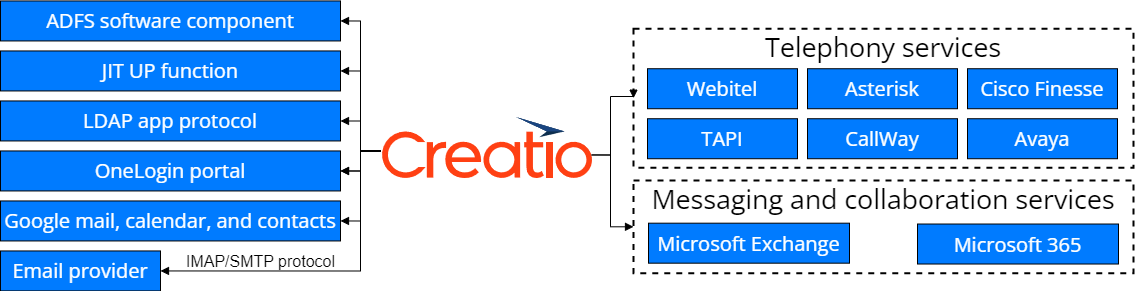
Creatio implements out-of-the-box integration solutions with the following apps:
- OneLogin portal, used as a single sign-on point for all company services.
- Active Directory Federation Services (ADFS) software component to manage single sign-on for all system users.
- Just-In-Time User Provisioning (JIT UP) function, which alleviates the need to create accounts for each separate service and keep the user database up-to-date manually.
- Lightweight Directory Access Protocol (LDAP) is an app layer protocol to access a specific database that usually stores accounts of users, computers, etc.
- Mail service via IMAP/SMTP protocol.
- Google mail, calendar, and contacts.
- Webitel, Asterisk, Cisco Finesse, TAPI, CallWay, Avaya telephony services.
- Microsoft Exchange and Microsoft 365 messaging and collaboration services.
See also
Service that runs business processes
Resources
Tech Hour - Integrate like a boss
E-learning courses
Integrations. Calling external web-services from the program code