Creatio agentic service cookbook
Service teams operate in an environment of rising customer expectations and increasing interaction volume. Service professionals must interpret large amounts of customer communication, locate relevant knowledge quickly, classify and prioritize incoming issues, and maintain consistent resolution quality — often under higher workloads and without additional support. Traditional automation can streamline isolated steps but cannot interpret context, understand customer intent, or support the full end-to-end resolution process.
This article covers Creatio's agentic service approach that addresses this gap.
Modern service operations are shifting toward a collaborative model that blends human expertise with AI-driven agents.
- Humans contribute empathy, judgment, contextual understanding, and strategic decision-making.
- AI Agents handle structured, repeatable, and time-consuming tasks such as summarizing messages, retrieving knowledge, enriching case data, and recommending next best actions.
This partnership enables service teams to focus on meaningful customer interactions while agents manage research, preparation, inspection, and documentation activities.
Purpose
This document provides a strategic, non-technical overview of how Creatio.ai supports agent-driven service processes. It outlines:
- key scenarios where the agentic service approach adds value
- stages of the service lifecycle where each scenario has the greatest impact
- roles and teams that benefit from deploying each agent
- specific behaviors and tasks the agent performs
- underlying capabilities that power the agent
This Cookbook is not a technical configuration guide. Instead, it explains how agentic scenarios function, how they complement CRM processes, and how organizations can adopt them to strengthen service execution.
Learn more about Creatio.ai configuration and customization in separate guide: Creatio.ai.
This Cookbook is intended for service operations personnel, revenue operations (RevOps) teams, business analysts, and system integrators involved in designing, configuring, or maintaining service-related processes in Creatio.
Use this document to:
- Identify current service challenges and match them to relevant agentic scenarios
- Understand how agents enhance existing service workflows
- Prioritize where AI can deliver the highest impact
- Explore how Creatio's agentic capabilities evolve as service needs grow
Agentic service overview
In Creatio, an AI Agent serves as a role-specific virtual teammate equipped with the following:
- generative AI abilities
- predictive insights
- CRM and external data retrieval
- summarization and enrichment workflows
- automated follow-up actions
- guided next steps
Instead of manually reviewing messages, searching knowledge bases, or compiling notes, service teams can delegate these tasks to agents that execute them instantly and consistently.
The Creatio agentic service approach is built around following agentic scenarios, each supporting a distinct phase of the service cycle:
- customer support
- knowledge base
- case classification
- customer success
- service playbook
- next best action
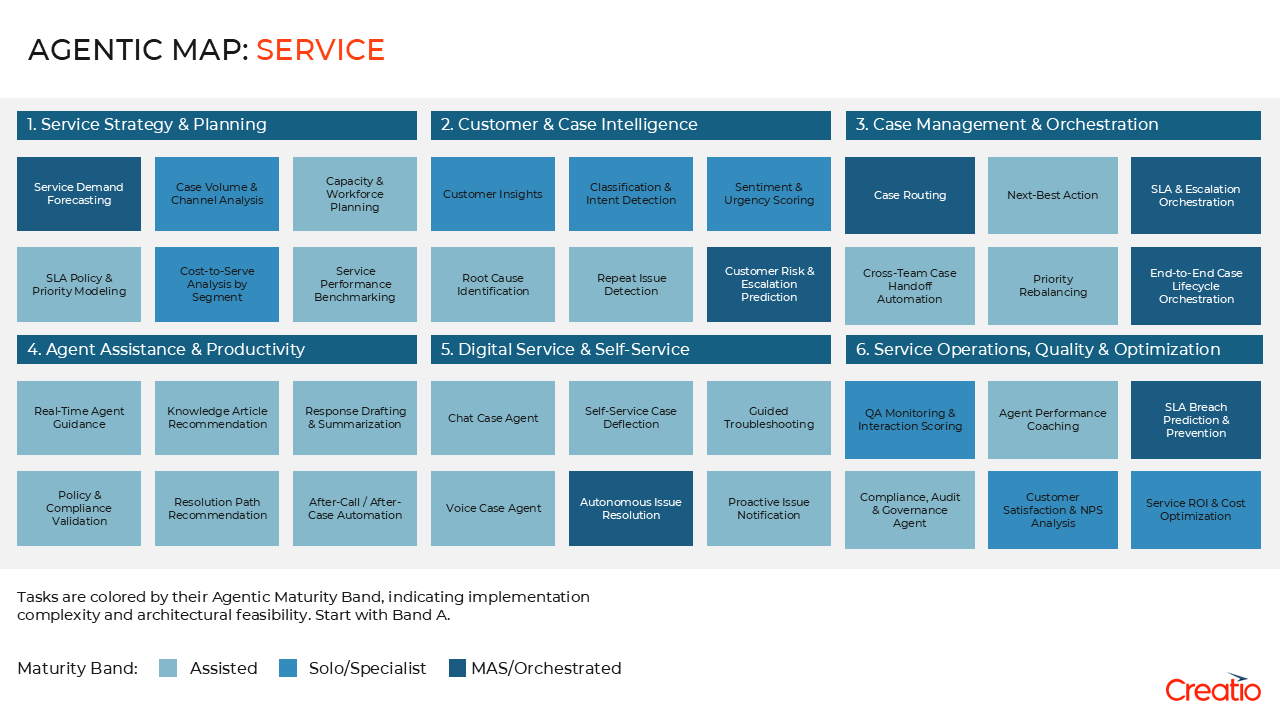
Together, they form a connected multi-agent service ecosystem that helps organizations reduce manual effort, improve response speed and accuracy, and enhance both customer and agent experience — without replacing human expertise.
Composable AI architecture
Creatio's composable AI architecture makes it possible to:
- assemble agentic workflows using modular building blocks
- tune behavior
- connect additional AI Skills or third-party data sources
- trigger agents through CRM events or user actions
- extend Creatio functionality using no-code tools
This flexibility enables organizations to adopt agentic scenarios gradually, deploy them as productivity accelerators, or build toward a fully AI-supported revenue model.
AI Agents can be deployed as out-of-the-box accelerators or extended with new AI skills such as summarization, rewriting, classification, extraction, semantic search, and next-best-action recommendations.
Key agentic service scenarios
Scenario | Primary users | Core value |
|---|---|---|
Support agents, dispatch leads, service coordinators | Summarizes customer messages, extracts key details, and drafts responses to accelerate case intake. | |
Support agents, knowledge managers, QA teams, escalation teams | Retrieves relevant knowledge, summarizes key procedures, and highlights needed updates to support consistent resolutions. | |
Dispatchers, team leads, support managers, triage coordinators | Predicts case category, priority, and routing to reduce manual review and improve accuracy. | |
Customer success managers, account managers, service leaders | Consolidates account activity, identifies risks, and recommends follow-ups to enable proactive engagement. | |
Support agents, QA teams, onboarding and training teams | Provides step-by-step guidance, generates checklists, and supplies templates to standardize case handling. | |
Support agents, team leads, customer success teams | Recommends next steps, drafts follow-up messages, and guides workflow actions to improve case progression. |
Below are the core agentic scenarios that collectively support the full service operations lifecycle.
Each scenario includes:
- purpose
- agent behaviors
- AI Skills used
- considered configuration steps
- primary users
- manual effort eliminated
- manual workflow → agent-assisted workflow comparisons
Customer support agent
Purpose
Service teams often spend significant time reading lengthy customer emails or chat transcripts, extracting key details, identifying sentiment, and drafting an initial response. This slows case intake, introduces inconsistency, and makes it difficult to maintain service-level expectations.
The Customer support agent automates these steps by summarizing messages, extracting structured information, highlighting sentiment signals, and generating draft replies aligned with communication guidelines.
Agent behaviors
- summarizes inbound messages into a clear, structured case description
- extracts key details such as issue type, urgency, product, or customer context
- detects sentiment or escalation cues for better routing
- generates draft responses aligned with service communication standards
- highlights missing information or questions that require clarification
AI Skills used
- "Summarize email"
- "Summarize case"
- "Formal text rewrite"
- "Friendly text rewrite"
- "Extend text"
- "Rephrase text"
- "Reply to email"
- "Extract structured information" (custom)
- "Analyze sentiment" (custom)
Configuration considerations
- auto-summarization triggers when a case is created or updated
- mapping extracted values to case fields like Category, Priority, Service, and other
- sentiment-based escalation rules to support routing
- on-demand summarization actions, such as the "Summarize this thread" action in the case workspace
- reusable communication templates for drafting responses
Primary users
Support agents, dispatch leads, service coordinators, QA teams, escalation teams
Eliminated effort
Users no longer need to:
- read lengthy messages manually
- re-enter extracted details into CRM fields
- draft repetitive responses from scratch
- identify sentiment or escalation indicators by hand
Manual workflow → Agent-assisted workflow
Before (human):
- reads full message threads manually
- interprets and summarizes details
- drafts responses word-by-word
- identifies potential escalations based on personal judgment
After (AI Agent):
- produces structured summaries in seconds
- extracts data and fills relevant fields automatically
- generates ready-to-send draft responses
- flags sentiment and potential escalations proactively
Knowledge base agent
Purpose
Support teams often need to search through extensive knowledge bases, review long articles, and determine which parts are relevant to the customer's issue. This increases handling time, creates inconsistencies in how information is applied, and makes it harder to maintain resolution quality.
The Knowledge base agent automates this process by retrieving relevant articles based on case context, summarizing key information, and highlighting procedures or steps that support fast and consistent resolutions.
Agent behaviors
- retrieves knowledge articles that match the case description or category
- summarizes long articles into key points for faster review
- highlights relevant procedures, troubleshooting steps, and policy excerpts
- identifies outdated or conflicting knowledge content
- recommends updates or corrections to knowledge managers
AI Skills used
- "Search data"
- "Summarize article" (custom)
- "Extract key points" (custom)
- "Find similar content" (custom)
- "Extract procedures" (custom)
Configuration considerations
- semantic search configuration tied to case description, category, or product
- relevance scoring rules to prioritize the most useful articles
- auto-suggestion logic that presents related articles during case intake
- optional article review workflows for content validation and improvement
- similarity algorithms to detect outdated, duplicate, or conflicting knowledge
Primary users
Support agents, knowledge managers, QA teams
Eliminated effort
Users no longer need to:
- search knowledge bases manually using keywords
- read multiple long articles to find relevant sections
- compile summaries or procedural notes by hand
- track which articles require updates or corrections
Manual workflow → Agent-assisted workflow
Before (human):
- searches the knowledge base manually
- opens and scans multiple articles
- extracts key steps or procedures by hand
- relies on personal memory to locate useful content
After (AI Agent):
- retrieves relevant content instantly
- summarizes only the sections needed for resolution
- highlights actionable steps and key procedures
- identifies outdated or conflicting content proactively
Case classification agent
Purpose
Case categorization and routing often require manual interpretation of customer messages. This slows down triage, introduces inconsistencies, and increases the likelihood of misrouted or incorrectly prioritized cases.
The Case classification agent automates this process by predicting the correct category and priority, identifying routing paths, and flagging sentiment-driven escalations to improve triage speed and accuracy
Agent behaviors
- predicts the appropriate case category or issue type
- recommends priority levels based on message context
- identifies the correct routing group or resolver team
- flags sentiment-driven escalations
- detects duplicate or similar past cases
AI Skills used
- "Rephrase text"
- "Extend text"
- "Formal text rewrite"
- "Friendly text rewrite"
- "Summarize case"
- "Case performance"
- "Check open cases"
- "Summarize email"
- "Search data"
- "Suggest case resolution"
- "Identify contacts"
- "Classify the message" (custom)
- "Analyze sentiment" (custom)
- "Detect topics" (custom)
Configuration considerations
- auto-classification triggers to predict category and priority when a case is created
- routing rules and queues connected to predicted categories or priorities
- sentiment thresholds that escalate urgent or high-risk cases
- duplicate detection logic using similarity algorithms
- optional human review steps before final case assignment
Primary users
Dispatchers, team leads, support managers, triage coordinators
Eliminated effort
Users no longer need to:
- review each case manually
- determine category and priority by reading message content
- identify duplicates or recurring issues by hand
- reassign misrouted cases after the fact
Manual workflow → Agent-assisted workflow
Before (human):
- opens each new case manually
- interprets the message to determine category and priority
- selects the appropriate routing team
- identifies potential escalations based on personal judgment
After (AI Agent):
- predicts category and priority automatically
- recommends the correct routing queue
- flags high-risk or escalating cases proactively
- detects duplicate or similar past cases
Customer success agent
Purpose
Customer success teams manage continuous customer engagement, monitor risks, track product adoption, and coordinate follow-up activities. Much of this work requires manually reviewing emails, case histories, account updates, and interaction logs. This creates inconsistencies, slows down response times, and makes it difficult to maintain a proactive engagement model at scale.
The Customer success agent automates these tasks by consolidating account activity, identifying risks, summarizing interaction history, and recommending follow-up actions to support more proactive and structured customer engagement.
Agent behaviors
- consolidates recent account activity, open cases, tasks, and communication history
- identifies risks such as inactivity, unresolved issues, or negative sentiment
- summarizes key interactions to support quick context switching
- recommends follow-up actions based on customer patterns
- highlights upsell or expansion signals when applicable
AI Skills used
- "Summarize case"
- "Summarize email"
- "Summarize activity"
- "Search data"
- "Extend text"
- "Identify risks" (custom)
- "Consolidate account history" (custom)
- "Recommend follow-up actions" (custom)
- "Detect churn signals" (custom)
Configuration considerations
- account activity aggregation rules to determine which events are included in summaries
- risk identification patterns based on inactivity, unresolved issues, or sentiment
- follow-up generation logic that proposes next steps for customer success managers
- interaction summarization settings for emails, cases, and tasks
- data retrieval rules for pulling information from related objects such as open cases, product usage, or opportunities
Primary users
Customer success managers, account managers, service leaders
Eliminated effort
Users no longer need to:
- review long histories of emails, cases, and activities manually
- compile summaries for account reviews or customer check-ins
- track risks or churn indicators manually
- identify follow-up tasks across multiple record types
Manual workflow → Agent-assisted workflow
Before (human):
- reviews long timelines of interactions manually
- identifies risks using personal judgment
- compiles notes for account reviews
- determines follow-up activities based on memory or intuition
After (AI Agent):
- generates consolidated account summaries instantly
- flags risks and churn signals proactively
- drafts structured follow-up recommendations
- centralizes account information into a single context snapshot
Service playbook agent
Purpose
Service teams rely on playbooks, checklists, and structured procedures to maintain consistent case handling. However, accessing the right steps often requires searching through lengthy documentation, reviewing historical cases, or relying on personal experience — all of which introduce delays and inconsistencies.
The Service playbook agent provides real-time, context-aware guidance by generating step-by-step instructions, checklists, and recommended actions that help agents resolve cases more quickly and consistently.
Agent behaviors
- generates step-by-step guidance based on the case category or issue type
- retrieves relevant procedures, troubleshooting steps, and policy rules
- highlights required validations or mandatory actions before resolution
- adapts recommendations based on case history or customer details
- identifies procedural gaps or outdated steps in existing playbooks
AI Skills used
- "Search data"
- "Summarize case"
- "Summarize email"
- "Extend text"
- "Suggest case resolution"
- "Generate steps" (custom)
- "Extract procedures" (custom)
- "Identify required checks" (custom)
Configuration considerations
- procedure mapping rules that connect case categories to specific playbooks
- step-generation templates for creating guided checklists and instructions
- validation logic to highlight mandatory actions or compliance requirements
- context retrieval rules to pull details from cases, activities, or messages
- continuous improvement workflows for identifying outdated or incomplete procedures
Primary users
Support agents, QA teams, onboarding and training teams
Eliminated effort
Users no longer need to:
- search for procedures manually across documentation
- review case histories to determine the correct resolution path
- build checklists or instructions from scratch
- remember complex or rarely used steps
- verify mandatory actions manually
Manual workflow → Agent-assisted workflow
Before (human):
- searches knowledge bases and documentation manually
- reads historical cases to understand the resolution path
- assembles steps or instructions manually
- identifies required checks based on experience alone
After (AI Agent):
- generates step-by-step guidance instantly
- retrieves relevant procedures and troubleshooting steps
- highlights mandatory checks for compliance
- recommends optimal resolution actions automatically
Next best action agent
Purpose
Service agents frequently make decisions about what to do next: follow up with a customer, request missing information, escalate a case, update documentation, or trigger related processes. These decisions often rely on experience, memory, or manual review of case context, which introduces delays and inconsistencies.
The Next best action agent supports service teams by analyzing case data, customer history, sentiment signals, and previous interactions to recommend the most effective next step. This improves case progression, reduces handling times, and ensures consistent service quality.
Agent behaviors
- analyzes case history, customer details, and current context
- recommends the next best action or step in the resolution process
- drafts follow-up messages or requests when appropriate
- highlights missing information required to move the case forward
- detects risk signals or escalation conditions related to inactivity or sentiment
AI Skills used
- "Summarize case"
- "Summarize email"
- "Summarize activity"
- "Search data"
- "Extend text"
- "Recommend next action" (custom)
- "Draft follow-up" (custom)
- "Identify missing information" (custom)
- "Detect risk signals" (custom)
Configuration considerations
- action recommendation rules that connect case patterns to specific next steps
- follow-up generation templates for drafting agent messages
- risk and escalation indicators based on sentiment, inactivity, or unresolved issues
- context retrieval settings for case history, emails, and activities
- routing and escalation paths triggered by the recommended actions
Primary users
Support agents, team leads, customer success teams
Eliminated effort
Users no longer need to:
- manually determine the next appropriate step
- review long case histories before acting
- draft routine follow-up messages
- track missing information manually
- monitor for inactivity-based or sentiment-based risks
Manual workflow → Agent-assisted workflow
Before (human):
- reads through the case history to understand next steps
- drafts follow-up emails manually
- decides on escalation or routing based on experience
- identifies missing details by reviewing records
- monitors cases for inactivity or customer dissatisfaction
After (AI Agent):
- analyzes case data and customer interactions automatically
- recommends the optimal next best action
- drafts follow-up messages instantly
- identifies missing information and required clarifications
- flags risk signals or escalation indicators proactively
Steps to adopt agentic service
Creatio's agentic service approach transforms how service teams operate by bringing AI-driven intelligence, context, and automation into every stage of the service lifecycle.
Each agent — from intake and knowledge retrieval to case routing and follow-up — helps reduce manual effort, streamline repeatable processes, support consistent case handling, and provide service teams with well-structured information.
The outcome is a connected, composable, and scalable multi-agent environment that supports individual service roles and broader service operations.
Below is a recommended phased approach for deploying agentic scenarios in Creatio.
1. Identify the highest-impact pain points
Start by mapping your most pressing service challenges to the agentic scenarios. This clarifies where automation can remove the most manual work and deliver immediate value.
Examples:
- Manual message reading and interpretation → Customer support agent
- Repetitive knowledge search and article review → Knowledge base agent
- Manual and variable case categorization or routing → Case classification agent
- Fragmented customer context across histories and channels → Customer success agent
- Procedures applied inconsistently across the team → Service playbook agent
- Follow-up steps determined differently across staff → Next best action agent
This helps prioritize where to begin your agentic service journey.
2. Identify 1–2 highest-priority agents
We recommend deploying agentic scenarios gradually. Start by selecting 1-2 scenarios that address your most immediate operational challenges and deliver visible impact quickly.
Anchor candidates:
- Customer support agent — accelerates intake by reducing manual message reading and summarization
- Case classification agent — improves routing accuracy and decreases triage workload
- Knowledge base agent — standardizes and speeds up resolution by providing relevant knowledge instantly
These scenarios deliver fast wins and help teams adapt to agent-assisted processes.
3. Configure predictive AI Skills and workflows
Each agent uses a combination of:
- summarization and extraction skills
- classification and sentiment skills
- knowledge retrieval or similarity search
- next-best-action recommendations
- rule-based or scheduled workflows
- context providers linked to cases, contacts, products, or communication channels
Tune these elements to align with your organization's terminology, processes, and data sources ensures each agent behaves predictably and delivers meaningful outcomes.
4. Integrate with existing CRM processes
Agentic behaviors have to reinforce—not replace—your established service processes. Ensure each agent's output flows naturally into the operational workflows your teams already use.
Examples:
- Summaries provided by the Customer support agent feed directly into intake and triage workflows.
- Article suggestions provided by the Knowledge base agent support standard resolution procedures.
- Predictions provided by the Case classification agent inform routing queues and prioritization rules.
- Account insights provided by the Customer success agent connect to review cycles and renewal processes.
- Recommendations provided by the Next best action agent trigger follow-up tasks and progression workflows.
5. Expand using additional skills and data sources
Creatio's composable architecture allows teams to extend agents with:
- adding new knowledge sources or external content repositories
- refining classification or sentiment logic
- introducing domain-specific summarization AI Skills
- integrating external data streams such as product logs or telemetry
- enabling workflows for escalations, SLA rules, or multi-team collaboration
This enables iterative improvement without rewrites or complex development.
See also
Enhance service workflow using Creatio.ai
Resources
Creatio.ai Foundational & Introductory